Add Material
Add material properties for the solid steel part from Materials. Do so by using a built-in material.
1
In the Home toolbar, click
Add Material to open the Add Material window.
2
Go to the Add Material window.
3
In the tree, select Built-in > Structural steel.
4
Click Add to Component in the window toolbar.
5
In the Home toolbar, click
Add Material to close the Add Material window.
6
In the Settings window, select Domain 2 only. Do so by clicking on the Solid part 2 in the Graphics window, and confirming the Selection in the Geometric Entity Selection section.
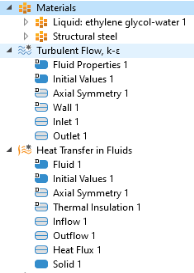
The Materials node; the Turbulent Flow, k-
ε
node; and the Heat Transfer in Fluids node should now have the following child nodes in the Model Builder window:
 Add Material to open the Add Material window.
 Add Material to close the Add Material window.