Analytic Function
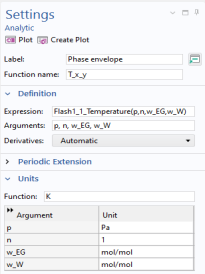
Create an Analytic function from the equilibrium function just defined. Analytic functions are convenient since they do not require the actual argument names in an expression when writing the function. Use the Analytic function to change the composition arguments from moles to mole fractions.
1
2
In the Settings window for Analytic, type Phase envelope in the Label text field.
3
4
-
In the Expression text field, type Flash1_1_Temperature(p,n,w_EG,w_W). You can press Ctrl+space after having written a few characters to get suggestions.
-
Remember to use the same order of the arguments as defined in the Equilibrium Calculation node.
5
-
-
In the Argument table, type Pa,1,mol/mol,mol/mol.
Note: The Expression Flash1_1_Temperature and what arguments to use can be found in the Model Builder window, under Global Definitions > Thermodynamics > Vapor-Liquid System 1 (pp1) > Mixture. Under Mixture, click Equilibrium Calculation. In the Settings window, locate the Functions subsection, as well as the Arguments subsection, both in the Definition section.