|
1
|
|
2
|
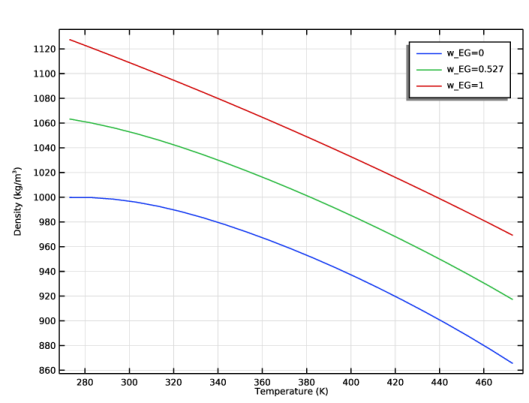
In the Settings window for 1D Plot Group, type Density in the Label field.
|
|
5
|
In the Settings window for Global, locate the y-Axis Data section. Click Replace Expression
 in the upper-right corner and, in the window that opens, either search for Densitypp1, or choose Densitypp1(...)-Density 1 under Model > Global Definitions > Functions. Double-click the expression to add it to the table. in the upper-right corner and, in the window that opens, either search for Densitypp1, or choose Densitypp1(...)-Density 1 under Model > Global Definitions > Functions. Double-click the expression to add it to the table. |
|
6
|
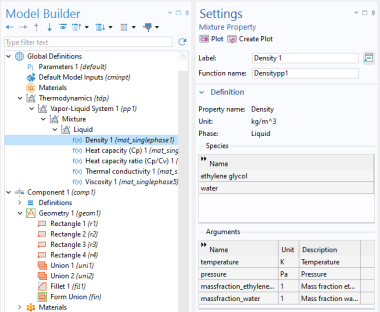
In the table, enter the following arguments for the function: Tc, pRef, w_EG, w_W. Make sure to add the arguments in this order. This is the order defined in the Mixture node.
|
|
3
|
Select the x-axis label checkbox and type Temperature (K).
|
|
4
|
Select the y-axis label checkbox and type Density (kg/m<sup>3</sup>).
|
|
2
|
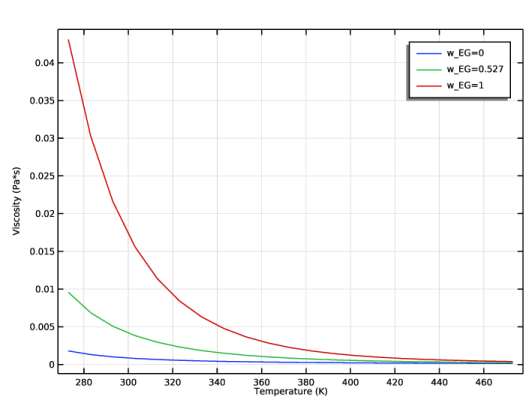
In the Settings window for 1D Plot Group, type Viscosity in the Label field.
|
|
5
|
In the Settings window for Global, locate the y-Axis Data section. Click Replace Expression
 in the upper-right corner and in the window that opens, search for Viscositypp1, or choose Viscositypp1(...)-Viscosity 1 under Model > Global Definitions > Functions. Double-click the expression to add it to the table. in the upper-right corner and in the window that opens, search for Viscositypp1, or choose Viscositypp1(...)-Viscosity 1 under Model > Global Definitions > Functions. Double-click the expression to add it to the table. |
|
3
|
Select the x-axis label checkbox and type Temperature (K).
|
|
4
|
Select the y-axis label checkbox and type Viscosity (Pa\cdot s).
|
|
2
|
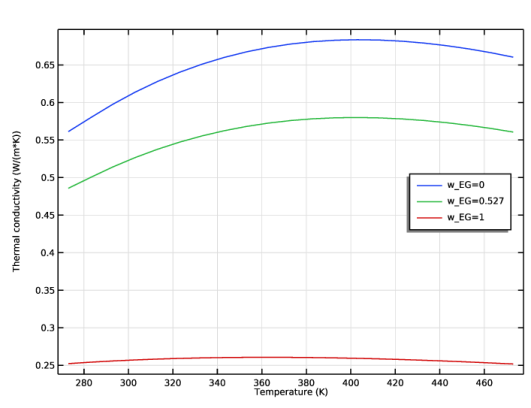
In the Settings window for 1D Plot Group, type Thermal Conductivity in the Label field.
|
|
5
|
In the Settings window for Global, locate the y-Axis Data section. Click Replace Expression
 in the upper-right corner and, in the window that opens, either search for ThermalConductivitypp1, or choose ThermalConductivitypp1(...)-Thermal conductivity 1 under Model > Global Definitions > Functions. Double-click the expression to add it to the table. in the upper-right corner and, in the window that opens, either search for ThermalConductivitypp1, or choose ThermalConductivitypp1(...)-Thermal conductivity 1 under Model > Global Definitions > Functions. Double-click the expression to add it to the table. |
|
3
|
Select the x-axis label checkbox and type Temperature (K).
|
|
4
|
Select the y-axis label checkbox and type Thermal conductivity (W/(m\cdot K)).
|
|
2
|
In the Settings window for 1D Plot Group, type Heat Capacity in the Label field.
|
|
5
|
In the Settings window for Global, locate the y-Axis Data section. Click Replace Expression
 in the upper-right corner and, in the window that opens, either search for HeatCapacity, or choose HeatCapacityCppp1(...)-Heat capacity 1 under Model > Global Definitions > Functions. Double-click the expression to add it to the table. in the upper-right corner and, in the window that opens, either search for HeatCapacity, or choose HeatCapacityCppp1(...)-Heat capacity 1 under Model > Global Definitions > Functions. Double-click the expression to add it to the table. |
|
3
|
Select the x-axis label checkbox and type Temperature (K).
|
|
4
|
Select the y-axis label checkbox and type Heat capacity (J/(kg\cdot K)).
|
 Add Plot Group and choose
  1D Plot Group.
 Global. This adds a Global plot to the Density plot group.
 Density.
 Plot.
Plot. Add Plot Group and choose
  1D Plot Group.
 Global. This adds a Global plot to the plot group.
 Viscosity.
 Plot.
Plot. Add Plot Group and choose
  1D Plot Group.
 Global.
  Thermal Conductivity.
 Plot.
Plot. Add Plot Group and choose
  1D Plot Group.
 Global.
  Heat Capacity.
 Plot.
Plot.