|
1
|
|
-
|
|
-
|
|
2
|
In the Select System window, choose Vapor-liquid from the list. In this case a two-phase system is needed to study the phase envelope of the coolant mixture. When solving for the heat transfer in the test apparatus, the mixture will be assumed to remain in the liquid phase.
|
|
4
|
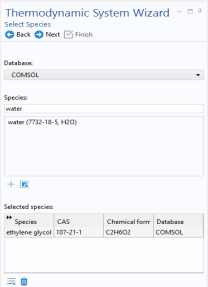
In the Select Species window, locate the Species list and type ethylene glycol in the Species filter field. While typing, the available species are dynamically updated in the list below.
 |
|
-
|
Type water in the Species filter field.
|
 Global Definitions and choose Thermodynamics >
  Thermodynamic System. This opens the Thermodynamic System Wizard. In the first step, select the phases in the system. You can choose among the following systems: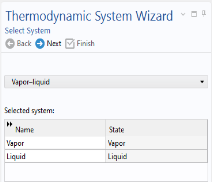
 Next in the window toolbar to proceed to the next step of the wizard.
  Add Selected to add it to the Selected species list.
 Add selected.
 Next in the window toolbar to proceed to the last step of the Thermodynamic System Wizard. Here you select the models used to compute thermodynamic and transport properties.
  Finish in the window toolbar.
  Thermodynamics in the Model Builder window. The default label (name) of the system is Vapor-Liquid System 1, indicating the phases in the system.