|
1
|
|
4
|
Locate the Energy Balance section. From the list, choose Include, and type the Q_mem in the associated text field.
|
|
5
|
|
3
|
In the Formula text field, type C6H5CH3+H2=>C6H6+CH4 and click Apply.
|
|
5
|
In the r text field, type
|
|
7
|
|
8
|
|
3
|
|
2
|
In the Settings window, locate the General Parameters section, and type T_inlet in the T0,in text field.
|
 (re).
(re).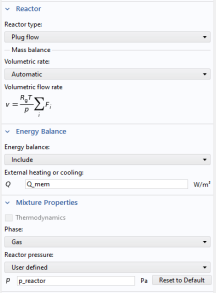
 .
. , locate the Reaction Formula section.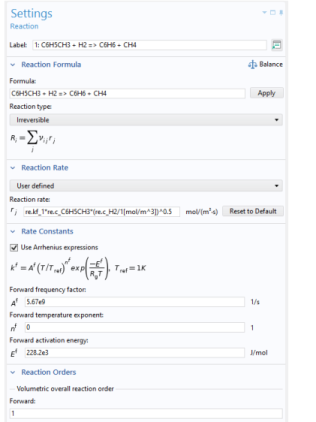
 .
. .
. feature to the Reaction Engineering interface
  to model the mass flow of hydrogen across the membrane.
 .
. under Component 1 (comp1) > Reaction Engineering (re)
  .
. with the corresponding species in the created Vapor–Liquid System
  . For a coupled species, the functions for thermodynamic properties will automatically be created and added to the system. When all species in the Reaction Engineering interface
  are matched (fully coupled), the properties of the reacting system (mixture heat capacity, mixture molar volume, and so on) will be calculated by the thermodynamic system.
 .
. , click to expand the Mixture properties section.