Global Definitions — Parameters and Variables
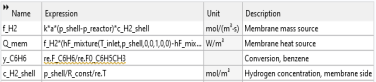
Next, you will load the model parameters from a text file. Alternatively, you could have created the parameters in the Parameter window directly. The file includes inlet temperature, shell pressure, reactor pressure, and so on. You will also import variable definitions from a variable text file. This could also have been defined manually.
Note: The location of a file is based on the installation. For example, if the installation is on your hard drive, the file path might be similar to C:\Program Files\COMSOL\COMSOL64\applications\.
Parameters 1
1
2
3
4
Definitions
Add variable definitions from a text file.
Variables 1
1
2
3
Note: The defined thermal function hF_mixture is used in the variable definition for the heat source Q_mem. The variables to be defined in Reaction Engineering interface are also used in some expressions. For example, in the orange-colored expression, re.F_C6H6 specifies the molar flow rate of benzene, which will be defined later in the Reaction Engineering interface. The reason for this variable expression being orange is that it includes expressions that are not yet defined. Once these expressions are defined in the Reaction Engineering interface, the orange color will disappear, unless there are errors in the units. The orange color signifies that COMSOL Multiphysics cannot get a consistent unit for an expression or that there is an undefined parameter or variable in an expression.