Study 5: Monolith Reactor Model
Set up the study to solve for each of the engine load cases using a Parametric Sweep study step. A separate study step is used to first solve for the fluid flow to provide good initial values for the full coupled problem.
1
In the Model Builder window, click Study 5.
2
In the Settings window for Study, type
Study 5: Monolith Reactor Model
in the Label text field.
Step 1: Stationary
1
In the Model Builder window, expand the Study 5: Monolith Reactor Model node, then click Step 1: Stationary.
2
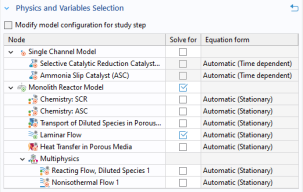
In the Settings window for Stationary, locate the Physics and Variables Selection section.
3
Set up this step to only solve for fluid flow. Use the Solve for column to clear the checkboxes for Chemistry: SCR, Chemistry: ASC, Transport of Diluted Species in Porous Media, and Heat Transfer in Porous Media.
4
Also clear the checkboxes for Reacting Flow, Diluted Species 1 and Nonisothermal Flow 1 under Monolith Reactor Model > Multiphysics.
Step 2: Stationary 2
In the Study toolbar, click
Study Steps and choose Stationary > Stationary.
Parametric Sweep
1
In the Study toolbar, click
Parametric Sweep.
2
In the Settings window for Parametric Sweep, locate the Study Settings section.
3
From the Sweep type list, choose Parameter switch.
4
Click
Add.
5
In the table, enter the following settings:
Switch
Cases
Case numbers
Cases
All
range(1,1,3)
6
In the Model Builder window, click Study 5: Monolith Reactor Model.
7
In the Settings window for Study, locate the Study Settings section.
8
For this model the plots will be created from results templates. Clear the Generate default plots checkbox.
9
In the Study toolbar, click
Compute.
The following steps generate
Figure 13
,
Figure 14
, and
Figure 15
. Using a Result Template is an efficient way to create plots. Add the template and then modify it if necessary.
 Study Steps and choose Stationary > Stationary.
 Parametric Sweep.
 Add.
Add. Compute.