Heat Transfer in Porous Media
Next, set up the Heat Transfer in Porous Media interface. Similarly to the procedure used for the mass transfer interface, go through the generated feature nodes, modify and add as needed.
1
2
3
Fluid 1
Begin by specifying settings for convective and conductive heat transfer in the monolith channels.
1
2
3
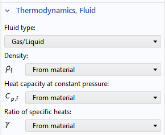
From the kf list, choose From material.
4
5
From the Cp,f list, choose From material.
6
From the γ list, choose From material.
Note that the fluid properties are now defined by the Fluid subnode of the Porous Material.
Porous Matrix 1
1
2
3
4
Locate the Heat Conduction, Porous Matrix section. From the ks list, choose User defined. From the list, choose Diagonal.
Specifying the diagonal thermal conductivity elements allows you to represent anisotropic conductive heat transfer in the monolith channels.
5
Specify the ks matrix as
Note that apart from the conductivity, the matrix properties are defined by the Solid: Monolith Material node added to the Porous Material feature.
Initial Values 1
1
2
3
In the T text field, type T_gas_in. This parameter was previously defined in Parameters: Temperature and Monolith Parameters.
Temperature 1
1
2
Outflow 1
1
2
3
Heat Source 1
Couple the Heat Source to the heat source defined by the Transport of Diluted Species in Porous Media interface. The heat source defined in this interface already accounts for the porosity and various chemical reactions on the different catalyst domains. For this coupling, it is important that the domain selections match between the Heat Source node and the Transport of Dilute Species in Porous Media Interface.
1
2
3
4
Locate the Heat Source section. From the Q0 list, choose Heat source (tds).
Continue by adding the features needed to describe the inflow boundary condition, the fluid domains, temperature boundary conditions, solid domains, porous domain, and the heat flux boundary conditions.
Inflow 1
1
2
3
4
Locate the Upstream Properties section. In the Tustr text field, type T_gas_in.
Fluid 1
1
2
3
4
Fluid 2
1
2
3
4
Next, add a temperature boundary condition at the metal wall of the reactor upstream of the SCR catalyst. We assume that the temperature is the same as that of the inlet gas.
Temperature 2
1
2
3
4
In the T0 text field, type T_gas_in.
We also have to define the temperature for the reactor wall downstream of the ASC catalyst. We assume that the temperature is that of the gas exiting the ASC catalyst. Add a feature to derive the average temperature of the outlet gas, and assign it to the boundary.
Average 1 (aveop1)
1
2
3
4
Temperature 3
1
2
3
4
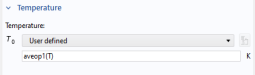
In the T0 text field, type aveop1(T).
Add a Solid feature to describe the heat transfer in the metal shell.
Solid 1
1
2
3
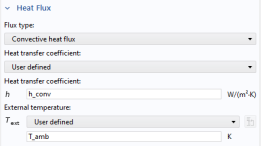
Add a Heat Flux feature to describe the heat transfer from the reactor exterior surface to the surrounding air.
Heat Flux 1
1
2
3
4
5
6
In the h text field, type h_conv.
7
In the Text text field, type T_amb.
Add another Heat Flux feature to describe the heat transfer from the reactor outlet surface to the surrounding air.
Heat Flux 2
1
2
3
4
5
6
In the h text field, type 1[W/(m^2*K)].
7
In the Text text field, type T_amb.
The final feature that is needed to describe the heat transfer in the system is a Porous Medium feature for the supportive mat domain. The fluid in the mat is, for the simplicity of this example, assumed to be exhaust gas. This is a fair assumption, and this way we can take the fluid properties from the material.
Porous Medium 2
1
2
3
Fluid 1
1
2
3
From the γ list, choose From material.
Porous Matrix 1
1
2
3
From the εp list, choose User defined. In the associated text field, type 0.5.
4
Locate the Heat Conduction, Porous Matrix section. From the kb list, choose User defined. In the associated text field, type 0.1.
5
Locate the Thermodynamics, Porous Matrix section. From the ρb list, choose User defined. In the associated text field, type 0.63[g/cm^3].
6
From the Cp,b list, choose User defined. In the associated text field, type 1.1[J/g/degC].
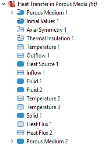
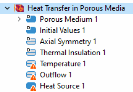
The node sequence in the Model Builder under the Heat Transfer in Porous Media interface should now match this figure:
Having finished setting up the heat transfer physics, proceed to set up the Laminar Flow interface. Model the fluid as compressible, and assume that the flow is laminar both inside the channels and in the free-flow domain between the catalysts.