|
1
|
|
2
|
In the Settings window, change the Label to Gas: Nitrogen Solvent, to use a simpler name.
|
|
3
|
|
4
|
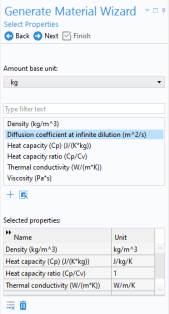
In the Physical Quantity dialog, type density in the text field and click Filter
 . Select Density (kg/m^3). Click OK. . Select Density (kg/m^3). Click OK. |
|
5
|
Perform the same action for the properties heat capacity (choose Heat capacity at constant pressure (J/(kg·K)) and thermal conductivity (choose Thermal conductivity (W/(m·K)).
|
|
6
|
Add expressions to the Output Properties section. Type 2970[kg/m^3] for the density, 975[J/kg/K] for the heat capacity, and 35[W/m/K] for the thermal conductivity.
|
|
7
|
In the Model Builder window, select the Material 1 and type Solid: Monolith Material in the Label field to name it accordingly.
|
|
6
|
|
4
|
In the Label text field, type Free Flow Domain Material.
|
 , locate Thermodynamics
  > Gas System
  .
. .
. .
. in the wizard.
 .
.
 .
. to create the material.
 .
. .
. below the table.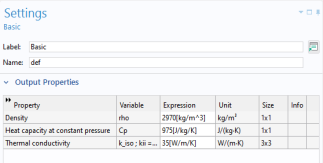
 .
. from the context menu. Notice that the generated global material Gas: Nitrogen Solvent is predefined for this node.
 from the context menu.
  Windows and choose Add Material from Library.
 Windows and choose Add Material from Library.
 Add Material to close the Add Material window.