Preparing to Model the Full Monolith Reactor
In the next phase of this example, set up a space-dependent 2D axisymmetric model of the monolithic reactor, including mass transport and reaction, heat transfer, and fluid flow.
The Monolith Reactor Model uses the plug flow Single Channel Model as a base. The Generate Space-Dependent Model feature creates a link between the plug flow reactor model and the space-dependent monolith model. It allows you to transfer reaction kinetics, thermodynamics, and transport properties set up in the Reaction Engineering interfaces to the physics interfaces describing space and time-dependent systems.
Generate Space-Dependent Model
1
In the Model Builder window, under Single Channel Model click Selective Catalytic Reduction Catalyst (SCR).
2
In the Reaction Engineering toolbar click Generate Space-Dependent Model
(or right-click Reaction Engineering
and choose it from the menu).
3
In the Settings window for Generate Space-Dependent Model, locate the Component Settings section. Choose 2Daxi: New from the Component to use list.
4
Locate the Physics Interfaces section. Find the Chemical species transport subsection. From the list, choose Transport of Diluted Species in Porous Media: New.
5
Find the Fluid flow subsection. From the list, choose Laminar Flow: New.
6
Find the Heat transfer subsection. From the list, choose Heat Transfer in Porous Media: New.
7
Locate the Space-Dependent Model Generation section. Click Create/Refresh. A 2Daxi Component is created.
The new 2Daxi component, called Component 2, appears in the Model Builder window. A Chemistry
node is automatically created for the SCR. It includes the kinetic, thermal, and transport properties setup in the Reaction Engineering interface that it was generated from. If necessary, changes can be made directly to this node.
Note:
In addition to the physics interfaces that were added with the Generate Space-Dependent Model feature, additional interfaces can be added by clicking Add Physics
in the Home toolbar.
 (or right-click Reaction Engineering
  and choose it from the menu).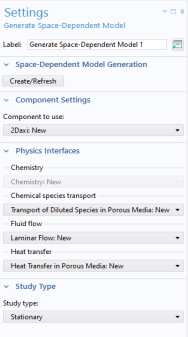
 node is automatically created for the SCR. It includes the kinetic, thermal, and transport properties setup in the Reaction Engineering interface that it was generated from. If necessary, changes can be made directly to this node.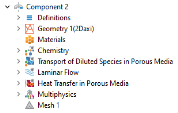
 in the Home toolbar.