Add Study
1
In the Study toolbar, click
Add Study to open the Add Study window.
2
Go to the Add Study window.
3
Find the Studies subsection. In the Select Study tree, select Preset Studies for Selected Physics Interfaces > Stationary Plug Flow.
4
Click the Add Study button in the window toolbar.
5
In the Study toolbar, click
Add Study to close the Add Study window.
 Add Study to open the Add Study window.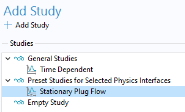
 Add Study to close the Add Study window.