Reaction Kinetics for the Selective Catalytic Reduction (SCR) Catalyst
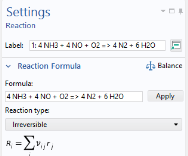
Now define the chemical reactions. First, type in the global reaction formula for the standard SCR reaction. The Reaction feature will automatically interpret the chemical equation and suggest reaction rates based on the mass action law (stoichiometry).
(1) Standard SCR: 4 NH3 + 4 NO + O2 => 4 N2 + 6 H2O
1
2
3
In the Formula text field, type 4NH3+4NO+O2=>4N2+6H2O.
4
Notice that, there being several ways to balance this formula, the button Balance is not applicable in this case.
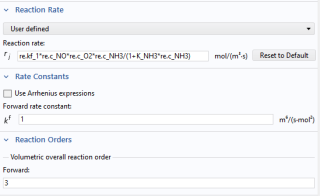
In this example, replace the automatically generated reaction rate expression with the rate expression known from the literature. The variable K_NH3 is defined in a Variables feature.
5
6
In the rj text field, type re.kf_1*re.c_NO*re.c_O2*re.c_NH3/(1+K_NH3*re.c_NH3).
In the next step, update the reaction order for this global reaction rate expression.
7
8
9
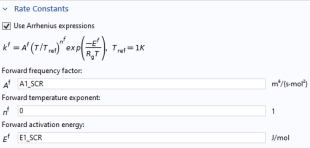
In the Af text field, type A1_SCR.
10
In the Ef text field, type E1_SCR.
Finally, edit the label of the Reaction feature. This is optional.
11
In the Label text field, type (1) Standard SCR: 4 NH3 + 4 NO + O2 => 4 N2 + 6 H2O.
In the same fashion, now define the reactions for the fast SCR reaction, the NO2 SCR reaction, the oxidation of NO, and the two undesired NH3 consuming reactions.
(2) Fast SCR: 2 NH3 + NO + NO2 => 2 N2 + 3 H2O
1
2
3
In the Formula text field, type 2 NH3 + NO + NO2 => 2 N2 + 3 H2O.
4
In the Label text field, type (2) Fast SCR: 2 NH3 + NO + NO2 => 2 N2 + 3 H2O.
5
6
In the rj text field, type re.kf_2*re.c_NO2*re.c_NO*re.c_NH3/(1+K_NH3*re.c_NH3).
7
8
In the Af text field, type A2_SCR.
9
In the Ef text field, type E2_SCR.
10
(3) NO2 SCR: 8 NH3 + 6 NO2 => 7 N2 + 12 H2O
1
2
3
In the Formula text field, type 8 NH3 + 6 NO2 => 7 N2 + 12 H2O.
4
In the Label text field, type (3) NO2 SCR: 8 NH3 + 6 NO2 => 7 N2 + 12 H2O.
5
6
In the rj text field, type re.kf_3*re.c_NO2*re.c_NH3/(1+K_NH3*re.c_NH3).
7
8
In the Af text field, type A3_SCR.
9
In the Ef text field, type E3_SCR.
10
(4) Equilibrium: 2 NO + O2 <=> 2 NO2
1
2
3
4
5
6
7
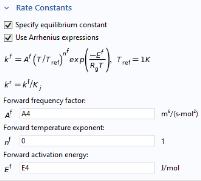
In the Af text field, type A4.
8
In the Ef text field, type E4.
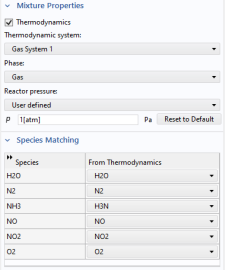
We want to derive the equilibrium constant from thermodynamics, which means that we first need to connect (couple) the species in Reaction Engineering to those in the Thermodynamic System.
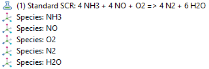
By adding these reactions, the required Species features have been added. Couple all species in Reaction Engineering to corresponding species in the created Thermodynamic System.
9
10
11
12
Now, Reaction Engineering is coupled to the Thermodynamic System, and the equilibrium constant for the fourth reaction is derived from thermodynamics. Continue to add the final two reactions.
13
14
In the Settings window for Reaction, type (4) Equilibrium: NO + O2 <=> 2 NO2 in the Label text field.
(5) Undesired Oxidation: 4 NH3 + 3 O2 => 2 N2 + 6 H2O
1
2
3
In the Formula text field, type 4 NH3 + 3 O2 => 2 N2 + 6 H2O.
4
In the Label text field, type (5) Undesired Oxidation: 4 NH3 + 3 O2 => 2 N2 + 6 H2O.
5
6
In the rj text field, type re.kf_5*(re.c_NH3*re.c_O2)/(1+K_NH3*re.c_NH3).
7
8
In the Af text field, type A5_SCR.
9
In the Ef text field, type E5_SCR.
10
(6) Undesired NO Formation: 4 NH3 + 5 O2 => 4 NO + 6 H2O
1
2
3
In the Formula text field, type 4 NH3 + 5 O2 => 4 NO + 6 H2O.
4
In the Label text field, type (6) Undesired NO Formation: 4 NH3 + 5 O2 => 4 NO + 6 H2O.
5
6
In the rj text field, type re.kf_6*re.c_O2*re.c_NH3/G.
7
8
In the Af text field, type A6_SCR.
9
In the Ef text field, type E6_SCR.
10
Now rename the interface to something descriptive.
11
12
In the Settings window for Reaction Engineering, type Selective Catalytic Reduction Catalyst (SCR) in the Label text field.
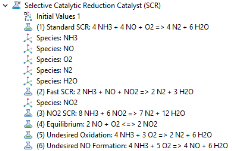
After setting up the reaction kinetics, define the suitable reactor model where the reactions take place. Using the Reaction Engineering node you can choose one of the predefined reactor types. Since you are planning to set up a single channel model, having chosen the Stationary Plug Flow study type previously, choose the Plug flow reactor.
13
Continue by defining the initial values for the reactor. Use the parameters previously loaded from files.
Initial Values 1
1
2
3
In the T0,in text field, type T_gas_in.
4
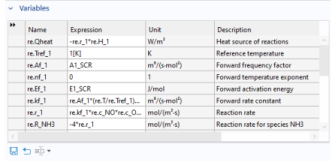
Now that the reactions and kinetics settings are set, use Equation View to check what variable names were generated. These variable names should be those used in the imported variable definitions under the Definitions node.
Equation View
1
2
3
Add a second Reaction Engineering physics interface to define the ammonia slip catalyst.