Thermodynamics
Next, create a Thermodynamic System that includes all thermodynamic properties (such as enthalpy, entropy, and so on) needed in the simulation of the reacting system. The thermodynamic properties are automatically coupled to the Reaction Engineering interface. One of the species in the system, NO
2
, is not part of the built-in thermodynamics database, and it must be added as a User-Defined Species. This species has been added to another application library model. Load it from there.
Gas System
1
In the Reaction Engineering toolbar, click
Thermodynamics and choose Import System.
2
Browse to the model’s Application Libraries folder and double-click the file
dissociation_thermo_system.xml
.
Remove the species N
2
H
4
since it is not needed, then add the rest of the species for this model.
Species N2O4
1
In the Model Builder window, expand the Global Definitions > Thermodynamics > User-Defined Species node.
2
Right-click Species 1 (N2O4) and choose Delete.
In the Reaction Engineering toolbar, click
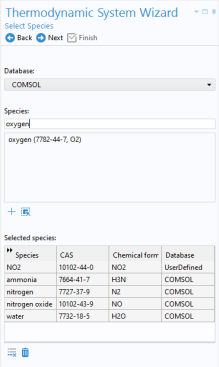
Thermodynamics and choose Thermodynamic System. This opens the Thermodynamic System Wizard which is used to define a system, including phase and species, and to set up thermodynamics and transport properties models.
Select System
1
In the first step in the wizard, keep Gas as the Selected system. Click Next
in the window toolbar.
Select Species
1
In the Select Species window, choose User defined from the Database list.
2
In the Species list, select NO2 (10102-44-0, NO2).
3
Click
Add Selected.
4
From the Database list, choose COMSOL.
5
In Select Species window, type the name of the remaining gas species that are present in the reactor system and Add
them to the Selected species table. Alternatively, it is also possible to double-click or press Enter to add species. Add ammonia, nitrogen, nitrogen oxide, oxygen, and water. Click Next
.
Select Thermodynamic Model
1
In the Select Thermodynamic Model, keep Ideal gas as Gas phase model.
As an option, check the Advanced options checkbox to select transport properties for later use in the space-dependent model. For now, keep the default selection by leaving the box cleared.
2
Click Finish
.
In the Settings window it is possible to review all the properties of the created Gas System
.