|
1
|
|
3
|
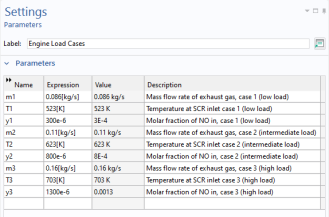
Browse to the file monolith_kinetics_engine_load_cases_parameters.txt in the application library folder on your computer, Chemical_Reaction_Engineering_Module\Tutorials. Double-click to add or click Open. The parameters from the txt-file are added to the table. The loaded file contains mass flow rates, nitrogen monoxide concentration, and temperature of the exhaust gas entering the reactor. Low engine load gives a lower mass flow rate, lower temperature, and less nitrogen oxides, than a high engine load.
 |
|
4
|
Rename the parameter node by editing the label text field. Rename it to Parameters: Engine Load Cases.
|
|
2
|
In the Settings window for Parameters, type Cases in the Label text field.
|
|
5
|
In the Settings window for Case, type Low Load in the Label text field.
|
|
8
|
In the Settings window for Case, type Intermediate Load in the Label text field.
|
|
10
|
In the Settings window for Case, type High Load in the Label text field.
|
|
2
|
In the Settings window for Parameters, type Parameters: Temperature and Monolith Parameters in the Label text field.
|
|
4
|
Browse to the model’s Application Libraries folder and double-click the file monolith_kinetics_temperature_monolith_parameters.txt.
|
|
2
|
In the Settings window for Parameters, type Parameters: Flow and Composition in the Label text field.
|
|
4
|
Browse to the model’s Application Libraries folder and double-click the file monolith_kinetics_flow_composition_parameters.txt.
|
|
2
|
In the Settings window for Parameters, type Parameters: Reaction Kinetics in the Label text field.
|
|
4
|
Browse to the model’s Application Libraries folder and double-click the file monolith_kinetics_kinetic_parameters.txt.
|
 and choose Parameter 1
  .
. .
. Parameters and choose Add > Parameters.
 Parameter Case.
 Parameter Case.
 Parameter Case.
 Parameters and choose Add > Parameters.
 Load from File.
 Parameters and choose Add > Parameters.
 Load from File.
 Parameters and choose Add > Parameters.
 Load from File.