Materials
1
In the Home toolbar click Add Material
.
2
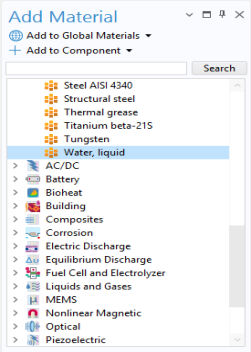
Go to the Add Material window. In the tree under Built-In click Water, liquid.
3
In the Add Material window, click
Add to Component.
4
In the Home toolbar click Add Material
again to close the window.
The physical properties are now available for the CFD simulation. The next step is to specify the domain and boundary conditions.
 .
.
 Add to Component.
 again to close the window.