Assign the Materials to the Domains of the Geometry
Assign the materials to the corresponding battery domains.
1
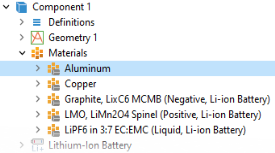
In the Model Builder window, click Aluminum.
2
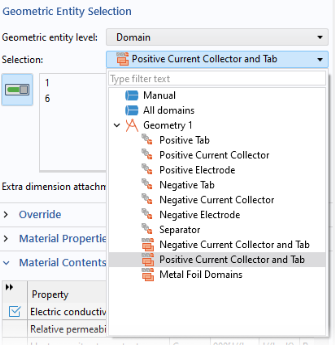
In the Settings window for the Materials>Aluminum node, locate the Geometric Entity Selection section.
3
From the Selection list, choose Positive Current Collector and Tab.
The named selections that appear in the list are created under the Geometry node, and were automatically included in the geometry sequence file you imported earlier.
Proceed similarly for the other materials:
1
Click Copper, and in the corresponding Geometric Entity Selection section, choose Negative Current Collector and Tab.
2
Click Graphite, LixC6 MCMB (Negative, Li-ion Battery) and choose Negative Electrode.
3
Click LMO, LiMn2O4 Spinel (Positive, Li-ion Battery) and choose Positive Electrode.
4
Click LiPF6 in 3:7 EC:EMC (Liquid, Li-ion Battery) and choose Separator.