Model Wizard
1
To start the software, double-click the COMSOL Multiphysics icon on the desktop. When the software opens, you can choose to use the Model Wizard to create a new COMSOL Multiphysics model or Blank Model to create one manually. For this tutorial, click the Model Wizard button.
If COMSOL Multiphysics is already open, you can start the Model Wizard by selecting New
from the File menu and then click Model Wizard
.
2
From the File menu, choose New.
3
In the New window, click
Model Wizard.
4
In the Model Wizard window, click
3D.
5
In the Select Physics tree, select Electrochemistry > Batteries > Lithium-Ion Battery (liion) and click Add.
6
Click
Study.
7
In the Select Study tree, select Preset Studies for Selected Physics Interfaces > Time Dependent with Initialization.
8
Click
Done.
 from the File menu and then click Model Wizard
  .
. Model Wizard.
 3D.
3D.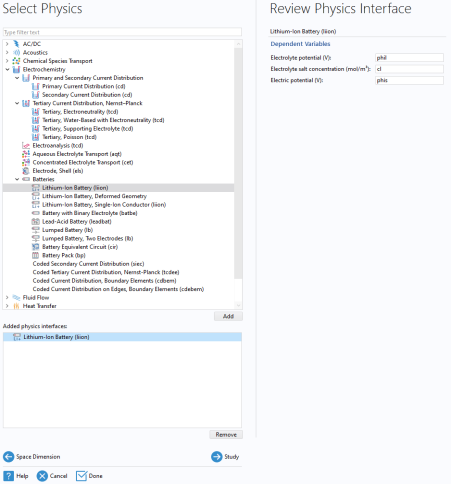
 Study.
 Done.
Done.