PDF

Random Particulate Composite RVE
Introduction
The Representative Volume Elements (RVEs) or Repeating Unit Cells (RUCs) serve as the fundamental building blocks for material homogenization techniques. COMSOL Multiphysics provides multiple built-in geometry parts for various RVEs and RUCs in the Unit Cells and RVEs folder of the Part Library. However, the existing geometry parts can only generate reinforcements of predefined sizes and at predefined positions within a cell.
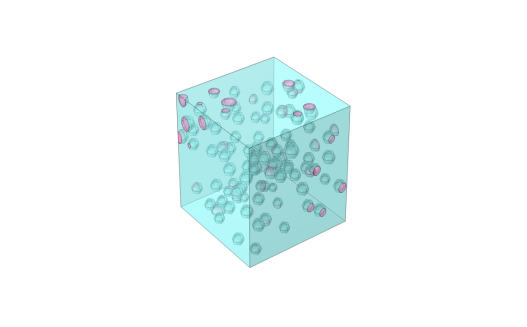
This add-in overcomes that limitation by generating spherical particles of random sizes and positions. It creates an RVE of a particulate composite, with spherical particles arranged either randomly or in a predefined pattern within a rectangular cell. The particle diameters can be fixed or follow a uniform, normal, or log-normal distribution.
Figure 1: Uniform randomly placed spherical particles in a matrix. The particle diameters follow a log-normal random distribution.
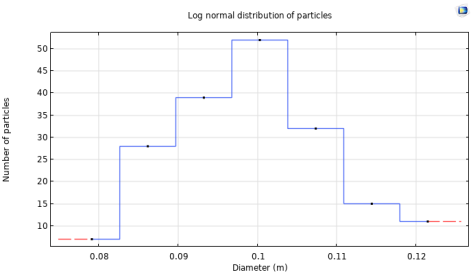
Figure 2: Histogram of uniform randomly placed spherical particles in a matrix. The particle diameters follow a log-normal random distribution.
Add-in Library path: COMSOL_Multiphysics/particulate_composite_random
Random Particulate Composite RVE
The default state of the add-in user interface looks as follows:
Toolbar
Use the toolbar at the top of the Settings window to perform different actions.
Click Create Geometry Part to build a geometry of a random particulate composite RVE as a geometry part. Click Plot Histogram to view the histogram representing the created particle size distribution. Click Reset All to remove all nodes and to reset the add-in to its default state.
Geometry parameters
In the Geometry Parameters section, there are four subsections: Cell dimensions, Particle size, Particle position, and Number of particles.
The Cell dimensions subsection defines the overall dimensions of the cell.
In the particle size distribution list you can specify one of the following choices:
Fixed — All particles have the same diameter.
Uniform — The particle diameters follow a uniform random distribution characterized by the smallest and largest diameters.
Normal — The particle diameters follow a normal random distribution characterized by a mean and a standard deviation.
Log-normal — The particle diameters follow a log-normal random distribution characterized by a mean and a standard deviation.
With the normal and log-normal distributions, there are additional options to cap the cumulative distribution function (CDF). The various options in the CDF-Lower and CDF-Upper lists cap the particle diameters. The default option in both lists in None.
From the particle position distribution list you can specify one of the following choice
Grid — All particle positions are predefined. The positions of particles needs to be specified through grid points. This option is only available when the fixed option is selected in the particle size distribution list.
Uniform — The particle positions follow a uniform random distribution. This option is available for all choices in the particle size distribution list. With this option you need to specify either the total number of particles or a volume fraction.
Depending on the chosen particle position distribution, the Number of particles needs to be specified. This can be either directly defined by the user or automatically calculated based on a specified Volume fraction of the cell volume.
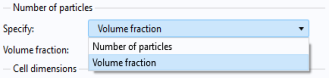
When the number of particles is specified based on a target Volume fraction, the computed volume fraction may deviate slightly. This is because a discrete number of particles, following a specified size distribution, cannot exactly match the target volume fraction. The computed volume fraction for the generated RVE is reported in the Results section.
Advanced Settings
This section has three choices: First, the random seed needs to be specified. The checkboxes Avoid particle-cell boundary overlap and Avoid particle-particle overlap control whether all particles should remain inside the cell boundaries, or should not intersect with each other, respectively. When the second checkbox is selected there is an additional input to specify the maximum number of iterations to find non-overlapping particle positions.
This section is not available when the Grid option is selected in the particle position distribution list.
Results
This section displays the total number of created particles and the actual particle volume fraction.
In this section, the number of bins for the histogram plot can be specified. This number must be greater than one and smaller than actual number of particles.