Model Wizard
Proceed to solve the model including a layer of absorptive glass wool on the muffler line. Continue working from where you left off with the model developed thus far and add a second study to keep your existing results intact. The first task is to add a second study to keep the existing results intact.
1
In the Home toolbar click Add Study
.
2
Go to the Add Study window. Under Studies click Frequency Domain
. Click Add Study
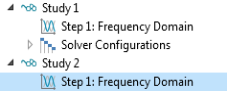
. A Study 2 node is added to the Model Builder.
3
In the Home toolbar, click Add Study to close the Add Study window.
 .
. . Click Add Study
  . A Study 2 node is added to the Model Builder.