Electric Currents (ec)
In the Model Builder window, under Component 1 (comp1) click Electric Currents (ec).
Boundary Terminal 1
1
In the Physics toolbar, click Boundaries
and choose Boundary Terminal.
2
Select Boundary 43 only.
3
In the Settings window for Terminal, locate the Terminal section.
4
In the I0 text field, type
I
.
The Settings of Boundary Terminal 1 are shown in the figure to the right. Next, make similar settings for Boundary Terminal 2.
Boundary Terminal 2
1
In the Physics toolbar, click Boundaries
and choose Boundary Terminal.
2
Select Boundaries 8 and 15 only.
3
In the Settings window for Boundary Terminal, locate the Terminal section.
4
From the Terminal type list, choose Voltage.
5
In the V0 text field, type
0
.
 and choose Boundary Terminal.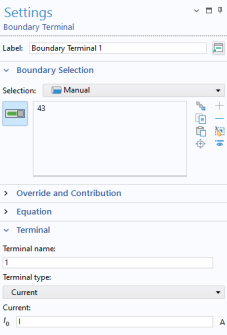
 and choose Boundary Terminal.