Heat Transfer in Solids (ht)
1
In the Model Builder window, under Component 1 (comp1) right-click Heat Transfer in Solids (ht) and choose Heat Flux.
2
In the Settings window for Heat Flux, locate the Boundary Selection section.
3
Select All boundaries except for 8, 15, and 43.
Note:
There are many ways to select geometric entities. When you know the boundaries to exclude, such as in this exercise, you can select all boundaries and then remove the corresponding boundaries. In this example, select 8, 15, 43 in the Selection window and click Remove from Selection
. You will also notice that there are some interior boundaries (such as 9–11) that are marked as ‘Not applicable’. For more information about selecting geometric entities in the Graphics window, see the
COMSOL Multiphysics Reference Manual
.
4
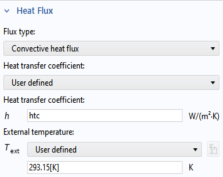
Locate the Heat Flux section. From the Flux type list, choose Convective heat flux. In the h text field, type
htc
.
 . You will also notice that there are some interior boundaries (such as 9–11) that are marked as ‘Not applicable’. For more information about selecting geometric entities in the Graphics window, see the COMSOL Multiphysics Reference Manual.