Materials
Add Material
1
In the Home toolbar, click Add Material
to open the Add Material window. Go to the Add Material window.
2
In the tree, select Built-in > Copper. Click Add to Component in the window toolbar.
3
In the tree, select Built-in > Titanium beta-21S. Click Add to Component in the window toolbar.
4
In the Home toolbar, click Add Material
to close the Add Material window.
Materials
1
Select Titanium beta-21S (mat2) and select Domains 2–7 only.
2
In the Settings window for Material, locate the Geometric Entity Selection section.
3
Click Create Selection
.
4
In the Create Selection dialog, type
Ti bolts
in the Selection name text field.
5
Click OK.
 to open the Add Material window. Go to the Add Material window.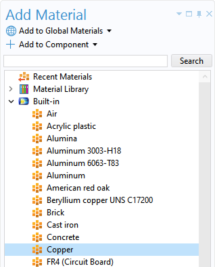
 to close the Add Material window.
 .
.