Global Definitions - Parameters
It is good modeling practice to gather constants and parameters in one place so that you can change them easily. Using parameters will also improve the readability of your input data.
The following parameters will be defined: the maximum element size
mh
, heat transfer coefficient
htc
, and terminal current
I
.
1
In the Model Builder Window, under Global Definitions, select Parameters 1
.
2
In the Settings window for Parameters, locate the Parameters section. You will find some parameters in the table. The parameters are used for building the geometry and they are imported together with the geometry sequence.
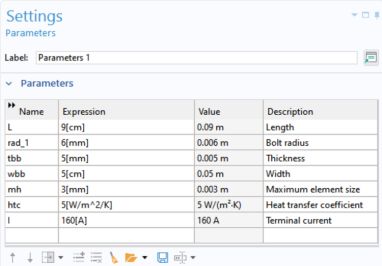
In the table, add the following parameters:
Name
Expression
Value
Description
mh
3[mm]
0.003 m
Maximum element size
htc
5[W/m^2/K]
5 W/(m²·K)
Heat transfer coefficient
I
160[A]
160 A
Terminal current
The third column in the table is filled out automatically. The final parameter table is shown below:
 .
.