Study 2
Set up a frequency sweep from 1 to 10 MHz in steps of 0.25 MHz.
1
In the Model Builder expand the Study 2 node and click Step 1: Frequency Domain
.
2
From the Frequency unit list, choose MHz.
3
Under Study Settings click the Range button
.
4
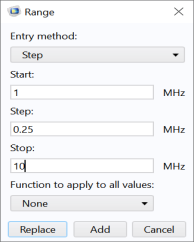
In the Range window, enter these settings:
-
In the Start text field, enter
1
.
-
In the Step text field, enter
0.25
.
-
In the Stop text field, enter
10
.
5
Click Replace.
6
In the Study toolbar click Compute
.
 .
.
 .
. .
.