Magnetic Fields (mf)
1
In the Model Builder click Magnetic Fields
.
2
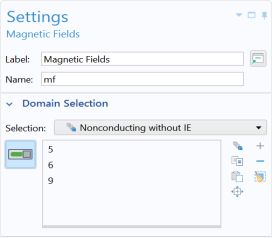
Go to the Settings window for Magnetic Fields. Under Domain Selection from the Selection list, select Nonconducting without IE.
Ampère’s Law in Solids 2
Apart from the surface losses in the copper conductor, there are also AC losses in the core. The core loss is introduced by specifying an effective complex permeability for the magnetic iron in the core, a quantity which is often available from the manufacturer. There is a specific constitutive relation for this.
1
In the Physics toolbar click Domains
and choose Ampère’s Law in Solids
.
Add a second Ampère’s Law in Solids node to the Model Builder.
2
Go to the Settings window for Ampère’s Law in Solids. Under Domain Selection, from the Selection list, select Core.
3
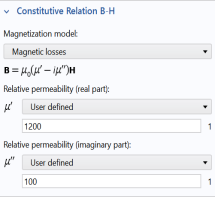
In the Settings window for Ampère’s Law in Solids, locate the Constitutive Relation B-H section.
4
From the Magnetization model list, choose Magnetic losses.
5
From the
μ
′
list, choose User defined. In the
μ
′
text field, type
1200
.
6
From the
μ
′′
list, choose User defined. In the
μ
′′
text field, type
100
.
Impedance Boundary Condition 1
1
In the Physics toolbar click Boundaries
. Under Passive Conductors, choose Impedance Boundary Condition
.
2
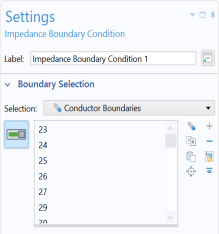
Go to the Settings window for Impedance Boundary Condition. Under Boundary Selection from the Selection list, select Conductor Boundaries.
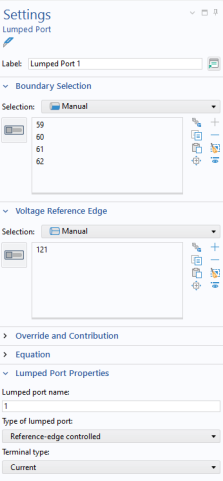
Lumped Port 1
With the Coil replaced by the Impedance Boundary Condition a different boundary feature, which is more appropriate for high frequency modeling, must be used to excite the model.
1
In the Physics toolbar click Boundaries
. Under Magnetic Fields, choose Lumped Port
.
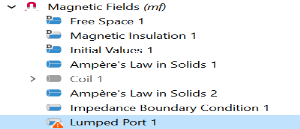
A Lumped Port node is added to the sequence in the Model Builder.
2
Go to the Settings window for Lumped Port. Select Boundaries 59–62 only.
3
Under Lumped Port Properties from the Type of lumped port list, select Reference-edge controlled.
4
Under Voltage Reference Edge, select edge 121 only.
5
From the Terminal type list, select Current.
Disable Domain Coil 1
The Domain Coil does not apply to an active domain anymore so it needs to be disabled.
In the Model Builder under Magnetic Fields, right-click Domain Coil 1
and choose Disable
. The node is unavailable.
Disable Ampère’s Law in Solids 1
This feature does not apply to an active domain anymore so it needs to be disabled.
In the Model Builder under Magnetic Fields, right-click Ampère’s Law in Solids 1
and choose Disable
. The node is unavailable.
 .
.
 and choose Ampère’s Law in Solids
  .
.
 . Under Passive Conductors, choose Impedance Boundary Condition
  .
.
 . Under Magnetic Fields, choose Lumped Port
  .
.
 and choose Disable
  . The node is unavailable.
 and choose Disable
  . The node is unavailable.