Magnetic Fields (mf)
Change the coil excitation to connect to the circuit part of the model.
1
In the Model Builder, under Component 1 (comp1) > Magnetic Fields (mf), click Domain Coil 1.
2
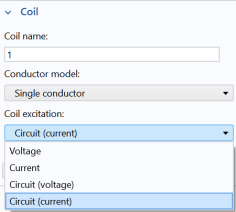
In the Settings window for Domain Coil
, change the Coil excitation to Circuit (current), as in the figure.
Note that a warning may appear “No connection to electrical circuit.” Also, a button appears that allows you to add a circuit connection.
In the following steps, however, the circuit connection is added manually.
 , change the Coil excitation to Circuit (current), as in the figure.