Study 1
Before the magnetostatic model is ready to solve an additional study step needs to be added for computing the exciting coil current.
1
Right-click the Study 1
node and select More Study Steps > Other > Coil Geometry Analysis
.
2
Right-click Coil Geometry Analysis
and select Move Up
. The Study node should at this stage match this figure.
3
In the Study toolbar click Compute
.
 node and select More Study Steps > Other > Coil Geometry Analysis
  .
.  and select Move Up
  . The Study node should at this stage match this figure.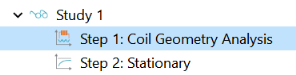
 .
.