Materials
Now define the material settings for the different parts of the inductor. Use the Selections defined in the previous section.
Copper
1
In the Home toolbar click Add Material
.
2
Go to the Add Material window. In the Materials tree under AC/DC, right-click Copper and choose
Add to Component 1 from the menu.
3
In the Model Builder, click Copper
.
4
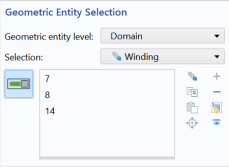
Go to the Settings window for Copper. Under Geometric Entity Selection select Winding from the Selection list.
5
In the Home toolbar click Add Material
to close the Add Material window.
 .
. Add to Component 1 from the menu.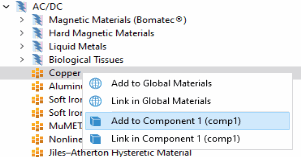
 .
.
 to close the Add Material window.