Geometry, with Grading Rings
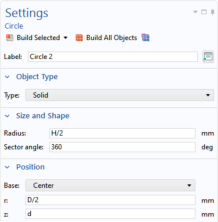
Circle 2 (c2)
1
In the Geometry toolbar, click Circle
.
2
In the Settings window for Circle, locate the Size and Shape section.
3
In the Radius text field, type
H/2
.
4
Locate the Position section. In the r text field, type
D/2
.
5
In the z text field, type
d
.
Circle 3 (c3)
1
Right-click Circle 2 (c2) and choose Duplicate.
2
In the Settings window for Circle, locate the Position section.
3
In the z text field, type
1150-d
.
 .
.