|
|
|
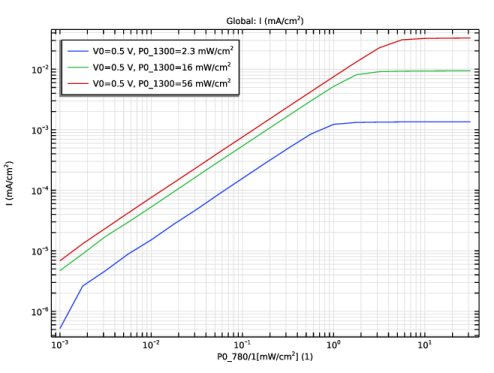
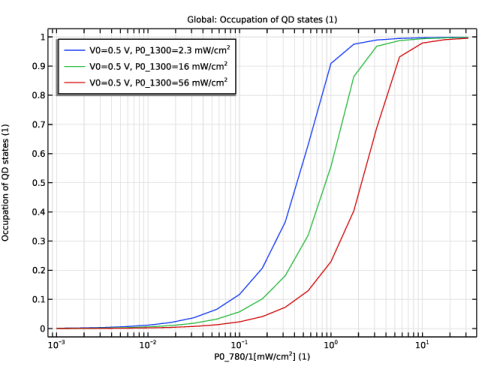
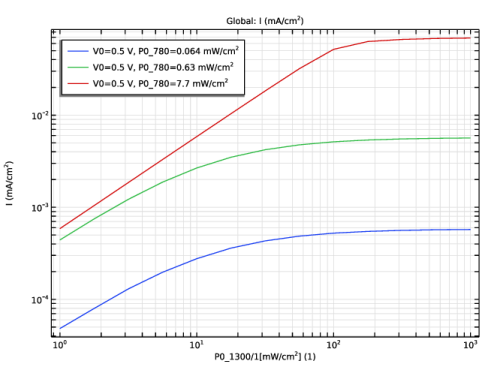
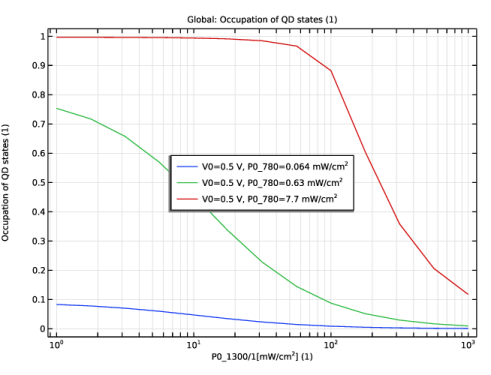
|
1
|
In the Model Wizard window, Use 1D geometry to model the dot-in-well solar cell.
|
|
2
|
click
 1D. 1D. |
|
3
|
|
4
|
Click Add.
|
|
5
|
Click
 Study. Study. |
|
6
|
In the Select Study tree, select Preset Studies for Selected Physics Interfaces > Semiconductor Equilibrium.
|
|
7
|
Click
 Done. Done. |
|
1
|
|
2
|
|
3
|
|
1
|
|
2
|
In the Settings window for Parameters, type Parameters 1 - Geometry & QW, QD in the Label text field.
|
|
3
|
|
4
|
Locate the Parameters section. In the table, enter the following settings:
|
|
1
|
|
2
|
|
3
|
Locate the Parameters section. In the table, enter the following settings:
|
|
1
|
|
2
|
|
3
|
|
4
|
Locate the Parameters section. In the table, enter the following settings:
|
|
1
|
|
2
|
|
3
|
|
4
|
|
1
|
|
2
|
|
3
|
Locate the Interval section. In the table, enter the following settings:
|
|
4
|
Locate the Selections of Resulting Entities section. Find the Cumulative selection subsection. Click New.
|
|
5
|
|
6
|
Click OK.
|
|
1
|
|
2
|
|
3
|
|
4
|
|
5
|
|
1
|
|
2
|
|
3
|
|
4
|
|
6
|
Click
 Build All Objects. Build All Objects. |
|
7
|
|
1
|
|
2
|
Go to the Add Material window.
|
|
3
|
|
4
|
Click the Add to Component button in the window toolbar.
|
|
5
|
|
1
|
|
2
|
Find the Local properties subsection. In the table, enter the following settings:
|
|
1
|
|
2
|
|
1
|
|
2
|
|
1
|
|
2
|
|
3
|
|
4
|
|
5
|
Click OK.
|
|
6
|
|
7
|
|
8
|
|
9
|
Click OK.
|
|
1
|
|
2
|
|
3
|
|
1
|
|
3
|
|
4
|
|
1
|
|
3
|
|
4
|
|
5
|
|
1
|
|
1
|
|
3
|
|
4
|
|
1
|
|
2
|
|
3
|
|
4
|
Locate the Trap-Assisted Recombination section. From the Trapping model list, choose Explicit trap distribution.
|
|
5
|
|
1
|
|
2
|
In the Settings window for Discrete Energy Level, type Discrete Energy Level - wells in the Label text field.
|
|
3
|
|
4
|
|
5
|
|
6
|
|
7
|
|
8
|
Locate the Carrier Capture section. From the Probability of electron capture list, choose User defined. In the Cn text field, type 0.
|
|
9
|
|
1
|
|
2
|
In the Settings window for Discrete Energy Level, type Discrete Energy Level - dots in the Label text field.
|
|
3
|
|
4
|
|
1
|
|
2
|
|
3
|
|
1
|
|
2
|
|
3
|
|
1
|
|
2
|
|
3
|
|
4
|
|
5
|
Locate the Variables section. In the table, enter the following settings:
|
|
1
|
|
2
|
|
3
|
|
4
|
|
5
|
Locate the Variables section. In the table, enter the following settings:
|
|
1
|
|
2
|
|
3
|
|
4
|
|
5
|
Locate the Variables section. In the table, enter the following settings:
|
|
1
|
In the Model Builder window, under Component 1 (comp1) > Semiconductor (semi) > Trap-Assisted Recombination 1 click Discrete Energy Level - wells.
|
|
2
|
In the Settings window for Discrete Energy Level, click to expand the Additional Carrier Capture Rate section.
|
|
3
|
|
4
|
|
1
|
|
2
|
In the Settings window for Discrete Energy Level, locate the Additional Carrier Capture Rate section.
|
|
3
|
|
4
|
|
1
|
|
2
|
In the Settings window for Transition Between Discrete Levels, locate the Transition Between Discrete Levels section.
|
|
3
|
|
4
|
|
5
|
|
1
|
|
1
|
|
2
|
|
3
|
|
4
|
|
6
|
|
7
|
Click
 Build All. Build All. |
|
1
|
|
2
|
In the Settings window for Study, type Study 1 - ramp V0 from 0 to 0.5 V, no light in the Label text field.
|
|
1
|
|
2
|
|
3
|
Select the Auxiliary sweep checkbox.
|
|
4
|
Click
 Add. Add. |
|
1
|
|
2
|
|
3
|
In the Model Builder window, expand the Study 1 - ramp V0 from 0 to 0.5 V, no light > Solver Configurations > Solution 1 (sol1) > Stationary Solver 1 node, then click Fully Coupled 1.
|
|
4
|
|
5
|
|
6
|
Click
 Compute. Compute. |
|
1
|
|
2
|
|
3
|
|
4
|
|
1
|
|
2
|
Go to the Add Study window.
|
|
3
|
|
4
|
Click the Add Study button in the window toolbar.
|
|
5
|
|
1
|
|
2
|
Select the Auxiliary sweep checkbox.
|
|
3
|
|
4
|
Click
 Add. Add. |
|
7
|
Click
 Add. Add. |
|
9
|
Click
 Add. Add. |
|
11
|
Click to expand the Values of Dependent Variables section. Find the Initial values of variables solved for subsection. From the Settings list, choose User controlled.
|
|
12
|
|
13
|
|
14
|
|
15
|
|
16
|
|
17
|
|
1
|
|
2
|
|
3
|
|
4
|
|
5
|
|
6
|
|
1
|
In the Model Builder window, under Results, Ctrl-click to select Energy Levels (semi) 1, Carrier Concentrations (semi) 1, Electric Potential (semi) 1, and Net Dopant Concentration (semi) 1.
|
|
2
|
Right-click and choose Group.
|
|
1
|
|
2
|
|
3
|
|
4
|
|
5
|
|
6
|
|
7
|
Select the y-axis log scale checkbox.
|
|
8
|
|
1
|
|
2
|
|
4
|
|
5
|
|
6
|
|
7
|
|
1
|
|
2
|
|
3
|
|
1
|
|
2
|
|
4
|
|
1
|
|
2
|
Go to the Add Study window.
|
|
3
|
|
4
|
Click the Add Study button in the window toolbar.
|
|
5
|
|
1
|
|
2
|
|
3
|
|
1
|
|
3
|
Click
 Move Up. Move Up. |
|
5
|
|
1
|
|
2
|
|
3
|
|
4
|
|
5
|
|
6
|
|
1
|
In the Model Builder window, under Results, Ctrl-click to select Energy Levels (semi) 2, Carrier Concentrations (semi) 2, Electric Potential (semi) 2, and Net Dopant Concentration (semi) 2.
|
|
2
|
Right-click and choose Group.
|
|
1
|
|
2
|
|
3
|
|
4
|
|
1
|
|
2
|
|
3
|
|
4
|
|
1
|
|
2
|
|
3
|
|
4
|
|
5
|
|
1
|
|
2
|
|
3
|
|
4
|