

PDF

Fast Prototyping of a Butler Matrix Beamforming Network
Introduction
A Butler matrix is a passive beamforming feed network. It is a cost-effective feed network for phased array antennas because the circuit can be fabricated in the form of microstrip lines and it is viable to perform beam scanning without deploying expensive active devices. This example guides how to design such a circuit efficiently using the Transmission Line physics interface. The results show the logarithmic voltage on the Butler matrix beamforming circuit at 30 GHz and the arithmetic phase progression at each output port.
Figure 1: A microstrip 4×4 Butler matrix beamforming network for a phased array antenna
Model Definition
The butler matrix beamforming network consists of a few subsections: 90 degree hybrid, 45 degree delay line, crossover, transition matching the output phase to that of crossover, and inner and outer front-ends. Since these subsections are repeatedly used in the entire structure, the geometry building process can be simplified by adding these subsections as the Geometry Parts under Global Definition node and reusing them as necessary.
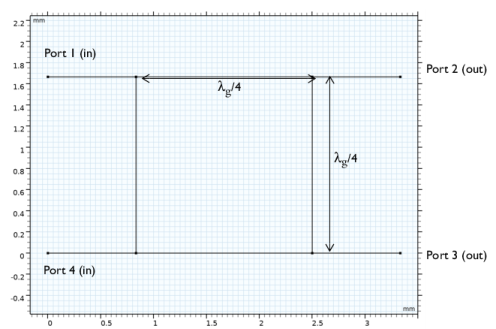
Figure 2: The part geometry of a 90 degree hybrid (branch-line coupler)
The geometry of a 90 degree hybrid, also known as a branch-line coupler is shown in Figure 2. Ref. 1 discusses the design characteristics and its S-parameters calculated using even-odd model analysis. A full 3D COMSOL model is available in Ref. 2. The 90 degree hybrid splits the input power equally into two output ports (-3 dB) with a 90 degree phase difference. Because the geometry is symmetric, the response of the circuit is reciprocal regardless of the input port configuration. In this example, the input ports are located on the left side and there is no coupled power between the input ports that is also described by its S-parameter matrix:
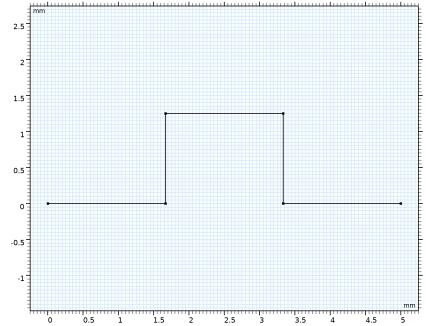
Figure 3 describes a delay line geometry providing a 45 degrees phase lag than the output phase of the crossover. Figure 4 shows a transition part that matches the output phase to that of the crossover.
Figure 3: The part geometry of a 45 degree delay line that is 0.125 wavelengths longer than the crossover part.
Figure 4: The part geometry of a transition structure. The electrical length is same as that in the input signal path of the crossover part.
Figure 5: The part geometry of a crossover structure. The port definition is only for the subsection analysis.
The geometry of a crossover in Figure 5 is analogous of a two-section cascaded branch-line coupler, but it consists of only 50 Ω lines. Its behavior can be analyzed with the same even-odd analysis method (Ref. 1) used for the branch-line coupler characterization. The even-odd analysis transforms the four-port network into two decoupled two-port networks. After the transformation, each cascaded two-port network can be described via ABCD parameters.
If the circuit is normalized by the 50 Ω reference impedance, the ABCD parameters for each section are
The reflection and transmission coefficients from ABCD are defined as
The wave amplitude at each port is
Because it is a passive and reciprocal network, the S-parameters are
The two input ports are isolated from each other. The input signal from the upper left side flows to the output at the lower right side while the input signal from the lower left side flows to the output at the upper right side. The ladder-shape crossover structure works like X-shape crossover lines.
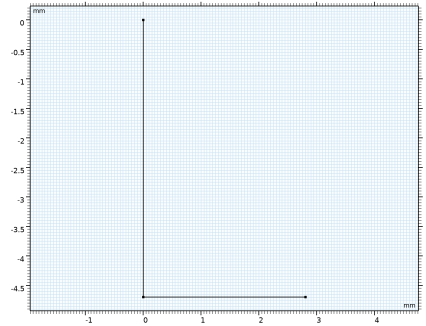
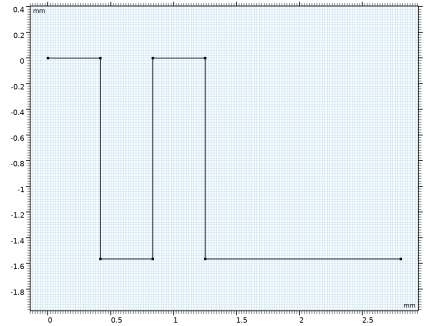
Figure 6 and Figure 7 show the geometry of front-end parts that adjust the distance between output ports from a quarter-wavelength to 0.48 wavelengths without distorting the output phase relation. The higher gain of an antenna array can be realized by increasing the distance between antenna elements, but this will result in an undesirable higher sidelobe level and a grating lobe. The given spacing configuration for antenna array elements provides the antenna radiation pattern with a reasonable gain and sidelobe level.
Figure 6: The part geometry of an outer front-end structure.
Figure 7: The part geometry of an inner front-end structure.
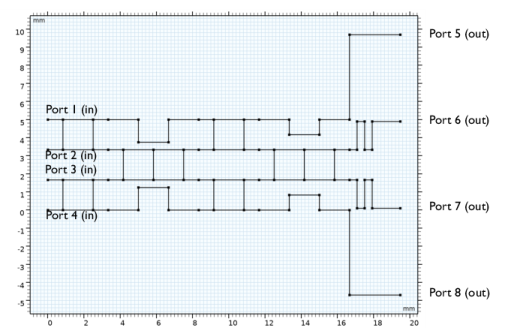
Figure 8: The finalized geometry of a butler matrix beamforming network.
By combining four 90 degree hybrids (branch-line couplers), two 45 degree delay lines, two phase matching transitions, two inner front ends, and two outer front ends, the geometry for the butler matrix beamforming network is completed (Figure 8).
All transmission line distributed element parameters except for a few branch-lines are set based on a 50 Ω microstrip line built on a 20 mil lossless substrate with permittivity εr = 3.38 and 1 oz copper. The accurate values can be calculated accurately from Ref. 3.
The contribution of the distributed resistance on the insertion loss with the given substrate properties is less than 0.05 dB. To make the modeling steps simpler in this example, the approximated parameter values in Table 2 are used for a 50 Ω microstrip line.
Ω/m
The transmission line parameters with a different characteristic impedance value, Z0/√2 for the branch-lines, are adjusted using the normalized impedance. The distributed inductance is proportionally scaled and the distributed capacitance is inversely scaled by the normalized impedance of the microstrip line.
In order to excite ports one by one, the port sweep option in the transmission line physics interface is activated and combined with a parametric sweep in the study steps. Each port is terminated by a lumped port with 50 Ω reference characteristic impedance.
Results and Discussion
The default plot show the real value of the voltage on the transmission lines. The default input expression is changed to plot the logarithmic value of the voltage (Figure 9). The plot shows that port 1, port 2, and port 3 have no coupled power (below 100 dB) from the excited port 4.
Figure 9: The dB-scaled voltage on the transmission lines when port 4 is excited. Port1, port 2 and port 3 are isolated below -100 dB.
In Figure 10, the minimum range of the dB-scaled voltage plot is set to 10 dB to get a closer look at the level of each output port. The input voltage is equally distributed to all four output ports (6 dB).
Figure 10: The range of the dB-scaled voltage plot is adjusted to see the output voltage level.
Table 3 shows the evaluated phase at each output port.
By adjusting some of the evaluated angles, the phase at each port can be configured in an arithmetic order and the resulted phase progression is summarized in Table 4. If the butler matrix beamforming network is excited in the order of port 3 (135 degrees), port 1
(45 degrees), port 4 (45 degrees), and port 2 (135 degrees), and connected to a 4×1 antenna array, the antenna radiation pattern will be steered from one side to the other side (Figure 11). Note that the antenna array model in Figure 11 is not included in this example.
 
Figure 11: The far-field radiation pattern of a 4×1 microstrip patch antenna array connected to the butler matrix beamforming network. The antenna model is not included in this example.
References
1. D.M. Pozar, Microwave Engineering, John Wiley & Sons, 1998.
2. COMSOL Application Gallery, “Branch-Line Coupler”, https://www.comsol.com/model/branch-line-coupler-11727
3. COMSOL Application Gallery, “Transmission Line Parameter Calculator”, https://www.comsol.com/model/transmission-line-parameter-calculator-22351
Application Library path: RF_Module/Couplers_and_Power_Dividers/transmission_line_butler
Model Instructions
From the File menu, choose New.
New
In the New window, click  Model Wizard.
Model Wizard
1
In the Model Wizard window, click  2D.
2
In the Select Physics tree, select Radio Frequency > Transmission Line (tl).
3
Click Add.
4
Click  Study.
5
In the Select Study tree, select General Studies > Frequency Domain.
6
Global Definitions
Parameters 1
1
In the Model Builder window, under Global Definitions click Parameters 1.
2
In the Settings window for Parameters, locate the Parameters section.
3
Click  Load from File.
4
Here, c_const in the imported table is a predefined COMSOL constant for the speed of light in vacuum.
The 4x4 Butler matrix beamforming network in this example consists of a few parts that are repeatedly shown in the geometry. To make the modeling process more efficient, define these as Geometry Parts and reuse them as necessary.
90 Degree Hybrid
1
In the Model Builder window, right-click Global Definitions and choose Geometry Parts > 2D Part.
2
In the Settings window for Part, type 90 Degree Hybrid in the Label text field.
3
Locate the Units section. From the Length unit list, choose mm.
Line Segment 1 (ls1)
1
In the Geometry toolbar, click  More Primitives and choose Line Segment.
2
In the Settings window for Line Segment, locate the Starting Point section.
3
From the Specify list, choose Coordinates.
4
Locate the Endpoint section. From the Specify list, choose Coordinates.
5
In the x text field, type ul*2.
Line Segment 2 (ls2)
1
In the Geometry toolbar, click  More Primitives and choose Line Segment.
2
In the Settings window for Line Segment, locate the Starting Point section.
3
From the Specify list, choose Coordinates.
4
Locate the Endpoint section. From the Specify list, choose Coordinates.
5
Locate the Starting Point section. In the x text field, type ul/2.
6
Locate the Endpoint section. In the x text field, type ul/2.
7
In the y text field, type ul.
Rotate 1 (rot1)
1
In the Geometry toolbar, click  Transforms and choose Rotate.
2
Click the  Select All button in the Graphics toolbar.
3
In the Settings window for Rotate, locate the Rotation section.
4
In the Angle text field, type 0 180.
5
Locate the Center of Rotation section. In the x text field, type ul.
6
In the y text field, type ul/2.
7
Click  Build Selected.
8
Click the  Zoom Extents button in the Graphics toolbar.
45 Degree Delay
1
In the Model Builder window, under Global Definitions right-click Geometry Parts and choose 2D Part.
2
In the Settings window for Part, type 45 Degree Delay in the Label text field.
3
Locate the Units section. From the Length unit list, choose mm.
Polygon 1 (pol1)
1
In the Geometry toolbar, click  Polygon.
2
In the Settings window for Polygon, locate the Object Type section.
3
From the Type list, choose Open curve.
4
Locate the Coordinates section. From the Data source list, choose Vectors.
5
In the x text field, type 0 ul ul ul ul ul*2 ul*2 ul*2 ul*2 ul*3.
6
In the y text field, type 0 0 0 ul*0.75 ul*0.75 ul*0.75 ul*0.75 0 0 0.
7
Click  Build Selected.
Transition
1
Right-click Geometry Parts and choose 2D Part.
2
In the Settings window for Part, type Transition in the Label text field.
3
Locate the Units section. From the Length unit list, choose mm.
4
In the Geometry toolbar, click  Polygon.
1
In the Settings window for Polygon, locate the Object Type section.
2
From the Type list, choose Open curve.
3
Locate the Coordinates section. From the Data source list, choose Vectors.
4
In the x text field, type 0 ul ul ul ul ul*2 ul*2 ul*2 ul*2 ul*3.
5
In the y text field, type 0 0 0 ul/2 ul/2 ul/2 ul/2 0 0 0.
6
Click  Build Selected.
Crossover
1
Right-click Geometry Parts and choose 2D Part.
2
In the Settings window for Part, type Crossover in the Label text field.
3
Locate the Units section. From the Length unit list, choose mm.
Line Segment 1 (ls1)
1
In the Geometry toolbar, click  More Primitives and choose Line Segment.
2
In the Settings window for Line Segment, locate the Starting Point section.
3
From the Specify list, choose Coordinates.
4
Locate the Endpoint section. From the Specify list, choose Coordinates.
5
In the x text field, type ul*3.
Line Segment 2 (ls2)
1
In the Geometry toolbar, click  More Primitives and choose Line Segment.
2
In the Settings window for Line Segment, locate the Starting Point section.
3
From the Specify list, choose Coordinates.
4
Locate the Endpoint section. From the Specify list, choose Coordinates.
5
Locate the Starting Point section. In the y text field, type ul.
6
Locate the Endpoint section. In the x text field, type ul*3.
7
In the y text field, type ul.
Line Segment 3 (ls3)
1
In the Geometry toolbar, click  More Primitives and choose Line Segment.
2
In the Settings window for Line Segment, locate the Starting Point section.
3
From the Specify list, choose Coordinates.
4
Locate the Endpoint section. From the Specify list, choose Coordinates.
5
Locate the Starting Point section. In the x text field, type ul/2.
6
Locate the Endpoint section. In the x text field, type ul/2.
7
In the y text field, type ul.
Array 1 (arr1)
1
In the Geometry toolbar, click  Transforms and choose Array.
2
3
In the Settings window for Array, locate the Size section.
4
In the x size text field, type 3.
5
Locate the Displacement section. In the x text field, type ul.
6
Click  Build Selected.
Front-end, outer
1
Right-click Geometry Parts and choose 2D Part.
2
In the Settings window for Part, type Front-end, outer in the Label text field.
3
Locate the Units section. From the Length unit list, choose mm.
Polygon 1 (pol1)
1
In the Geometry toolbar, click  Polygon.
2
In the Settings window for Polygon, locate the Object Type section.
3
From the Type list, choose Open curve.
4
Locate the Coordinates section. From the Data source list, choose Vectors.
5
In the x text field, type 0 0 0 -1.5*array_d+ul*6.
6
In the y text field, type 0 -1.5*(array_d-ul) -1.5*(array_d-ul) -1.5*(array_d-ul).
7
Click  Build Selected.
Front-end, inner
1
Right-click Geometry Parts and choose 2D Part.
2
In the Settings window for Part, type Front-end, inner in the Label text field.
3
Locate the Units section. From the Length unit list, choose mm.
4
In the Geometry toolbar, click  Polygon.
1
In the Settings window for Polygon, locate the Object Type section.
2
From the Type list, choose Open curve.
3
Locate the Coordinates section. From the Data source list, choose Vectors.
4
In the x text field, type 0 ul*0.25 ul*0.25 ul*0.25 ul*0.25 ul*0.5 ul*0.5 ul*0.5 ul*0.5 ul*0.75 ul*0.75 ul*0.75 ul*0.75 -1.5*array_d+ul*6.
5
In the y text field, type 0 0 0 -(array_d-ul)/2 -(array_d-ul)/2 -(array_d-ul)/2 -(array_d-ul)/2 0 0 0 0 -(array_d-ul)/2 -(array_d-ul)/2 -(array_d-ul)/2.
6
Click  Build Selected.
Geometry 1
1
In the Model Builder window, under Component 1 (comp1) click Geometry 1.
2
In the Settings window for Geometry, locate the Units section.
3
From the Length unit list, choose mm.
90 Degree Hybrid 1 (pi1)
In the Geometry toolbar, click  Part Instance and choose 90 Degree Hybrid.
90 Degree Hybrid 2 (pi2)
1
In the Geometry toolbar, click  Part Instance and choose 90 Degree Hybrid.
2
In the Settings window for Part Instance, locate the Position and Orientation of Output section.
3
In the x-displacement text field, type ul*5.
4
Click  Build Selected.
5
Click the  Zoom Extents button in the Graphics toolbar.
45 Degree Delay 1 (pi3)
1
In the Geometry toolbar, click  Part Instance and choose 45 Degree Delay.
2
In the Settings window for Part Instance, locate the Position and Orientation of Output section.
3
In the x-displacement text field, type ul*2.
Transition 1 (pi4)
1
In the Geometry toolbar, click  Part Instance and choose Transition.
2
In the Settings window for Part Instance, locate the Position and Orientation of Output section.
3
In the x-displacement text field, type ul*7.
4
Click  Build Selected.
5
Click the  Zoom Extents button in the Graphics toolbar.
Front-end, outer 1 (pi5)
1
In the Geometry toolbar, click  Part Instance and choose Front-end, outer.
2
In the Settings window for Part Instance, locate the Position and Orientation of Output section.
3
In the x-displacement text field, type ul*10.
4
Click  Build Selected.
5
Click the  Zoom Extents button in the Graphics toolbar.
Front-end, inner 1 (pi6)
1
In the Geometry toolbar, click  Part Instance and choose Front-end, inner.
2
In the Settings window for Part Instance, locate the Position and Orientation of Output section.
3
In the x-displacement text field, type ul*10.
4
In the y-displacement text field, type ul.
5
Click  Build Selected.
Mirror 1 (mir1)
1
In the Geometry toolbar, click  Transforms and choose Mirror.
2
Click the  Select All button in the Graphics toolbar.
3
In the Settings window for Mirror, locate the Input section.
4
Select the Keep input objects checkbox.
5
Locate the Point on Line of Reflection section. In the y text field, type ul*1.5.
6
Locate the Normal Vector to Line of Reflection section. In the x text field, type 0.
7
In the y text field, type 1.
8
Click  Build Selected.
9
Click the  Zoom Extents button in the Graphics toolbar.
Crossover 1 (pi7)
1
In the Geometry toolbar, click  Part Instance and choose Crossover.
2
In the Settings window for Part Instance, locate the Position and Orientation of Output section.
3
In the x-displacement text field, type ul*2.
4
In the y-displacement text field, type ul.
Crossover 2 (pi8)
1
In the Geometry toolbar, click  Part Instance and choose Crossover.
2
In the Settings window for Part Instance, locate the Position and Orientation of Output section.
3
In the x-displacement text field, type ul*7.
4
In the y-displacement text field, type ul.
5
Click  Build All Objects.
Transmission Line (tl)
Transmission Line Equation 1
1
In the Model Builder window, under Component 1 (comp1) > Transmission Line (tl) click Transmission Line Equation 1.
2
In the Settings window for Transmission Line Equation, locate the Transmission Line Equation section.
3
In the L text field, type L0.
4
In the C text field, type C0.
Transmission Line Equation 2
1
In the Physics toolbar, click  Boundaries and choose Transmission Line Equation.
2
Set the impedance of the selected transmission lines (branch-lines in the 90 degree hybrid) to Z0/sqrt(2) by adjusting the distributed inductance and capacitance values.
3
In the Settings window for Transmission Line Equation, locate the Transmission Line Equation section.
4
In the L text field, type L0*z1.
5
In the C text field, type C0/z1.
Lumped Port 1
1
In the Physics toolbar, click  Points and choose Lumped Port.
2
See Figure 8 to confirm the lumped port configuration.
Lumped Port 2
1
In the Physics toolbar, click  Points and choose Lumped Port.
2
Lumped Port 3
1
In the Physics toolbar, click  Points and choose Lumped Port.
2
Lumped Port 4
1
In the Physics toolbar, click  Points and choose Lumped Port.
2
Lumped Port 5
1
In the Physics toolbar, click  Points and choose Lumped Port.
2
Lumped Port 6
1
In the Physics toolbar, click  Points and choose Lumped Port.
2
Lumped Port 7
1
In the Physics toolbar, click  Points and choose Lumped Port.
2
Lumped Port 8
1
In the Physics toolbar, click  Points and choose Lumped Port.
2
3
In the Model Builder window, click Transmission Line (tl).
4
In the Settings window for Transmission Line, locate the Port Sweep Settings section.
5
Select the Use manual port sweep checkbox.
6
Click Configure Sweep Settings. By clicking the Configure Sweep Settings button, all necessary port sweep settings such as sweep parameter and parametric study step will be automatically added.
Mesh 1
In the Model Builder window, under Component 1 (comp1) right-click Mesh 1 and choose Edit Physics-Induced Sequence.
Size
1
In the Model Builder window, under Component 1 (comp1) > Mesh 1 click Size.
2
In the Settings window for Size, locate the Element Size section.
3
Click the Custom button.
4
Locate the Element Size Parameters section. In the Maximum element size text field, type ul/15.
5
Click  Build All.
Study 1
1
In the Model Builder window, click Study 1.
2
In the Settings window for Study, locate the Study Settings section.
3
Clear the Generate default plots checkbox.
Step 1: Frequency Domain
1
In the Model Builder window, under Study 1 click Step 1: Frequency Domain.
2
In the Settings window for Frequency Domain, locate the Study Settings section.
3
In the Frequencies text field, type f0.
Parametric Sweep 1
1
In the Model Builder window, click Parametric Sweep 1.
2
In the Settings window for Parametric Sweep, locate the Study Settings section.
3
Sweep only four input ports.
4
In the Study toolbar, click  Compute.
Results
2D Plot Group 1
In the Results toolbar, click  2D Plot Group.
Line 1
1
Right-click 2D Plot Group 1 and choose Line.
2
In the Settings window for Line, locate the Expression section.
3
In the Expression text field, type 20*log10(abs(V)).
4
In the 2D Plot Group 1 toolbar, click  Plot.
Other input ports (port 1, port2 and port 3) are fully isolated from the excited port 4. See Figure 9.
5
Click to expand the Range section. Select the Manual color range checkbox.
6
In the Minimum text field, type -10.
7
In the Maximum text field, type 0.
8
Locate the Coloring and Style section. From the Line type list, choose Tube.
9
In the 2D Plot Group 1 toolbar, click  Plot.
Figure 10 shows that the input power to port 4 is equally split into all output ports (-6 dB).
Global Evaluation 1
1
In the Results toolbar, click  Global Evaluation.
2
In the Settings window for Global Evaluation, locate the Expressions section.
3
4
Click  Evaluate.
Table 1
1
Go to the Table 1 window.
Compare the evaluated values to those in Table 3.