|
|
|


|
1
|
|
2
|
|
3
|
Click Add.
|
|
4
|
Click
 Study. Study. |
|
5
|
|
6
|
Click
 Done. Done. |
|
1
|
|
2
|
|
50 Ω
|
|||
|
200 Ω
|
|||
|
100 Ω
|
|||
|
1
|
|
2
|
|
3
|
|
5
|
Click
 Build All Objects. Build All Objects. |
|
1
|
In the Model Builder window, under Component 1 (comp1) > Transmission Line (tl) click Transmission Line Equation 1.
|
|
2
|
In the Settings window for Transmission Line Equation, locate the Transmission Line Equation section.
|
|
3
|
|
4
|
|
1
|
|
2
|
Click the
 Zoom Extents button in the Graphics toolbar to make the size of the transmission line suitable for selecting the second interval. Zoom Extents button in the Graphics toolbar to make the size of the transmission line suitable for selecting the second interval. |
|
4
|
In the Settings window for Transmission Line Equation, locate the Transmission Line Equation section.
|
|
5
|
|
6
|
|
1
|
|
3
|
|
4
|
|
1
|
|
3
|
|
4
|
|
1
|
|
2
|
|
3
|
From the list, choose User-controlled mesh.
|
|
1
|
|
2
|
|
3
|
Click the Custom button.
|
|
4
|
|
1
|
|
2
|
|
3
|
|
4
|
|
1
|
|
2
|
|
3
|
|
4
|
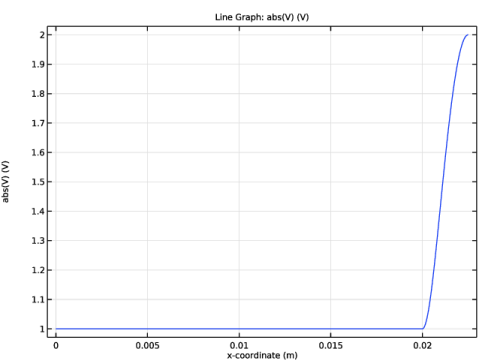
Click Replace Expression in the upper-right corner of the x-Axis Data section. From the menu, choose Component 1 (comp1) > Geometry > Coordinate > x - x-coordinate.
|
|
5
|
|
1
|
|
2
|
|
1
|
|
2
|
|
3
|
Click
 Range. Range. |
|
4
|
|
5
|
|
6
|
|
7
|
Click Replace.
|
|
8
|
|
1
|
|
2
|
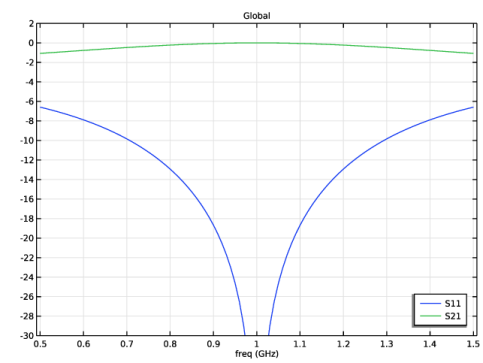
In the Settings window for Global, click Replace Expression in the upper-right corner of the y-Axis Data section. From the menu, choose Component 1 (comp1) > Transmission Line > Ports > S-parameter, dB > tl.S11dB - S11.
|
|
3
|
Click Add Expression in the upper-right corner of the y-Axis Data section. From the menu, choose Component 1 (comp1) > Transmission Line > Ports > S-parameter, dB > tl.S21dB - S21.
|
|
4
|
|
1
|
|
2
|
|
3
|
Select the Manual axis limits checkbox.
|
|
4
|
|
5
|
|
6
|
|
7
|
|
1
|
|
2
|
|
3
|
|
4
|
|
1
|
In the Model Builder window, under Component 1 (comp1) > Transmission Line (tl) click Lumped Port 2.
|
|
2
|
|
3
|
|
1
|
|
2
|
|
3
|
|
4
|
|
1
|