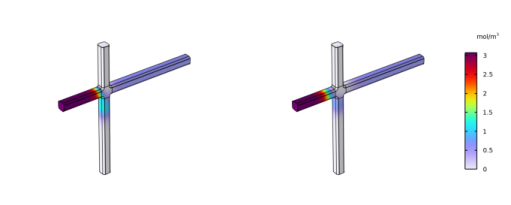
|
|
|
|
Dimensions (μm)
|
|||
|
Position (μm)
|
|||
|
Rounding (μm)
|
|||

 denotes the dynamic viscosity (SI unit: kg/(m·s)), u is the velocity (SI unit: m/s), and p is the pressure (SI unit: Pa).













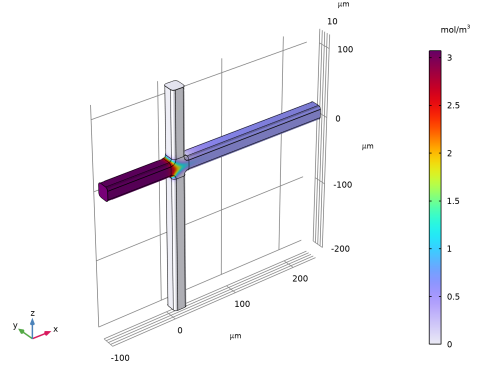
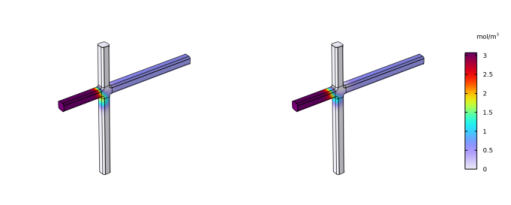
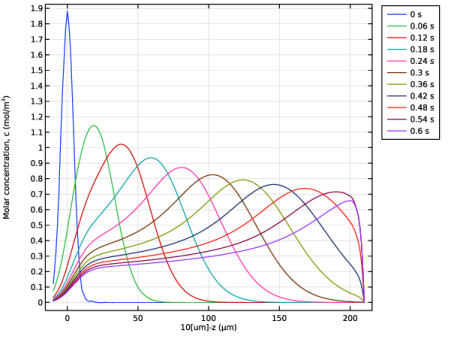
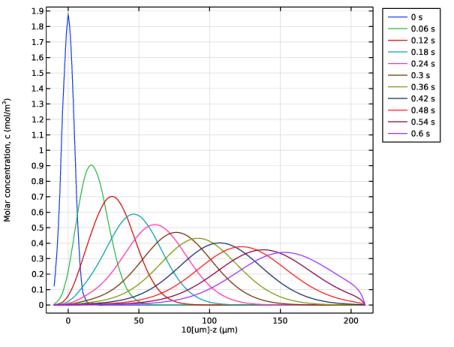
|
1
|
|
2
|
|
3
|
Click Add.
|
|
4
|
|
5
|
Click Add.
|
|
6
|
|
7
|
Click Add.
|
|
8
|
Click
 Study. Study. |
|
9
|
|
10
|
Click
 Done. Done. |
|
1
|
|
2
|
|
3
|
Click
 Load from File. Load from File. |
|
4
|
Browse to the model’s Application Libraries folder and double-click the file electrokinetic_valve_parameters.txt.
|
|
1
|
|
2
|
Browse to the model’s Application Libraries folder and double-click the file electrokinetic_valve_geom_sequence.mph.
|
|
3
|
|
1
|
In the Model Builder window, under Component 1 (comp1) right-click Materials and choose Blank Material.
|
|
2
|
|
3
|
Locate the Material Contents section. In the table, enter the following settings:
|
|
1
|
|
2
|
In the Settings window for Electric Potential, type Electric Potential - Focusing stage and Injection stage mode B in the Label text field.
|
|
3
|
|
4
|
|
1
|
|
2
|
In the Settings window for Ground, type Ground - Focusing stage and Injection stage mode B in the Label text field.
|
|
3
|
|
1
|
|
2
|
In the Settings window for Electric Potential, type Electric Potential - Injection stage in the Label text field.
|
|
3
|
|
4
|
|
1
|
|
2
|
|
3
|
|
1
|
|
2
|
|
3
|
Select the Migration in electric field checkbox.
|
|
4
|
|
1
|
In the Model Builder window, under Component 1 (comp1) > Transport of Diluted Species (tds) click Species Charges.
|
|
2
|
|
3
|
|
1
|
In the Model Builder window, under Component 1 (comp1) > Transport of Diluted Species (tds) click Fluid 1.
|
|
2
|
In the Settings window for Fluid, type Transport Properties - Focusing stage in the Label text field.
|
|
3
|
Locate the Model Input section. From the T list, choose User defined. In the associated text field, type T.
|
|
4
|
|
5
|
|
6
|
|
1
|
|
2
|
In the Settings window for Fluid, type Transport Properties - Injection stage in the Label text field.
|
|
3
|
|
1
|
|
2
|
In the Settings window for Concentration, type Concentration at sample inlet in the Label text field.
|
|
3
|
|
4
|
|
5
|
|
1
|
|
2
|
In the Settings window for Concentration, type Concentration at buffer inlets in the Label text field.
|
|
3
|
|
4
|
|
1
|
|
2
|
|
3
|
|
1
|
|
2
|
In the Settings window for Flux, type Migration at inlets and outlets - Injection stage in the Label text field.
|
|
3
|
Locate the Boundary Selection section. From the Selection list, choose Migration at inlets and outlets - Injection stage.
|
|
4
|
|
5
|
|
1
|
|
2
|
|
3
|
|
4
|
|
5
|
|
1
|
|
2
|
|
3
|
|
4
|
|
5
|
|
1
|
|
2
|
|
3
|
|
4
|
|
5
|
|
1
|
|
2
|
|
3
|
|
4
|
|
1
|
|
2
|
|
3
|
Click the Custom button.
|
|
4
|
|
5
|
|
6
|
Click
 Build All. Build All. |
|
1
|
|
2
|
|
1
|
|
2
|
|
3
|
Locate the Physics and Variables Selection section. In the Solve for column of the table, under Component 1 (comp1), clear the checkboxes for Electric Currents (ec) and Transport of Diluted Species (tds).
|
|
1
|
|
2
|
|
3
|
Locate the Physics and Variables Selection section. Select the Modify model configuration for study step checkbox.
|
|
4
|
|
5
|
Right-click and choose Disable in Solvers.
|
|
6
|
|
7
|
Right-click and choose Disable in Solvers.
|
|
8
|
In the tree, select Component 1 (comp1) > Electric Currents (ec) > Electric Potential - Injection stage.
|
|
9
|
Right-click and choose Disable.
|
|
10
|
|
11
|
Right-click and choose Disable.
|
|
1
|
|
2
|
|
3
|
Locate the Physics and Variables Selection section. Select the Modify model configuration for study step checkbox.
|
|
4
|
|
5
|
Right-click and choose Disable in Solvers.
|
|
6
|
|
7
|
Right-click and choose Disable in Solvers.
|
|
8
|
In the tree, select Component 1 (comp1) > Transport of Diluted Species (tds) > Transport Properties - Injection stage.
|
|
9
|
Right-click and choose Disable.
|
|
10
|
In the tree, select Component 1 (comp1) > Transport of Diluted Species (tds) > Migration at inlets and outlets - Injection stage.
|
|
11
|
Right-click and choose Disable.
|
|
1
|
|
2
|
|
3
|
Locate the Physics and Variables Selection section. Select the Modify model configuration for study step checkbox.
|
|
4
|
In the tree, select Component 1 (comp1) > Electric Currents (ec) > Electric Potential - Focusing stage and Injection stage mode B.
|
|
5
|
Right-click and choose Disable.
|
|
6
|
In the tree, select Component 1 (comp1) > Electric Currents (ec) > Ground - Focusing stage and Injection stage mode B.
|
|
7
|
Right-click and choose Disable.
|
|
8
|
|
9
|
Right-click and choose Disable in Solvers.
|
|
10
|
|
11
|
Right-click and choose Disable in Solvers.
|
|
1
|
|
2
|
In the Settings window for Time Dependent, type Time Dependent - Injection stage in the Label text field.
|
|
3
|
|
4
|
Locate the Physics and Variables Selection section. In the Solve for column of the table, under Component 1 (comp1), clear the checkboxes for Electric Currents (ec) and Creeping Flow (spf).
|
|
5
|
|
1
|
|
2
|
|
3
|
|
4
|
|
5
|
|
6
|
|
7
|
|
8
|
|
1
|
|
2
|
|
3
|
|
4
|
 Plot.
Plot.|
1
|
|
2
|
In the Settings window for 1D Plot Group, type Concentration Line Plot - Mode A in the Label text field.
|
|
3
|
|
4
|
|
1
|
|
2
|
In the Settings window for Line Graph, click Replace Expression in the upper-right corner of the y-Axis Data section. From the menu, choose Component 1 (comp1) > Transport of Diluted Species > Species c > c - Molar concentration, c - mol/m³.
|
|
3
|
|
4
|
|
5
|
|
6
|
|
7
|
|
1
|
|
2
|
Go to the Add Study window.
|
|
3
|
|
4
|
Click the Add Study button in the window toolbar.
|
|
5
|
|
1
|
|
2
|
|
3
|
In the Solve for column of the table, under Component 1 (comp1), clear the checkboxes for Electric Currents (ec) and Transport of Diluted Species (tds).
|
|
4
|
|
1
|
|
2
|
|
3
|
Locate the Physics and Variables Selection section. Select the Modify model configuration for study step checkbox.
|
|
4
|
In the tree, select Component 1 (comp1) > Electric Currents (ec) > Electric Potential - Injection stage.
|
|
5
|
Right-click and choose Disable.
|
|
6
|
|
7
|
Right-click and choose Disable.
|
|
8
|
|
9
|
Right-click and choose Disable in Solvers.
|
|
10
|
|
11
|
Right-click and choose Disable in Solvers.
|
|
1
|
|
2
|
|
3
|
Locate the Physics and Variables Selection section. Select the Modify model configuration for study step checkbox.
|
|
4
|
|
5
|
Right-click and choose Disable in Solvers.
|
|
6
|
In the tree, select Component 1 (comp1) > Transport of Diluted Species (tds) > Transport Properties - Injection stage.
|
|
7
|
Right-click and choose Disable.
|
|
8
|
In the tree, select Component 1 (comp1) > Transport of Diluted Species (tds) > Migration at inlets and outlets - Injection stage.
|
|
9
|
Right-click and choose Disable.
|
|
10
|
|
11
|
Right-click and choose Disable in Solvers.
|
|
1
|
|
2
|
|
3
|
Locate the Physics and Variables Selection section. In the Solve for column of the table, under Component 1 (comp1), clear the checkboxes for Transport of Diluted Species (tds) and Creeping Flow (spf).
|
|
1
|
|
2
|
In the Settings window for Time Dependent, type Time Dependent - Injection stage in the Label text field.
|
|
3
|
|
4
|
Locate the Physics and Variables Selection section. In the Solve for column of the table, under Component 1 (comp1), clear the checkboxes for Electric Currents (ec) and Creeping Flow (spf).
|
|
5
|
|
1
|
|
2
|
|
3
|
|
4
|
|
5
|
|
6
|
|
7
|
|
1
|
|
2
|
|
3
|
|
4
|
|
5
|
|
1
|
|
2
|
In the Settings window for 1D Plot Group, type Concentration Line Plot - Mode B in the Label text field.
|
|
3
|
|
4
|
|
1
|
|
2
|
In the Settings window for Line Graph, click Replace Expression in the upper-right corner of the y-Axis Data section. From the menu, choose Component 1 (comp1) > Transport of Diluted Species > Species c > c - Molar concentration, c - mol/m³.
|
|
3
|
|
4
|
|
5
|
|
6
|
|
7
|