|
|
|










|
1
|
|
2
|
|
3
|
Click Add.
|
|
4
|
In the Concentrations (mol/m³) table, enter the following settings:
|
|
5
|
Click
 Study. Study. |
|
6
|
In the Select Study tree, select Preset Studies for Selected Physics Interfaces > AC Impedance, Initial Values.
|
|
7
|
Click
 Done. Done. |
|
1
|
|
2
|
|
3
|
Click
 Load from File. Load from File. |
|
4
|
Browse to the model’s Application Libraries folder and double-click the file impedance_spectroscopy_parameters.txt.
|
|
1
|
|
2
|
|
4
|
Click
 Build All Objects. Build All Objects. |
|
5
|
|
1
|
|
2
|
|
3
|
|
4
|
|
1
|
|
2
|
|
3
|
|
4
|
|
1
|
|
3
|
|
4
|
Select the Species cRed checkbox.
|
|
5
|
|
6
|
Select the Species cOx checkbox.
|
|
7
|
|
1
|
|
3
|
|
4
|
|
1
|
|
2
|
|
3
|
|
4
|
|
5
|
|
1
|
|
2
|
|
3
|
|
1
|
|
2
|
|
3
|
|
4
|
|
1
|
|
3
|
|
4
|
Click the Custom button.
|
|
5
|
Locate the Element Size Parameters section.
|
|
6
|
|
1
|
|
2
|
|
3
|
Click
 Add. Add. |
|
1
|
|
2
|
|
3
|
|
4
|
|
1
|
|
2
|
|
3
|
|
4
|
|
1
|
In the Model Builder window, right-click Impedance with Respect to Ground, Real Part (tcd) and choose Duplicate.
|
|
2
|
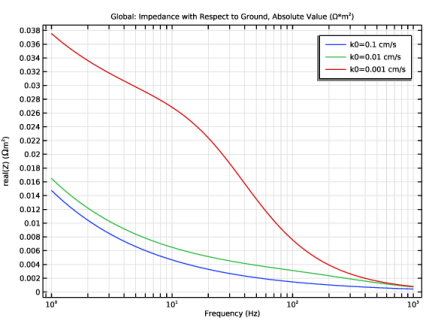
In the Settings window for 1D Plot Group, type Impedance with Respect to Ground, Absolute Value in the Label text field.
|
|
1
|
In the Model Builder window, expand the Impedance with Respect to Ground, Absolute Value node, then click Global 1.
|
|
2
|
|
Ω*m^2
|
|
4
|
|
1
|
In the Model Builder window, right-click Impedance with Respect to Ground, Absolute Value and choose Duplicate.
|
|
2
|
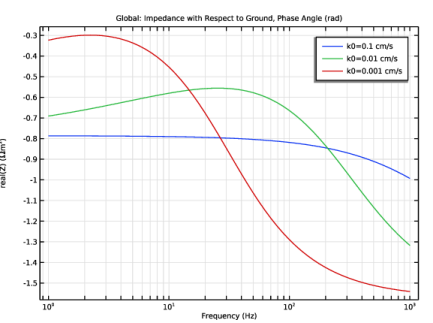
In the Settings window for 1D Plot Group, type Impedance with Respect to Ground, Phase Angle in the Label text field.
|
|
1
|
In the Model Builder window, expand the Impedance with Respect to Ground, Phase Angle node, then click Global 1.
|
|
2
|
|
4
|