|
|
|

|
•
|
|
•
|
|
•
|
|
•
|

 are the partial fugacities of species i in mixture for vapor, v, and liquid phase, l, respectively. The partial fugacity of species i can be defined as
 is the fugacity coefficients of species i in mixture, P is the total pressure, x is the mole fraction of species i in liquid phase, γ is the activity coefficient of species i, and f is the liquid fugacity of pure species at the equilibrium temperature and pressure which can be defined as
 is the partial molar volume of species and Psat is the species saturated vapor pressure. Inserting Equation 3 to Equation 2 gives




|
1
|
|
2
|
|
4
|
|
1
|
Go to the Select System window.
|
|
2
|
|
3
|
Click the Next button in the window toolbar.
|
|
1
|
Go to the Select Species window.
|
|
2
|
|
3
|
Click
 Add Selected. Add Selected. |
|
4
|
|
5
|
Click
 Add Selected. Add Selected. |
|
6
|
Click the Next button in the window toolbar.
|
|
1
|
Go to the Select Thermodynamic Model window.
|
|
2
|
From the list, choose UNIFAC VLE.
|
|
3
|
Click the Finish button in the window toolbar.
|
|
1
|
Go to the Select Species window.
|
|
2
|
In the list, select chloroform.
|
|
3
|
Click
 Add Selected. Add Selected. |
|
4
|
In the list, select methanol.
|
|
5
|
Click
 Add Selected. Add Selected. |
|
6
|
Click the Next button in the window toolbar.
|
|
1
|
Go to the Equilibrium Specifications window.
|
|
2
|
|
3
|
|
4
|
|
5
|
Click the Next button in the window toolbar.
|
|
1
|
Go to the Equilibrium Function Overview window.
|
|
2
|
Click the Finish button in the window toolbar.
|
|
1
|
|
2
|
|
1
|
|
2
|
Go to the Add Study window.
|
|
3
|
Find the Studies subsection. In the Select Study tree, select Preset Studies for Selected Physics Interfaces > Stationary.
|
|
4
|
Click the Add Study button in the window toolbar.
|
|
5
|
|
1
|
In the Model Builder window, under Study 1 - Dew Point and Boiling Point Curves click Step 1: Stationary.
|
|
2
|
|
3
|
Select the Auxiliary sweep checkbox.
|
|
4
|
|
5
|
Click
 Add. Add. |
|
7
|
|
1
|
|
2
|
|
3
|
|
4
|
Locate the Plot Settings section.
|
|
5
|
|
6
|
|
1
|
|
2
|
|
4
|
|
5
|
|
6
|
Click to expand the Coloring and Style section. Find the Line style subsection. From the Line list, choose Cycle.
|
|
7
|
|
8
|
|
1
|
|
2
|
|
3
|
|
4
|
|
5
|
|
6
|
|
7
|
|
1
|
|
2
|
|
3
|
Select the Manual axis limits checkbox.
|
|
4
|
|
5
|
|
6
|
|
1
|
|
2
|
|
1
|
|
2
|
|
1
|
|
2
|
Go to the Add Physics window.
|
|
3
|
|
4
|
Find the Physics interfaces in study subsection. In the table, clear the Solve checkbox for Study 1 - Dew Point and Boiling Point Curves.
|
|
5
|
Click the Add to Component 1 button in the window toolbar.
|
|
6
|
|
1
|
In the Model Builder window, expand the Component 1 (comp1) > Global ODEs and DAEs (ge) > Global Equations 1 (ODE1) node, then click Global Equations 1 (ODE1).
|
|
2
|
|
4
|
|
5
|
Click
 Select Source Term Quantity. Select Source Term Quantity. |
|
6
|
|
7
|
|
8
|
Click OK.
|
|
9
|
|
1
|
Go to the Select Properties window.
|
|
2
|
|
3
|
In the list, select Enthalpy (J/mol).
|
|
4
|
Click
 Add Selected. Add Selected. |
|
5
|
Click the Next button in the window toolbar.
|
|
1
|
Go to the Select Phase window.
|
|
2
|
Click the Next button in the window toolbar.
|
|
1
|
Go to the Select Species window.
|
|
2
|
Click
 Add All. Add All. |
|
3
|
Click the Next button in the window toolbar.
|
|
1
|
Go to the Mixture Property Overview window.
|
|
2
|
Click the Finish button in the window toolbar.
|
|
1
|
Go to the Select Properties window.
|
|
2
|
In the list, select Enthalpy (J/mol).
|
|
3
|
Click
 Add Selected. Add Selected. |
|
4
|
Click the Next button in the window toolbar.
|
|
1
|
Go to the Select Phase window.
|
|
2
|
From the list, choose Liquid.
|
|
3
|
Click the Next button in the window toolbar.
|
|
1
|
Go to the Select Species window.
|
|
2
|
Click
 Add All. Add All. |
|
3
|
Click the Next button in the window toolbar.
|
|
1
|
Go to the Mixture Property Overview window.
|
|
2
|
Click the Finish button in the window toolbar.
|
|
1
|
|
2
|
|
1
|
In the Model Builder window, under Component 1 (comp1) right-click Definitions and choose Variables.
|
|
2
|
|
1
|
|
2
|
Go to the Add Study window.
|
|
3
|
|
4
|
Right-click and choose Add Study.
|
|
5
|
|
1
|
|
2
|
Select the Auxiliary sweep checkbox.
|
|
3
|
Click
 Add. Add. |
|
6
|
Click
 Add. Add. |
|
8
|
|
9
|
|
10
|
|
11
|
|
12
|
|
13
|
|
1
|
|
2
|
|
3
|
Select the Only plot when requested checkbox.
|
|
1
|
|
2
|
|
3
|
|
1
|
|
2
|
|
3
|
|
4
|
|
5
|
Locate the y-Axis Data section. In the table, enter the following settings:
|
|
6
|
|
7
|
Locate the Coloring and Style section. Find the Line style subsection. From the Line list, choose Dashed.
|
|
8
|
|
9
|
|
10
|
Clear the Solution checkbox.
|
|
11
|
Clear the Description checkbox.
|
|
1
|
|
2
|
|
3
|
|
4
|
|
5
|
Locate the y-Axis Data section. In the table, enter the following settings:
|
|
6
|
|
7
|
Locate the Coloring and Style section. Find the Line style subsection. From the Line list, choose Dotted.
|
|
8
|
|
9
|
|
10
|
Clear the Solution checkbox.
|
|
11
|
Clear the Description checkbox.
|
|
1
|
|
2
|
|
3
|
|
4
|
Select the y-axis label checkbox. In the associated text field, type Enthalpy / kJ \cdot mol<sup>-1</sup>.
|
|
1
|
|
2
|
|
3
|
|
4
|
Locate the y-Axis Data section. In the table, enter the following settings:
|
|
5
|
|
6
|
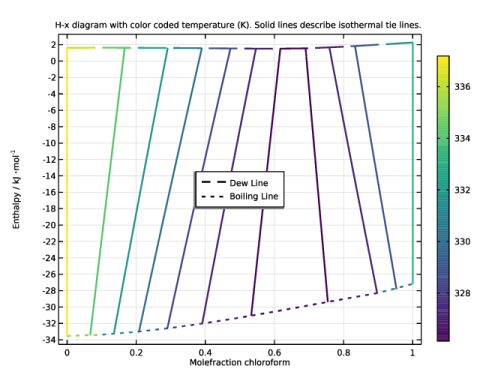
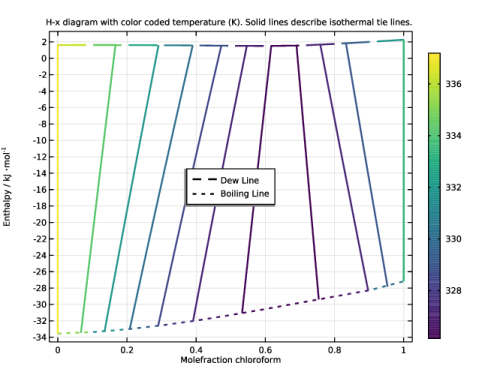
In the Title text area, type H-x diagram with color coded temperature (K). Solid lines describe isothermal tie lines..
|
|
7
|
|
8
|
|
9
|
|
10
|
|
1
|
|
2
|
|
3
|
|
4
|
|
5
|
Clear the Color legend checkbox.
|
|
6
|
|
1
|
|
2
|
|
3
|
|
1
|
|
2
|
|
3
|
|
4
|
Click to expand the Title section. Locate the Coloring and Style section. Select the Color legend checkbox.
|
|
5
|
 represents an ideal system with Raoult’s law.