
|
|
|

























|
1
|
|
2
|
|
3
|
Click Add.
|
|
4
|
|
5
|
Click Add.
|
|
6
|
In the Concentrations (mol/m³) table, enter the following settings:
|
|
7
|
Click Add.
|
|
8
|
In the Concentrations (mol/m³) table, enter the following settings:
|
|
9
|
Click Add.
|
|
10
|
In the Concentrations (mol/m³) table, enter the following settings:
|
|
11
|
In the Select Physics tree, select Fluid Flow > Porous Media and Subsurface Flow > Darcy’s Law (dl).
|
|
12
|
Click Add.
|
|
13
|
|
14
|
Click Add.
|
|
15
|
|
16
|
|
17
|
Click Add.
|
|
18
|
|
19
|
Click Add.
|
|
20
|
|
21
|
Click Add.
|
|
22
|
|
23
|
|
24
|
Click Add.
|
|
25
|
|
26
|
In the Dependent variables (1) table, enter the following settings:
|
|
27
|
Click
 Select Dependent Variable Quantity. Select Dependent Variable Quantity. |
|
28
|
|
29
|
|
30
|
Click OK.
|
|
31
|
|
32
|
|
33
|
|
34
|
Click OK.
|
|
35
|
|
36
|
|
37
|
Click
 Done. Done. |
|
1
|
|
2
|
|
3
|
Click
 Load from File. Load from File. |
|
4
|
Browse to the model’s Application Libraries folder and double-click the file diesel_particulate_filter_parameters.txt.
|
|
1
|
In the Model Builder window, under Component 1 (comp1) right-click Definitions and choose Variables.
|
|
2
|
|
3
|
Click
 Load from File. Load from File. |
|
4
|
Browse to the model’s Application Libraries folder and double-click the file diesel_particulate_filter_variables.txt.
|
|
1
|
|
2
|
|
3
|
|
1
|
|
2
|
|
3
|
Find the In-plane visualization of 3D geometry subsection. Clear the Coincident entities (blue) checkbox.
|
|
4
|
Clear the Intersection (green) checkbox.
|
|
1
|
|
2
|
|
3
|
|
4
|
|
5
|
|
1
|
|
2
|
|
4
|
Click
 Build All Objects. Build All Objects. |
|
5
|
|
1
|
|
2
|
|
3
|
|
1
|
|
2
|
|
3
|
|
4
|
Click Apply.
|
|
5
|
|
6
|
|
7
|
Locate the Reaction Orders section. Find the Volumetric overall reaction order subsection. In the Forward text field, type 1.
|
|
8
|
|
9
|
|
10
|
|
11
|
|
12
|
Locate the Reaction Thermodynamic Properties section. From the Enthalpy of reaction list, choose User defined.
|
|
13
|
|
1
|
|
2
|
|
3
|
Select the Keep concentration/activity constant checkbox.
|
|
4
|
|
5
|
|
6
|
Find the Bulk species subsection. From the Species solved for list, choose Transport of Diluted Species.
|
|
8
|
Find the Surface species subsection. In the table, enter the following settings:
|
|
9
|
|
10
|
In the Show More Options dialog, in the tree, select the checkbox for the node Physics > Advanced Physics Options.
|
|
11
|
Click OK.
|
|
1
|
|
2
|
In the Settings window for Transport of Diluted Species, click to expand the Advanced Settings section.
|
|
3
|
|
1
|
In the Model Builder window, under Component 1 (comp1) > Transport of Diluted Species (tds) click Fluid 1.
|
|
2
|
|
3
|
Specify the u vector as
|
|
4
|
|
5
|
|
1
|
|
3
|
|
4
|
|
1
|
|
3
|
|
4
|
|
1
|
|
2
|
In the Settings window for Transport of Diluted Species, click to expand the Advanced Settings section.
|
|
3
|
|
1
|
In the Model Builder window, under Component 1 (comp1) > Transport of Diluted Species 2 (tds2) click Fluid 1.
|
|
2
|
|
3
|
Specify the u vector as
|
|
4
|
|
5
|
|
1
|
|
2
|
|
3
|
|
1
|
|
3
|
|
4
|
|
1
|
|
3
|
|
4
|
Select the Species c2_C checkbox.
|
|
5
|
|
1
|
|
2
|
In the Settings window for Transport of Diluted Species, click to expand the Advanced Settings section.
|
|
3
|
|
1
|
In the Model Builder window, under Component 1 (comp1) > Transport of Diluted Species 3 (tds3) click Fluid 1.
|
|
2
|
|
3
|
Specify the u vector as
|
|
4
|
|
5
|
|
1
|
|
3
|
|
4
|
|
1
|
|
1
|
In the Model Builder window, under Component 1 (comp1) > Darcy’s Law (dl) > Porous Medium 1 click Fluid 1.
|
|
2
|
|
3
|
|
4
|
|
1
|
|
2
|
|
3
|
|
4
|
|
1
|
|
2
|
|
3
|
|
4
|
|
1
|
|
3
|
|
4
|
|
1
|
In the Model Builder window, under Component 1 (comp1) > Darcy’s Law 2 (dl2) > Porous Medium 1 click Fluid 1.
|
|
2
|
|
3
|
|
4
|
|
1
|
|
2
|
|
3
|
|
4
|
|
1
|
|
3
|
|
4
|
|
1
|
|
3
|
|
4
|
|
1
|
In the Model Builder window, under Component 1 (comp1) > Heat Transfer in Fluids (ht) click Fluid 1.
|
|
2
|
|
3
|
Specify the u vector as
|
|
4
|
Locate the Heat Conduction, Fluid section. From the k list, choose User defined. From the list, choose Diagonal.
|
|
5
|
Specify the k matrix as
|
|
6
|
|
7
|
|
8
|
|
9
|
|
1
|
|
2
|
|
3
|
|
1
|
|
3
|
|
4
|
|
1
|
|
3
|
|
4
|
|
1
|
In the Model Builder window, under Component 1 (comp1) > Heat Transfer in Fluids 2 (ht2) click Fluid 1.
|
|
2
|
|
3
|
|
4
|
Specify the k matrix as
|
|
5
|
|
6
|
|
7
|
|
8
|
|
1
|
|
2
|
|
3
|
|
1
|
|
3
|
|
4
|
|
1
|
|
3
|
|
4
|
|
1
|
|
3
|
|
4
|
|
1
|
|
3
|
|
4
|
|
1
|
In the Model Builder window, under Component 1 (comp1) > Heat Transfer in Fluids 3 (ht3) click Fluid 1.
|
|
2
|
|
3
|
Specify the u vector as
|
|
4
|
Locate the Heat Conduction, Fluid section. From the k list, choose User defined. From the list, choose Diagonal.
|
|
5
|
Specify the k matrix as
|
|
6
|
|
7
|
|
8
|
|
9
|
|
1
|
|
2
|
|
3
|
|
1
|
|
3
|
|
4
|
|
1
|
|
1
|
In the Model Builder window, under Component 1 (comp1) > General Form PDE (g) click General Form PDE 1.
|
|
2
|
|
3
|
Specify the Γ vector as
|
|
4
|
|
1
|
|
2
|
|
3
|
|
1
|
|
1
|
|
2
|
|
3
|
|
1
|
|
2
|
|
3
|
|
1
|
|
3
|
|
4
|
|
5
|
|
1
|
|
2
|
|
3
|
|
4
|
|
5
|
|
6
|
Select the Symmetric distribution checkbox.
|
|
7
|
Select the Reverse direction checkbox.
|
|
8
|
Click
 Build All. Build All. |
|
9
|
|
1
|
|
2
|
|
3
|
In the Solve for column of the table, under Component 1 (comp1), clear the checkbox for General Form PDE (g).
|
|
1
|
|
2
|
|
3
|
|
1
|
|
2
|
|
3
|
Click
 Add. Add. |
|
1
|
|
2
|
|
3
|
In the Model Builder window, expand the Study 1 > Solver Configurations > Solution 1 (sol1) > Stationary Solver 1 node, then click Direct.
|
|
4
|
|
5
|
|
6
|
In the Model Builder window, expand the Study 1 > Solver Configurations > Solution 1 (sol1) > Stationary Solver 1 > Segregated 1 node.
|
|
1
|
In the Model Builder window, under Study 1 > Solver Configurations > Solution 1 (sol1) > Stationary Solver 1 > Segregated 1, Ctrl-click to select Temperature, Temperature (2), Temperature (3), and Concentration C1_O2.
|
|
2
|
Right-click and choose Delete.
|
|
1
|
|
2
|
In the Model Builder window, under Study 1 > Solver Configurations > Solution 1 (sol1) > Stationary Solver 1 > Segregated 1 click Concentration C3_O2.
|
|
3
|
|
4
|
|
5
|
|
6
|
|
7
|
|
8
|
Click OK.
|
|
9
|
|
10
|
|
11
|
|
12
|
|
13
|
|
14
|
In the Add dialog, in the Variables list, choose Temperature (comp1.T1), Temperature (comp1.T2), and Temperature (comp1.Tm).
|
|
15
|
Click OK.
|
|
16
|
|
17
|
|
18
|
|
19
|
|
20
|
|
21
|
|
22
|
|
23
|
In the Add dialog, in the Variables list, choose Concentration (comp1.c1_O2) and Concentration (comp1.c3_O2).
|
|
24
|
Click OK.
|
|
25
|
|
26
|
|
27
|
|
28
|
|
29
|
|
30
|
|
31
|
|
32
|
|
33
|
|
34
|
Click OK.
|
|
35
|
|
36
|
|
37
|
|
38
|
|
39
|
|
40
|
|
41
|
In the Model Builder window, expand the Study 1 > Solver Configurations > Solution 1 (sol1) > Time-Dependent Solver 1 node, then click Direct.
|
|
42
|
|
43
|
|
44
|
In the Model Builder window, expand the Study 1 > Solver Configurations > Solution 1 (sol1) > Time-Dependent Solver 1 > Segregated 1 node.
|
|
1
|
In the Model Builder window, under Study 1 > Solver Configurations > Solution 1 (sol1) > Time-Dependent Solver 1 > Segregated 1, Ctrl-click to select Temperature, Temperature (2), Temperature (3), and Concentration C1_O2.
|
|
2
|
Right-click and choose Delete.
|
|
1
|
|
2
|
In the Model Builder window, under Study 1 > Solver Configurations > Solution 1 (sol1) > Time-Dependent Solver 1 > Segregated 1 click Concentration C3_O2.
|
|
3
|
|
4
|
|
5
|
|
6
|
|
7
|
|
8
|
Click OK.
|
|
9
|
|
10
|
|
11
|
|
12
|
|
13
|
|
14
|
In the Add dialog, in the Variables list, choose Temperature (comp1.T1), Temperature (comp1.T2), and Temperature (comp1.Tm).
|
|
15
|
Click OK.
|
|
16
|
|
17
|
|
18
|
|
19
|
|
20
|
|
21
|
|
22
|
|
23
|
In the Add dialog, in the Variables list, choose Concentration (comp1.c1_O2) and Concentration (comp1.c3_O2).
|
|
24
|
Click OK.
|
|
25
|
|
26
|
|
27
|
|
28
|
|
29
|
|
30
|
|
31
|
|
32
|
|
33
|
|
34
|
Click OK.
|
|
35
|
|
36
|
|
37
|
|
38
|
|
39
|
|
40
|
|
41
|
|
42
|
|
43
|
Clear the Generate default plots checkbox.
|
|
44
|
|
1
|
|
2
|
|
3
|
|
4
|
|
5
|
|
1
|
|
2
|
|
3
|
|
4
|
|
5
|
|
1
|
|
2
|
|
3
|
|
4
|
|
5
|
|
1
|
|
2
|
|
3
|
|
4
|
|
1
|
|
2
|
|
1
|
|
2
|
|
1
|
|
2
|
|
1
|
|
2
|
In the Settings window for Slice, click Replace Expression in the upper-right corner of the Expression section. From the menu, choose Component 1 (comp1) > Transport of Diluted Species 2 > Species c2_C > c2_C - Molar concentration, c2_C - mol/m³.
|
|
3
|
|
1
|
|
2
|
|
1
|
|
2
|
|
3
|
|
4
|
|
1
|
|
2
|
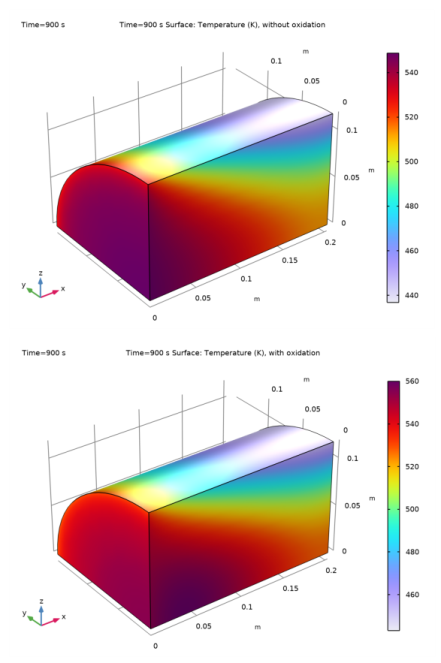
In the Settings window for 3D Plot Group, type Temperature, Tm, no oxidation in the Label text field.
|
|
3
|
|
4
|
|
5
|
|
6
|
|
1
|
|
2
|
|
3
|
|
4
|
|
5
|
|
1
|
|
2
|
In the Settings window for 3D Plot Group, type Temperature, Tm, with oxidation in the Label text field.
|
|
3
|
|
4
|
|
1
|
|
2
|
|
3
|
|
4
|
|
5
|
|
1
|
|
2
|
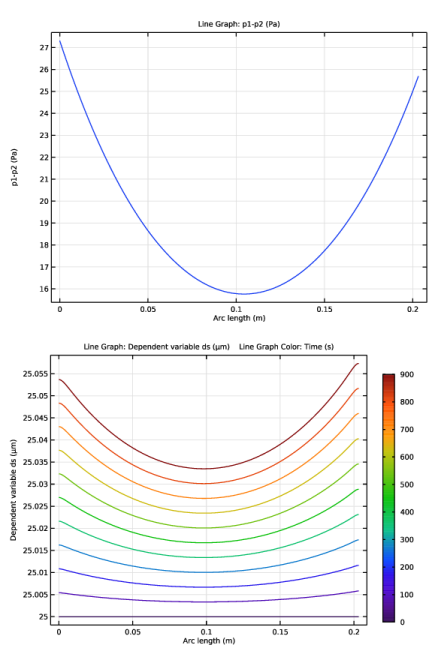
In the Settings window for 1D Plot Group, type Pressure difference along the centerline, without oxidation reaction in the Label text field.
|
|
3
|
|
4
|
|
5
|
|
6
|
|
7
|
|
1
|
Right-click Pressure difference along the centerline, without oxidation reaction and choose Line Graph.
|
|
3
|
|
4
|
|
5
|
|
6
|
|
1
|
In the Model Builder window, right-click Pressure difference along the centerline, without oxidation reaction and choose Duplicate.
|
|
2
|
In the Settings window for 1D Plot Group, type Soot layer thickness along the centerline, without oxidation reaction in the Label text field.
|
|
3
|
|
1
|
In the Model Builder window, expand the Soot layer thickness along the centerline, without oxidation reaction node, then click Line Graph 1.
|
|
2
|
|
3
|
|
4
|
|
1
|
|
2
|
|
3
|
|
4
|
|
5
|
|
6
|
|
7
|
|
8
|
|
1
|
|
2
|
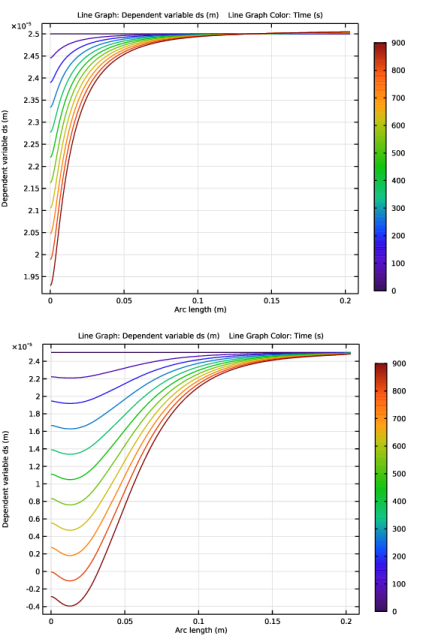
In the Settings window for 1D Plot Group, type Soot layer ds, along the top line in the Label text field.
|
|
1
|
|
3
|
|
4
|
|
1
|
|
2
|
|
3
|
|
1
|
|
2
|
In the Settings window for 1D Plot Group, type Soot layer ds, along the centerline in the Label text field.
|
|
1
|
In the Model Builder window, expand the Soot layer ds, along the centerline node, then click Line Graph 1.
|
|
2
|
|
3
|
Click to select the
 Activate Selection toggle button. Activate Selection toggle button. |
|
4
|
|
6
|
|
1
|
|
2
|
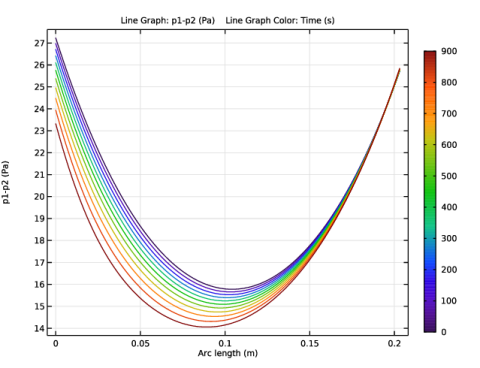
In the Settings window for 1D Plot Group, type Pressure difference p1-p2, along the centerline 1 in the Label text field.
|
|
1
|
In the Model Builder window, expand the Pressure difference p1-p2, along the centerline 1 node, then click Line Graph 1.
|
|
2
|
|
3
|
|
4
|


