mphnavigator
Graphical user interface (GUI) for viewing the COMSOL Multiphysics model object.
Syntax
mphnavigator
mphnavigator(model)
Description
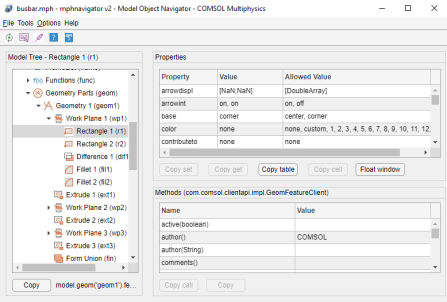
mphnavigator opens the Model Object Navigator which is a graphical user interface that can be used to navigate the model object and to view the properties and methods of the nodes in the model tree.
The GUI requires that the COMSOL object is stored in a variable in the base workspace (at the MATLAB® command prompt) with the name model.
mphnavigator(model) opens the model object defined with the name model in Model Object Navigator window.
The model can either be saved as a files or in Model Manager.
Example
Load busbar.mph from the Model Library:
mphopen busbar
Navigate the model object that is accessible with the variable model
mphnavigator
open the model COMSOL_Multiphysics/Diffusion/effective_diffusivity from the COMSOL Multiphysics Application Library and set the model object with the variable eff_diff:
eff_diff = mphopen('effective_diffusivity');
Navigate the model object that is accessible with the variable eff_diff
mphnavigator(eff_diff)
See also
mphgetexpressions, mphgetproperties, mphgetselection, mphmodel, mphsearch, mphshowerrors