One-Point Map
Use the One-Point Map () attribute to specify the orientation of the source mesh on the destination for a Copy, Copy Face, Copy Domain, or an Identical Mesh node. Using this node, the source mesh of the copy operation is transformed so that the source point of the One-Point Map node is mapped onto the destination point with the specified orientation, as shown in Figure 8-87.
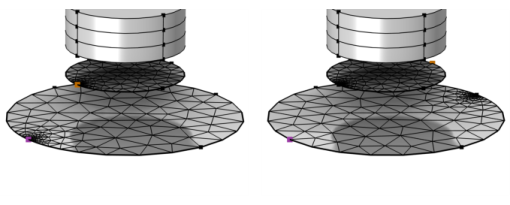
Figure 8-87: Specifying two different selections for a One-Point Map node when copying the mesh from the smaller circle (yellow source point) to the larger circle (magenta destination point).
To add One-Point Map node, choose one of the following:
•
•
When a Copy Face, Copy Domain, or Identical Mesh node is selected in the Model Builder tree, click More Attributes () in the Mesh toolbar and select One-Point Map ().
Then enter the properties using the following sections:
Point Selection
Click the Active button to toggle between turning ON and OFF selections.
•
Activate the Point on source list and select the point that you want to define as source point in the Graphics window.
•
Activate the Point on destination list and select the point that you want to define as destination point in the Graphics window.
•
•
•