Defining a Parametric Sweep
This example shows how to automate the setup of a Parametric Sweep by specifying the sweep parameters and their values programmatically.
Assume that we start from a file output.txt on the COMSOL Spreadsheet format which corresponds to the output of a design of experiments (DoE) study, as shown in the figure below.
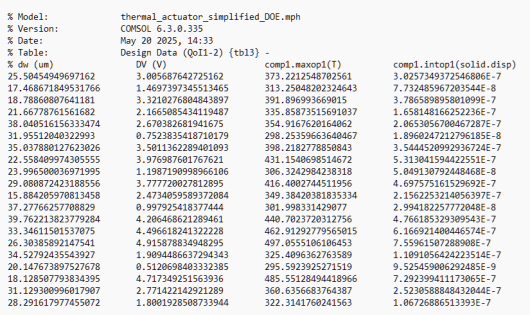
The first two columns are the input parameters and values to this study and the last two columns are the output. Let’s say that we now would like to create a parametric sweep based on the two input columns. How do we bring this data into a Parametric Sweep?
There are several ways of doing this and below are two examples.
The first example reads parameter values for the parameters dw and DV from a text file. It converts each column into a space-separated string and then configures a parametric sweep for the Sweep type option Specified combinations. It uses the built-in readStringMatrixFromFile method and the inserts the contents into the parametric sweep node in the current study by setting the properties plistarr, pname, and punit accordingly. In this case the file output.txt is stored in the model, under Libraries > Files, and is accessed using the file scheme syntax embedded:///output.txt.
String[][] p = readStringMatrixFromFile("embedded:///output.txt");
String[] pardwArray = getColumn(p, 0);
String[] parVArray = getColumn(p, 1);
String pardw = String.join(" ", pardwArray);
String parV = String.join(" ", parVArray);
model.study("std1").feature("param").set("plistarr", new String[]{pardw, parV});
model.study("std1").feature("param").set("pname", new String[]{"dw", "DV"});
model.study("std1").feature("param").set("punit", new String[]{"um", "V"});
The corresponding file is available for download (see below).
The second example reads the parameter values for the parameters dw and DV from the same text file and formats them into the parametric sweep file format readable from the user interface. Each row is constructed as:
<param_name> "val1 val2 ..." [unit]
The resulting two-line table is written to a file that can be loaded as a sweep definition from the Parametric Sweep table.
double[][] p = readMatrixFromFile("embedded:///output.txt");
double[] pardw = getColumn(p, 0);
double[] parV = getColumn(p, 1);
 
int len = pardw.length+2; // +2 for parameter name and unit string, respectively
String[][] parSweep = new String[2][len];
parSweep[0][0] = "dw \"";
parSweep[1][0] = "DV \"";
for (int k = 1; k < len-1; k++) {
parSweep[0][k] = toString(pardw[k-1],4);
parSweep[1][k] = toString(parV[k-1],4);
}
parSweep[0][len-1] = "\" [um]";
parSweep[1][len-1] = "\" [V]";
 
String[][] fileContents = new String[2][1];
fileContents[0][0] = ""; // Not null
fileContents[1][0] = "";
 
for (int k = 0; k < len; k++) {
fileContents[0][0] = fileContents[0][0]+" "+parSweep[0][k];
fileContents[1][0] = fileContents[1][0]+" "+parSweep[1][k];
}
 
writeFile("temp:///parfile.txt", fileContents);
fileSaveAs("temp:///parfile.txt");
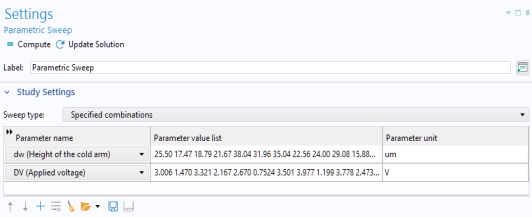
The figure below shows the results of importing the parametric sweep file.
Note: the syntax
String out = toString(double value, int digits)
is used to format the numeric value in a string to a specified number of significant digits.
This example is part of a collection available for download:
https://www.comsol.com/model/application-programming-guide-examples-140771
The relevant file for this example is: