You are viewing the documentation for an older COMSOL version. The latest version is available here.
PDF

Thermo-Mechanical Analysis of a Surface-Mounted Resistor
Introduction
The drive for miniaturizing electronic devices has resulted in today’s extensive use of surface-mount electronic components. An important aspect in electronics design and the choice of materials is a product’s durability and lifetime. For surface-mount resistors and other components producing heat it is a well-known problem that temperature cycling can lead to cracks propagating through the solder joints, resulting in premature failure (Ref. 1). For electronics in general there is a strong interest in changing the soldering material from lead- or tin-based solder alloys to other mixtures.
The following multiphysics example models the heat transport and structural stresses and deformations resulting from the temperature distribution using the Heat Transfer in Solids and Solid Mechanics interfaces.
Note: This application requires either the Structural Mechanics Module or the MEMS Module.
Model Definition
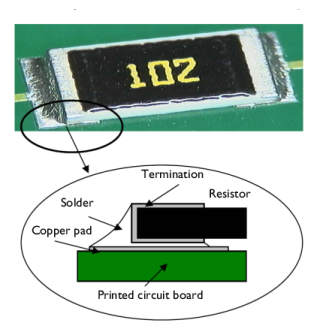
Figure 1 shows a photograph of a surface-mount resistor together with a diagram of it on a printed circuit board (PCB).
Figure 1: A photo and diagram of a typical surface-mounted resistor soldered to a PCB.
Table 1 shows the dimensions of the resistor and other key components in the model including the PCB.
35 μm
25 μm
105 μm
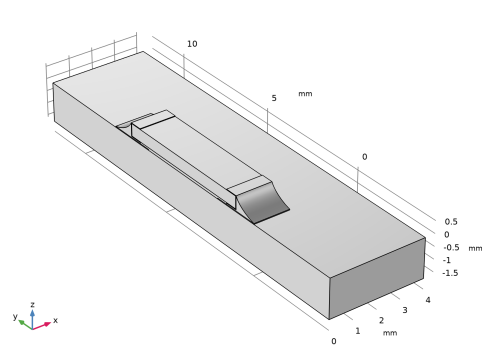
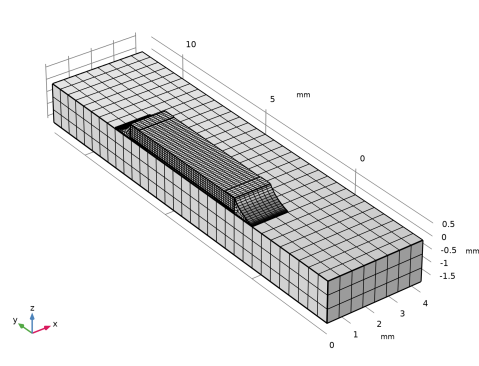
The simulation makes use of the symmetry so that it needs to include only half of the component (Figure 2). The modeling of the PCB is terminated a distance away from the resistor, in order to reduce effects of the boundary conditions.
Figure 2: The simulation models only one half of the resistor.
In operation, the resistor dissipates 0.2 W of power as heat. Conduction to the PCB and convection to the surrounding air provide cooling. In this model, the heat transfer occurs through conduction in the subdomains. The model simplifies the surface cooling and describes it using a heat transfer coefficient, h, in this case set to 10 W/(m2·K); the surrounding air temperature, Tinf, is at 300 K. The resulting heat transfer equation and boundary condition (included in the model using the Heat Transfer interface) are
where k is the thermal conductivity, and Q is the heating power per unit volume of the resistor (equal to 22.2 MW/m3 corresponding to 0.2 W in total).
The model handles thermal expansion using a static structural analysis using the Structural Mechanics interface (a description of the corresponding equations is available in the Structural Mechanics Module User’s Guide). The thermal and mechanical material properties in this model are taken from the material library. The data for the solid materials are temperature independent, and the reference values are shown in the table below.
E (GPa)
ν
α (ppm)
k (W/(m·K))
ρ (kg/m3)
Cp (J/(kg·K))
Air has temperature-dependent and pressure-dependent properties in the built-in material library. Because the temperature is a variable of the problem, it is automatically used. The pressure is by default set to 1 atm.
The stresses are zero at room temperature, 293 K. The boundary condition for the Solid Mechanics interface is that the cuts in the PCB do not rotate and have no net force normal to the cut.
Results and Discussion
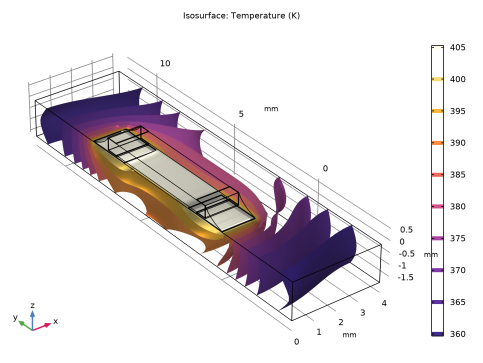
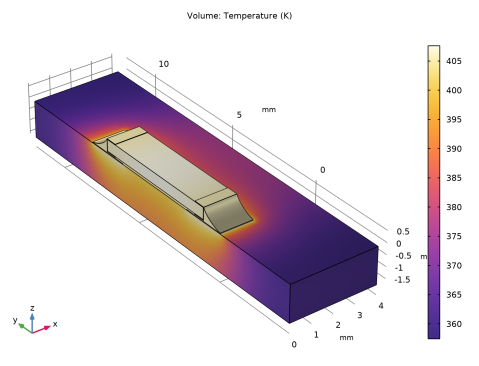
The isosurfaces in Figure 3 show the temperature distribution at steady state. The highest temperature occurs in the center of the resistor. The circuit board also heats up significantly.
Figure 3: Temperature distribution in the resistor and the circuit board at steady state.
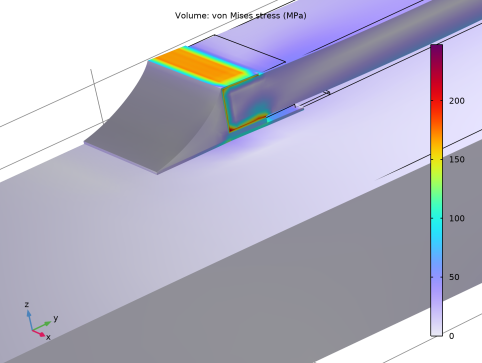
Thermal stresses appear as a result of the temperature increase; they arise from the materials’ different expansion coefficients and from the bending of the PCB. Figure 4 plots the equivalent stress (von Mises) together with the resulting deformation of the assembly.
Figure 4: The thermally induced distribution of von Mises stress together with the deformation (magnified).
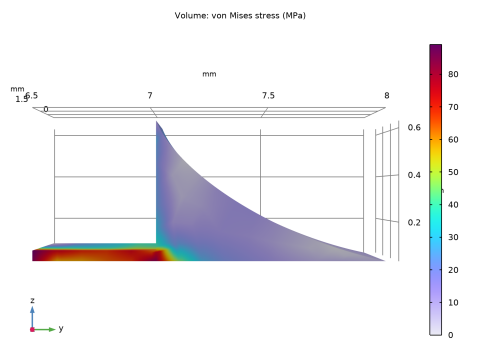
The highest stress seem to occur in the termination material. It is interesting to compare the equivalent stress to the yield stress and thereby investigate whether or not the material is irreversibly deformed. In that case the solder is the weak point. Figure 5 shows the stress in the solder alone. The yield stress for solder is approximately 220 MPa. The highest stress in the solder is about 40 percent of this value. The structure does not get permanently deformed directly when heated. However, it is possible that the solder displays creep strains over time because of the combination of fairly high stress levels and elevated temperatures.
Figure 5: Close-up of the von Mises stress in the solder joints.
Notes About the COMSOL Implementation
In this example, the Thermal Stress interface automatically adds and couples the Solid Mechanics interface and the Heat Transfer interface. This is done by the predefined multiphysics coupling Thermal Expansion.
Build the geometry as an assembly of the bottom plate and the resistor to make it possible to mesh the parts independently. Use continuity conditions for the temperature and the displacements to connect the top and bottom parts of the geometry.
It is assumed that the temperature gradient in the normal direction on the cuts in the PCB is zero. The mechanical boundary conditions on the cuts must not impose a general state of compressive stress due to thermal expansion. At the same time, the restraint from the part of the PCB that is not modeled means that there is no rotation of the cross section. To obtain this effect, the entire cut must have the same (but unknown) displacement in the direction normal to the cut. This can be achieved by using a special setting in the Symmetry condition which allows a translation normal to the symmetry plane.
The heat transfer problem is nonlinear because the air has temperature-dependent properties, and is independent on the displacements. The structural problem, on the other hand, is linear but depends on the temperature. You can therefore solve the problem sequentially. Here this is done in a single study step by using a modified Segregated solver.
References
1. H. Lu, C. Bailey, M. Dusek, C. Hunt, and J. Nottay, “Modeling the Fatigue Life of Solder Joints of Surface Mount Resistors,” EMAP, 2000.
2. J.M. Coulson and J.F. Richardson, Chemical Engineering, vol. 1, Pergamon Press, appendix, 1990.
Application Library path: Heat_Transfer_Module/Thermal_Stress/surface_resistor
Modeling Instructions
From the File menu, choose New.
New
In the New window, click  Model Wizard.
Model Wizard
1
In the Model Wizard window, click  3D.
2
In the Select Physics tree, select Structural Mechanics>ThermalStructure Interaction>Thermal Stress, Solid.
3
Click Add.
4
Click  Study.
5
In the Select Study tree, select General Studies>Stationary.
6
Global Definitions
Parameters 1
1
In the Model Builder window, under Global Definitions click Parameters 1.
2
In the Settings window for Parameters, locate the Parameters section.
3
Geometry 1
1
In the Model Builder window, under Component 1 (comp1) click Geometry 1.
2
In the Settings window for Geometry, locate the Units section.
3
From the Length unit list, choose mm.
First, draw the cross section of the resistor in a 2D work plane.
Work Plane 1 (wp1)
1
In the Geometry toolbar, click  Work Plane.
2
In the Settings window for Work Plane, locate the Plane Definition section.
3
From the Plane list, choose yz-plane.
4
Locate the Unite Objects section. Clear the Unite objects check box.
5
Click  Go to Plane Geometry.
Work Plane 1 (wp1)>Rectangle 1 (r1)
1
In the Work Plane toolbar, click  Rectangle.
2
In the Settings window for Rectangle, locate the Size and Shape section.
3
In the Width text field, type 2.
4
In the Height text field, type 0.035.
5
Click  Build Selected.
6
Click the  Zoom Extents button in the Graphics toolbar.
Work Plane 1 (wp1)>Quadratic Bézier 1 (qb1)
1
In the Work Plane toolbar, click  More Primitives and choose Quadratic Bézier.
2
In the Settings window for Quadratic Bézier, locate the Control Points section.
3
In row 1, set xw to 0.975.
4
In row 1, set yw to 0.63.
5
In row 2, set xw to 0.8.
6
In row 2, set yw to 0.2.
7
In row 3, set yw to 0.035.
Work Plane 1 (wp1)>Polygon 1 (pol1)
1
In the Work Plane toolbar, click  Polygon.
2
In the Settings window for Polygon, locate the Object Type section.
3
From the Type list, choose Open curve.
4
Locate the Coordinates section. From the Data source list, choose Vectors.
5
In the xw text field, type 0 1.5 1.5 1.5 1.5 0.975 0.975 0.975.
6
In the yw text field, type 0.035 0.035 0.035 0.08 0.08 0.08 0.08 0.63.
Work Plane 1 (wp1)>Convert to Solid 1 (csol1)
1
In the Work Plane toolbar, click  Conversions and choose Convert to Solid.
2
Select the objects pol1 and qb1 only.
3
In the Work Plane toolbar, click  Build All.
Work Plane 1 (wp1)>Rectangle 2 (r2)
1
In the Work Plane toolbar, click  Rectangle.
2
In the Settings window for Rectangle, locate the Size and Shape section.
3
In the Width text field, type 0.525.
4
In the Height text field, type 0.55.
5
Locate the Position section. In the xw text field, type 0.975.
6
In the yw text field, type 0.08.
Work Plane 1 (wp1)>Rectangle 3 (r3)
1
In the Work Plane toolbar, click  Rectangle.
2
In the Settings window for Rectangle, locate the Size and Shape section.
3
In the Width text field, type 0.52.
4
In the Height text field, type 0.5.
5
Locate the Position section. In the xw text field, type 1.
6
In the yw text field, type 0.105.
7
In the Work Plane toolbar, click  Build All.
8
Click the  Zoom Extents button in the Graphics toolbar.
Work Plane 1 (wp1)>Difference 1 (dif1)
1
In the Work Plane toolbar, click  Booleans and Partitions and choose Difference.
2
Select the objects csol1, r1, and r2 only.
3
In the Settings window for Difference, locate the Difference section.
4
Click to select the  Activate Selection toggle button for Objects to subtract.
5
6
Click  Build Selected.
Work Plane 1 (wp1)>Mirror 1 (mir1)
1
In the Work Plane toolbar, click  Transforms and choose Mirror.
2
3
In the Settings window for Mirror, locate the Input section.
4
Select the Keep input objects check box.
5
Locate the Point on Line of Reflection section. In the xw text field, type 4.
6
Click  Build Selected.
7
Click the  Zoom Extents button in the Graphics toolbar.
Work Plane 1 (wp1)>Rectangle 4 (r4)
1
In the Work Plane toolbar, click  Rectangle.
2
In the Settings window for Rectangle, locate the Size and Shape section.
3
In the Width text field, type 6.
4
In the Height text field, type 0.5.
5
Locate the Position section. In the xw text field, type 1.
6
In the yw text field, type 0.105.
7
In the Work Plane toolbar, click  Build All.
Work Plane 1 (wp1)>Line Segment 1 (ls1)
1
In the Work Plane toolbar, click  More Primitives and choose Line Segment.
2
On the object dif1, select Point 12 only.
3
In the Settings window for Line Segment, locate the Endpoint section.
4
Click to select the  Activate Selection toggle button for End vertex.
5
On the object mir1, select Point 12 only.
6
In the Work Plane toolbar, click  Build All.
Work Plane 1 (wp1)>Convert to Solid 2 (csol2)
1
In the Work Plane toolbar, click  Conversions and choose Convert to Solid.
2
Click in the Graphics window and then press Ctrl+A to select all objects.
3
In the Settings window for Convert to Solid, click  Build Selected.
Work Plane 1 (wp1)>Union 1 (uni1)
1
In the Work Plane toolbar, click  Booleans and Partitions and choose Union.
2
Work Plane 1 (wp1)>Plane Geometry
Partition domains to facilitate a higher quality mesh.
Work Plane 1 (wp1)>Partition Domains 1 (pard1)
1
In the Work Plane toolbar, click  Booleans and Partitions and choose Partition Domains.
2
On the object uni1, select Domains 2, 5, and 7 only.
3
In the Settings window for Partition Domains, locate the Partition Domains section.
4
From the Partition with list, choose Extended edges.
5
On the object uni1, select Boundaries 4, 11, and 30 only.
6
Click  Build Selected.
Work Plane 1 (wp1)>Plane Geometry
Partition domains to facilitate a higher quality mesh.
Work Plane 1 (wp1)>Partition Domains 2 (pard2)
1
In the Work Plane toolbar, click  Booleans and Partitions and choose Partition Domains.
2
On the object pard1, select Domains 4 and 10 only.
3
In the Settings window for Partition Domains, locate the Partition Domains section.
4
From the Partition with list, choose Lines through vertices.
5
On the object pard1, select Points 4–7, 22, 23, 25, and 26 only.
6
Click  Build Selected.
Work Plane 1 (wp1)>Plane Geometry
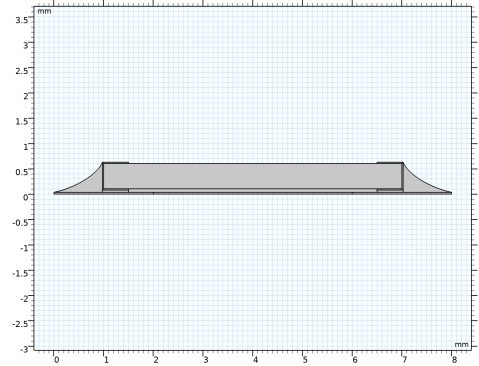
The 2D geometry should now look as in the figure below.
1
In the Model Builder window, click Plane Geometry.
Extrude 1 (ext1)
1
In the Model Builder window, under Component 1 (comp1)>Geometry 1 right-click Work Plane 1 (wp1) and choose Extrude.
2
3
In the Settings window for Extrude, locate the Distances section.
4
5
Click  Build All Objects.
Block 1 (blk1)
1
In the Geometry toolbar, click  Block.
2
In the Settings window for Block, locate the Size and Shape section.
3
In the Width text field, type 4.
4
In the Depth text field, type 16.
5
In the Height text field, type 1.6.
6
Locate the Position section. In the y text field, type -4.
7
In the z text field, type -1.6.
8
Click  Build All Objects.
9
Click the  Zoom Extents button in the Graphics toolbar.
Now, create an imprint of the resistor’s bottom boundary on the printed circuit board to make a pair with matching parts.
Form Union (fin)
1
In the Model Builder window, under Component 1 (comp1)>Geometry 1 click Form Union (fin).
2
In the Settings window for Form Union/Assembly, locate the Form Union/Assembly section.
3
From the Action list, choose Form an assembly.
4
Select the Create imprints check box.
Simply the geometry by adding mesh control faces.
Mesh Control Faces 1 (mcf1)
1
In the Geometry toolbar, click  Virtual Operations and choose Mesh Control Faces.
2
On the object fin, select Boundaries 17, 22, 25, 41, 59, 60, and 62 only.
3
In the Geometry toolbar, click  Build All.
The completed geometry is shown in Figure 2.
Add Material
1
In the Home toolbar, click  Add Material to open the Add Material window.
2
Go to the Add Material window.
3
In the tree, select Built-in>FR4 (Circuit Board).
4
Click Add to Component in the window toolbar.
5
In the tree, select Built-in>Alumina.
6
Click Add to Component in the window toolbar.
7
In the tree, select Built-in>Copper.
8
Click Add to Component in the window toolbar.
9
In the tree, select Material Library>Elements>Silver>Silver [solid]>Silver [solid,annealed].
10
Click Add to Component in the window toolbar.
11
In the tree, select Built-in>Solder, 60Sn-40Pb.
12
Click Add to Component in the window toolbar.
13
14
Click Add to Component in the window toolbar.
15
In the Home toolbar, click  Add Material to close the Add Material window.
Materials
FR4 (Circuit Board) (mat1)
1
In the Model Builder window, under Component 1 (comp1)>Materials click FR4 (Circuit Board) (mat1).
2
In the Settings window for Material, locate the Geometric Entity Selection section.
3
From the Selection list, choose Manual.
4
Click  Clear Selection.
5
Alumina (mat2)
1
In the Model Builder window, click Alumina (mat2).
2
Copper (mat3)
1
In the Model Builder window, click Copper (mat3).
2
Silver [solid,annealed] (mat4)
1
In the Model Builder window, click Silver [solid,annealed] (mat4).
2
Solder, 60Sn-40Pb (mat5)
1
In the Model Builder window, click Solder, 60Sn-40Pb (mat5).
2
Air (mat6)
1
In the Model Builder window, click Air (mat6).
2
Definitions
Symmetry Plane
1
In the Definitions toolbar, click  Box.
2
In the Settings window for Box, type Symmetry Plane in the Label text field.
3
Locate the Geometric Entity Level section. From the Level list, choose Boundary.
4
Locate the Box Limits section. In the x maximum text field, type 0.1.
5
Locate the Output Entities section. From the Include entity if list, choose Entity inside box.
Solid Mechanics (solid)
1
In the Model Builder window, under Component 1 (comp1) click Solid Mechanics (solid).
2
Symmetry 1
1
In the Physics toolbar, click  Boundaries and choose Symmetry.
2
In the Settings window for Symmetry, locate the Boundary Selection section.
3
From the Selection list, choose Symmetry Plane.
Roller 1
1
In the Physics toolbar, click  Boundaries and choose Roller.
2
Symmetry 2
1
In the Physics toolbar, click  Boundaries and choose Symmetry.
2
3
In the Settings window for Symmetry, click to expand the Normal Direction Condition section.
4
From the list, choose Free displacement.
Symmetry 3
1
In the Physics toolbar, click  Boundaries and choose Symmetry.
2
3
In the Settings window for Symmetry, locate the Normal Direction Condition section.
4
From the list, choose Free displacement.
Prescribed Displacement 1
1
In the Physics toolbar, click  Points and choose Prescribed Displacement.
2
3
In the Settings window for Prescribed Displacement, locate the Prescribed Displacement section.
4
From the Displacement in z direction list, choose Prescribed.
Heat Transfer in Solids (ht)
In the Model Builder window, under Component 1 (comp1) click Heat Transfer in Solids (ht).
Fluid 1
1
In the Physics toolbar, click  Domains and choose Fluid.
2
Heat Source 1
1
In the Physics toolbar, click  Domains and choose Heat Source.
2
3
In the Settings window for Heat Source, locate the Heat Source section.
4
From the Heat source list, choose Heat rate.
5
In the P0 text field, type Psource.
Heat Flux 1
1
In the Physics toolbar, click  Boundaries and choose Heat Flux.
2
3
In the Settings window for Heat Flux, locate the Heat Flux section.
4
From the Flux type list, choose Convective heat flux.
5
In the h text field, type h_air.
6
In the Text text field, type T_air.
Because the material properties are temperature dependent, the solution converges better if you supply an initial guess of the temperature.
Initial Values 1
1
In the Model Builder window, click Initial Values 1.
2
In the Settings window for Initial Values, locate the Initial Values section.
3
In the T text field, type T0.
Mesh 1
Mapped 1
1
In the Mesh toolbar, click  More Generators and choose Mapped.
2
Size 1
1
Right-click Mapped 1 and choose Size.
2
3
In the Settings window for Size, locate the Element Size section.
4
Click the Custom button.
5
Locate the Element Size Parameters section.
6
Select the Maximum element size check box. In the associated text field, type 0.1.
Free Quad 1
1
In the Mesh toolbar, click  More Generators and choose Free Quad.
2
Size 1
1
Right-click Free Quad 1 and choose Size.
2
In the Settings window for Size, locate the Element Size section.
3
Click the Custom button.
4
Locate the Element Size Parameters section.
5
Select the Maximum element size check box. In the associated text field, type 0.1.
Swept 1
In the Mesh toolbar, click  Swept.
Size 1
1
Right-click Swept 1 and choose Size.
2
In the Settings window for Size, locate the Geometric Entity Selection section.
3
From the Geometric entity level list, choose Domain.
4
5
Locate the Element Size section. Click the Custom button.
6
Locate the Element Size Parameters section.
7
Select the Maximum element size check box. In the associated text field, type 0.2.
Size
1
In the Model Builder window, under Component 1 (comp1)>Mesh 1 click Size.
2
In the Settings window for Size, locate the Element Size section.
3
From the Predefined list, choose Extra fine.
4
Click  Build All.
Because the heat transfer problem is independent of the displacements, the two fields can be solved to convergence in sequence with no outer iterations.
Study 1
Solution 1 (sol1)
1
In the Study toolbar, click  Show Default Solver.
2
In the Model Builder window, expand the Solution 1 (sol1) node.
3
In the Model Builder window, expand the Study 1>Solver Configurations>Solution 1 (sol1)>Stationary Solver 1 node, then click Segregated 1.
4
In the Settings window for Segregated, locate the General section.
5
From the Termination technique list, choose Iterations.
6
In the Model Builder window, expand the Study 1>Solver Configurations>Solution 1 (sol1)>Stationary Solver 1>Segregated 1 node, then click Temperature.
7
In the Settings window for Segregated Step, click to expand the Method and Termination section.
8
From the Termination technique list, choose Tolerance.
9
In the Tolerance factor text field, type 1.
10
In the Model Builder window, under Study 1>Solver Configurations>Solution 1 (sol1)>Stationary Solver 1>Segregated 1 click Solid Mechanics.
11
In the Settings window for Segregated Step, locate the Method and Termination section.
12
From the Termination technique list, choose Tolerance.
13
In the Tolerance factor text field, type 1.
14
In the Study toolbar, click  Compute.
Results
Volume 1
1
In the Model Builder window, expand the Stress (solid) node, then click Volume 1.
2
In the Settings window for Volume, locate the Expression section.
3
From the Unit list, choose MPa.
Hold down the left mouse button and drag in the Graphics window to rotate the geometry so that you see the opposite side of the resistor, which is where the largest stresses occur, as shown in Figure 4. Similarly, use the right mouse button to translate the geometry and the middle button to zoom.
Now, study the stresses in the solder.
Add Predefined Plot
1
In the Home toolbar, click  Windows and choose Add Predefined Plot.
2
Go to the Add Predefined Plot window.
3
In the tree, select Study 1/Solution 1 (sol1)>Heat Transfer in Solids>Isothermal Contours (ht).
4
Click Add Plot in the window toolbar.
Results
Isosurface 1
1
Click the  Zoom Extents button in the Graphics toolbar.
2
Click the  Go to Default View button in the Graphics toolbar.
Stress in Solder Joint
1
In the Model Builder window, expand the Isothermal Contours (ht) node.
2
Right-click Results and choose 3D Plot Group.
3
In the Settings window for 3D Plot Group, type Stress in Solder Joint in the Label text field.
4
Locate the Plot Settings section. Clear the Plot dataset edges check box.
Volume 1
1
Right-click Stress in Solder Joint and choose Volume.
2
In the Settings window for Volume, click Replace Expression in the upper-right corner of the Expression section. From the menu, choose Component 1 (comp1)>Solid Mechanics>Stress>solid.misesGp - von Mises stress - N/m².
3
Locate the Expression section. From the Unit list, choose MPa.
4
Locate the Coloring and Style section. Click  Change Color Table.
5
In the Color Table dialog box, select Rainbow>Prism in the tree.
6
Selection 1
1
Right-click Volume 1 and choose Selection.
2
3
In the Stress in Solder Joint toolbar, click  Plot.
4
Click the  Go to YZ View button in the Graphics toolbar.
Compare the resulting plot with that in Figure 5.
Temperature (ht)
The second default plot group shows the temperature on the modeled geometry’s surface.
1
Click the  Go to Default View button in the Graphics toolbar.
2
In the Model Builder window, under Results click Temperature (ht).
Isothermal Contours (ht)
The third default plot shows the isosurfaces (Figure 3).