You are viewing the documentation for an older COMSOL version. The latest version is
available here
.
Introduction
The Particle Tracing Module is a general-purpose tool for computing the paths of particles as they move through a geometry and are subjected to various forces. The simulated particles could represent ions, electrons, cells, grains of sand, projectiles, planets, stars, and much more.
Most of the physics interfaces in COMSOL Multiphysics use the Finite Element Method (FEM) to compute fields such as temperature, fluid velocity, electric potential, concentration, or displacement. In contrast, particle tracing provides a Lagrangian description of a problem, in which the particles are treated as discrete entities that can interact with external fields, with boundaries in the surrounding geometry, and with each other. Their trajectories are computed in the time domain by solving a set of equations based on their laws of motion. The most common such system of equations are the second-order ordinary differential equations based on Newton’s Second Law of Motion, to which the forces based on external fields can easily be added.
As particles travel through the geometry of a model, they may also come into contact with boundaries in their surroundings. When this happens, each surface can affect the particle behavior in a different way. The built-in particle-boundary interactions include different types of absorption and combinations of diffuse and specular reflection. The Particle Tracing Module also offers a wide variety of release mechanisms to control how the particles are inserted into the geometry. After the simulation is complete, many dedicated tools for visualizing particle motion and reporting particle statistics are available.
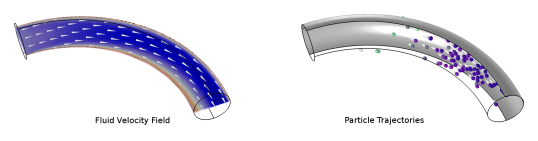
A basic particle tracing model usually involves first solving for some fields, such as a fluid velocity field (left), then tracking particles in the field, using forces such as the built-in Drag Force (right).
Main Subject Areas
Particle Tracing Module applications can be loosely categorized into three subject areas:
•
Charged particle tracing, the calculation of ion or electron paths under electric, magnetic, and collisional forces;
•
Particle tracing in fluids, the tracking of micron-scale particles such as cells or airborne contaminants under the influence of drag, gravity, and other field forces; and
•
Mathematical particle tracing, the setup of customized equations of motion, including the Hamiltonian and Lagrangian formulations from classical mechanics.
These three subject areas correspond to the three main physics interfaces included with the Particle Tracing Module: the Charged Particle Tracing interface (
), the Particle Tracing for Fluid Flow interface (
), and the Mathematical Particle Tracing interface (
), respectively. In addition, several multiphysics interfaces are available, each with predefined couplings to other physics interfaces such as Electrostatics (
) and Laminar Flow (
).
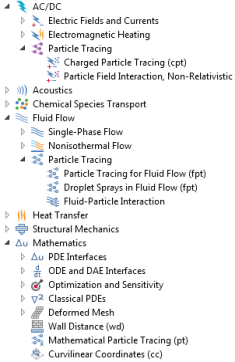
Locations of Particle Tracing physics interfaces in the Model Wizard. The options shown are available with licenses for COMSOL Multiphysics and the Particle Tracing Module. Depending on other licensed products, the Model Wizard may include options other than those that are shown here.
Physics Interface Guide by Space Dimension and Preset Study Type
Physics interface
Icon
Tag
Space Dimension
Available Study Type
AC/DC
Particle Tracing
Particle Field Interaction, Non-Relativistic
—
3D, 2D, 2D axisymmetric
bidirectionally coupled particle tracing; time dependent
Particle Field Interaction, Relativistic
1
—
3D, 2D, 2D axisymmetric
bidirectionally coupled particle tracing; time dependent
Charged Particle Tracing
cpt
3D, 2D, 2D axisymmetric
bidirectionally coupled particle tracing; time dependent
Fluid Flow
Particle Tracing
Particle Tracing for Fluid Flow
fpt
3D, 2D, 2D axisymmetric
bidirectionally coupled particle tracing; time dependent
Fluid-Particle Interaction
—
3D, 2D, 2D axisymmetric
bidirectionally coupled particle tracing; time dependent
Droplet Sprays in Fluid Flow
—
3D, 2D, 2D axisymmetric
bidirectionally coupled particle tracing; time dependent
Mathematics
Mathematical Particle Tracing
pt
3D, 2D, 2D axisymmetric
bidirectionally coupled particle tracing; time dependent
1
Requires the addition of the AC/DC Module.