You are viewing the documentation for an older COMSOL version. The latest version is available here.
PDF

Thick Plate Stress Analysis
Introduction
This example implements the static stress analysis described in the NAFEMS Test No LE10, “Thick Plate Pressure,” found on page 77 in the NAFEMS report Background to Benchmarks (Ref. 1). The computed stress level is compared with the values given in the benchmark report.
Model Definition
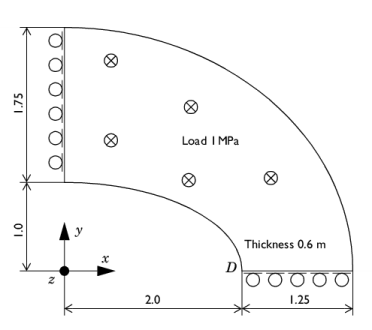
The geometry is an ellipse with an ellipse-shaped hole in it. Due to symmetry in load and in geometry, the analysis only includes a quarter of the ellipse.
Figure 1: The thick plate geometry, reduced to a quarter of the ellipse due to symmetry.
Material
Isotropic with E = 2.1·1011 Pa, ν = 0.3.
Load
A distributed load of 106 Pa on the upper surface pointing in the negative z direction.
Constraints
Symmetry planes, x = 0, y = 0.
Results
The normal stress σy is evaluated on the top surface at the inside of the elliptic hole, point D in Figure 1 with coordinate (2, 0, 0.6). It is in good agreement with the NAFEMS benchmark (Ref. 1), considering the coarse mesh. The difference is less than 4%.
σy (at D)
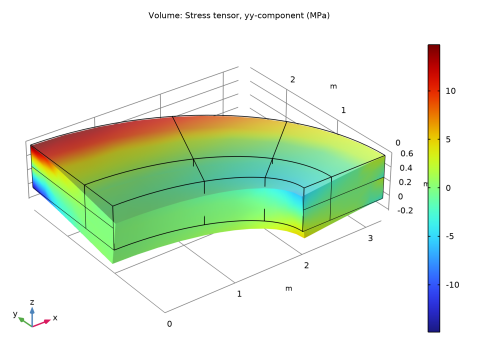
The y-component of the stress is shown in Figure 2.
Figure 2: The stress in the y direction.
A note about this example is that the z direction constraint is applied to an edge only. This is a singular constraint, which causes local stresses at the constrained edge. These stresses are unlimited from a theoretical point of view, and in practice the stresses and vertical displacements are strongly mesh dependent. This does not invalidate the possibility to determine stresses at a distance far away from the singular constraint.
Notes About the COMSOL Implementation
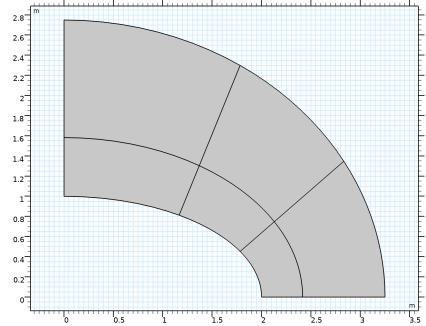
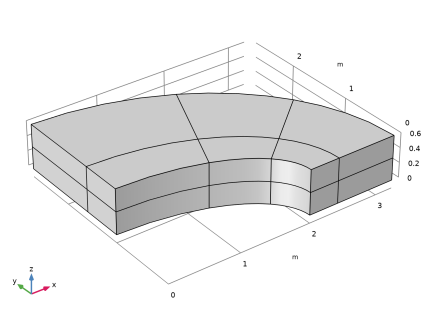
In order to get the same mesh as in the original benchmark, some extra lines are drawn in the 2D geometry. As an effect, there will be several domains. This approach is efficient in this simple example, whereas for more complex geometries, the use of Mesh Control Domains should be considered.
Reference
1. G.A.O. Davies, R.T. Fenner, and R.W. Lewis, Background to Benchmarks, NAFEMS, Glasgow, 1993.
Application Library path: Structural_Mechanics_Module/Verification_Examples/thick_plate
Modeling Instructions
From the File menu, choose New.
New
In the New window, click  Model Wizard.
Model Wizard
1
In the Model Wizard window, click  3D.
2
In the Select Physics tree, select Structural Mechanics>Solid Mechanics (solid).
3
Click Add.
4
Click  Study.
5
In the Select Study tree, select General Studies>Stationary.
6
Geometry 1
If you do not want to build all the geometry, you can load the geometry sequence from the stored model. In the Model Builder window, under Component 1 (comp1) right-click Geometry 1 and choose Insert Sequence. Browse to the model’s Application Libraries folder and double-click the file thick_plate.mph. You can then continue to the Add Material section below.
To build the geometry from scratch, continue here.
Work Plane 1 (wp1)
1
In the Geometry toolbar, click  Work Plane.
2
In the Settings window for Work Plane, click  Show Work Plane.
Work Plane 1 (wp1)>Plane Geometry
In the Model Builder window, click Plane Geometry.
Work Plane 1 (wp1)>Ellipse 1 (e1)
1
In the Work Plane toolbar, click  Ellipse.
2
In the Settings window for Ellipse, locate the Size and Shape section.
3
In the a-semiaxis text field, type 3.25.
4
In the b-semiaxis text field, type 2.75.
5
In the Sector angle text field, type 90.
6
Click  Build Selected.
7
Click the  Zoom Extents button in the Graphics toolbar.
Work Plane 1 (wp1)>Ellipse 2 (e2)
1
In the Work Plane toolbar, click  Ellipse.
2
In the Settings window for Ellipse, locate the Size and Shape section.
3
In the a-semiaxis text field, type 2.
4
In the Sector angle text field, type 90.
5
Click  Build Selected.
Work Plane 1 (wp1)>Ellipse 3 (e3)
1
In the Work Plane toolbar, click  Ellipse.
2
In the Settings window for Ellipse, locate the Size and Shape section.
3
In the a-semiaxis text field, type 2.416.
4
In the b-semiaxis text field, type 1.583.
5
In the Sector angle text field, type 90.
6
Click  Build Selected.
Work Plane 1 (wp1)>Difference 1 (dif1)
1
In the Work Plane toolbar, click  Booleans and Partitions and choose Difference.
2
Select the objects e1 and e3 only.
3
In the Settings window for Difference, locate the Difference section.
4
Find the Objects to subtract subsection. Click to select the  Activate Selection toggle button.
5
6
Click  Build Selected.
Work Plane 1 (wp1)>Polygon 1 (pol1)
1
In the Work Plane toolbar, click  Polygon.
2
In the Settings window for Polygon, locate the Object Type section.
3
From the Type list, choose Open curve.
4
Locate the Coordinates section. In the table, enter the following settings:
Work Plane 1 (wp1)>Polygon 2 (pol2)
1
In the Work Plane toolbar, click  Polygon.
2
In the Settings window for Polygon, locate the Object Type section.
3
From the Type list, choose Open curve.
4
Locate the Coordinates section. In the table, enter the following settings:
5
In the Work Plane toolbar, click  Build All.
Work Plane 1 (wp1)>Plane Geometry
Click the  Zoom Extents button in the Graphics toolbar.
Work Plane 1 (wp1)>Partition Objects 1 (par1)
1
In the Work Plane toolbar, click  Booleans and Partitions and choose Partition Objects.
2
3
In the Settings window for Partition Objects, locate the Partition Objects section.
4
Find the Tool objects subsection. Click to select the  Activate Selection toggle button.
5
Select the objects pol1 and pol2 only.
6
Click  Build Selected.
Extrude 1 (ext1)
1
In the Model Builder window, under Component 1 (comp1)>Geometry 1 right-click Work Plane 1 (wp1) and choose Extrude.
2
In the Settings window for Extrude, locate the Distances section.
3
4
Click  Build Selected.
5
Click the  Zoom Extents button in the Graphics toolbar.
Materials
Material 1 (mat1)
1
In the Model Builder window, under Component 1 (comp1) right-click Materials and choose Blank Material.
2
In the Settings window for Material, locate the Material Contents section.
3
Solid Mechanics (solid)
Symmetry 1
1
In the Model Builder window, under Component 1 (comp1) right-click Solid Mechanics (solid) and choose More Constraints>Symmetry.
2
Prescribed Displacement 1
1
In the Physics toolbar, click  Boundaries and choose Prescribed Displacement.
2
3
In the Settings window for Prescribed Displacement, locate the Prescribed Displacement section.
4
Select the Prescribed in x direction check box.
5
Select the Prescribed in y direction check box.
Prescribed Displacement 2
1
In the Physics toolbar, click  Edges and choose Prescribed Displacement.
2
3
In the Settings window for Prescribed Displacement, locate the Prescribed Displacement section.
4
Select the Prescribed in z direction check box.
Boundary Load 1
1
In the Physics toolbar, click  Boundaries and choose Boundary Load.
2
3
In the Settings window for Boundary Load, locate the Force section.
4
Specify the FA vector as
Mesh 1
Mapped 1
In the Mesh toolbar, click  Boundary and choose Mapped.
Distribution 1
Right-click Mapped 1 and choose Distribution.
Mapped 1
Select Boundaries 7, 14, 23, 30, 39, and 48 only.
Distribution 1
1
In the Model Builder window, click Distribution 1.
2
In the Settings window for Distribution, locate the Distribution section.
3
In the Number of elements text field, type 2.
4
Locate the Edge Selection section. From the Selection list, choose All edges.
5
Click  Build Selected.
Swept 1
1
In the Mesh toolbar, click  Swept.
2
In the Settings window for Swept, click  Build All.
Study 1
In the Home toolbar, click  Compute.
Results
Point Evaluation 1
1
In the Results toolbar, click  Point Evaluation.
2
This corresponds to point D in Figure 1.
3
In the Settings window for Point Evaluation, click Replace Expression in the upper-right corner of the Expressions section. From the menu, choose Component 1 (comp1)>Solid Mechanics>Stress>Stress tensor (spatial frame) - N/m²>solid.syy - Stress tensor, yy-component.
4
Locate the Expressions section. In the table, enter the following settings:
5
Click  Evaluate.
Stress (solid)
Modify the default surface plot to show the y-component of the stress tensor.
Volume 1
1
In the Model Builder window, expand the Results>Stress (solid) node, then click Volume 1.
2
In the Settings window for Volume, click Replace Expression in the upper-right corner of the Expression section. From the menu, choose Component 1 (comp1)>Solid Mechanics>Stress>Stress tensor (spatial frame) - N/m²>solid.syy - Stress tensor, yy-component.
3
Locate the Expression section. From the Unit list, choose MPa.
4
Locate the Coloring and Style section. Click  Change Color Table.
5
In the Color Table dialog box, select Rainbow>Rainbow in the tree.
6
7
In the Stress (solid) toolbar, click  Plot.