


You are viewing the documentation for an older COMSOL version. The latest version is available here.
PDF

Transient Negative Mobility and Negative Differential Conductivity Effects in Xenon
Introduction
This model simulates two interesting effects that can be explained by solving the Boltzmann equation in the two-term approximation: (i) the Negative Differential Conductivity (NDC) in gases that occurs when the electron drift velocity decreases with the increase of the electric field; and (ii) the Transient Negative Mobility (TNM) that occurs when the temporal variation of the Electron Energy Distribution Function (EEDF) is much faster than the variation of the electron number density and the electron mobility becomes negative during the relaxation of the EEDF. The model results here presented agree well with the results from Ref. 1.
Model Definition
The theory and formulation used in this tutorial is based on Ref. 2. In Ref. 2 only a approximated version of the stationary Boltzmann equation is solved. Here, to study the TNM effect the time derivative of the electron energy distribution function is introduced in the same way as in Ref. 1.
The time dependent Boltzmann equation in the two-term approximation can be written as
where F0 is the normalized EEDF (eV3/2) and
(1)
and
(2)
For definitions of the quantities in the equations Equation 1 and Equation 2, see the chapter The Boltzmann Equation, Two-Term Approximation Interface in the Plasma Module User’s Guide.
At zero energy, the condition that energy flux is zero must hold:
and as ε → ∞, F0 → 0.
The EEDF is defined by how electrons gain energy from the electric field and lose (or gain) their energy in collisions with the background gas. The electron collisions are characterized by cross sections that need to be provided by the user. In this model, the background gas is xenon and the electron impact collisions cross-sections are obtained from Ref. 3.
Results and Discussion
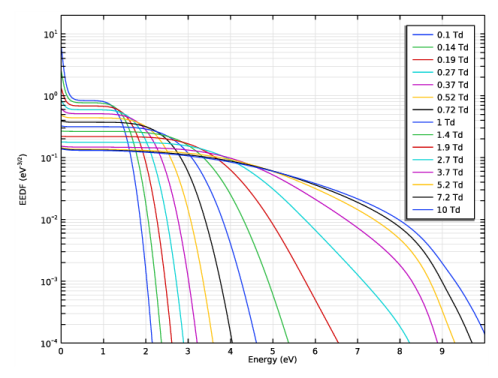
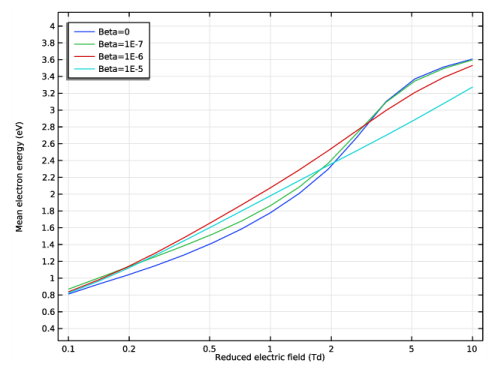
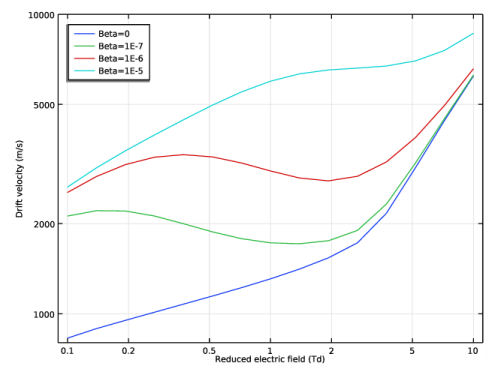
To study the NDC it is used the stationary Boltzmann equation in the two-term approximation. The simulations are done at 1 atm and cover a range of reduced electric fields between 0.1 and 10 Td, and ionization degrees between 0 and 10-5. The results are presented in Figure 1to Figure 4. The electron drift velocity is presented in Figure 4 as a function of the reduced electric field. Without electron-electron collisions the drift velocity is a monotonic increasing function of the electric field. However, introducing electron-electron collisions a negative slope on the drift velocity appears indicating the presence of NDC.
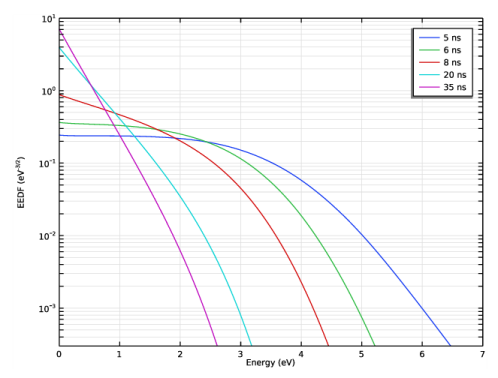
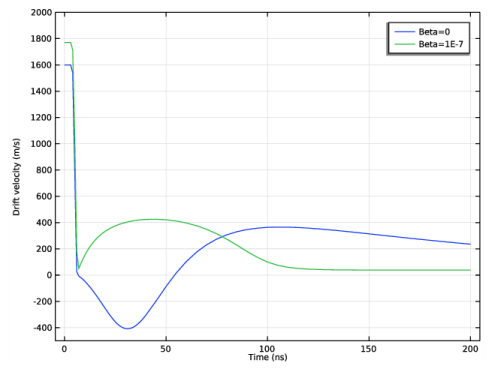
To study the TNM it is used the time dependent Boltzmann equation in the two-term approximation. The simulations are done at 10 atm and solve the temporal relaxation of the EEDF to 0.01 Td starting from a stationary solution at 2.2 Td. Figure 5 to Figure 7 show simulation results related to the TNM. Figure 7 shows the electron drift velocity as a function of time. After switching the electric field to 0.01 Td there is a fast drop (~3 ns) in the drift velocity followed by long relaxation period of the order of 100 ns. For the case with electron-electron collisions (ionization degree of 10-7) the drift velocity is allays positive and reaches a steady just after 100 ns. Without electron-electron collisions the drift velocity passes by a region of negative values clearly showing the TNM effect and a steady state is still not reached at 200 ns.
Figure 1: EEDFs for the stationary case for β=0, 1 atm, and for several reduced electric fields between 0.1 and 10 Td. Compare with figure 2 of Ref. 1.
Figure 2: EEDFs for the stationary case for β=10-6, 1 atm, and for several reduced electric fields between 0.1 and 10 Td. Compare with figure 2 of Ref. 1.
Figure 3: Mean electron energy as a function of the reduced electric field for several ionization degrees at 1 atm. Compare with figure 2 of Ref. 1.
Figure 4: Electron drift velocity as a function of the reduced electric field for several ionization degrees at 1 atm. Compare with figure 4 of Ref. 1.
Figure 5: EEDFs for several time instants during the relaxation from 2.2 to 0.01 Td at 10 atm and β=0. Compare with figure 8 of Ref. 1.
Figure 6: EEDFs for several time instants during the relaxation from 2.2 to 0.01 Td at 10 atm and β=10-7. Compare with figure 8 of Ref. 1.
Figure 7: Temporal evolution of the electron drift velocity at 10 atm for β=0 and 10-7. Compare with figure 7 of Ref. 1.
References
1. Z. Donko and N. Dyatko, “First-Principles Particle Simulation and Boltzmann Equation of Negative Differential Conductivity and Transient Negative Effects in Xenon”, Eur.Phys. J. D vol. 70, pp. 135–146, 2016.
2. G.J.M. Hagelaar and L.C. Pitchford, “Solving the Boltzmann Equation to Obtain Electron Transport Coefficients and Rate Coefficients for Fluid Models”, Plasma Sources Science and Technology, vol. 14, pp. 722–733, 2005.
3. M. Hayashi (2003) database, www.lxcat.net, retrieved 2021.
Application Library path: Plasma_Module/Two-Term_Boltzmann_Equation/transient_negative_mobility
Modeling Instructions
Select a 0D space dimension to have access to the Boltzmann Equation, Two-Term Approximation interface.
From the File menu, choose New.
New
In the New window, click  Model Wizard.
Model Wizard
1
In the Model Wizard window, click  0D.
2
In the Select Physics tree, select Plasma>Boltzmann Equation, Two-Term Approximation (be).
3
Click Add.
4
Click  Study.
5
In the Select Study tree, select Preset Studies for Selected Physics Interfaces>Reduced Electric Fields.
6
Boltzmann Equation, Two-Term Approximation (be)
Select to include electron-electron collision, add more elements, refine the region at 0 eV, and set the maximum energy to 30 eV.
1
In the Model Builder window, under Component 1 (comp1) click Boltzmann Equation, Two-Term Approximation (be).
2
In the Settings window for Boltzmann Equation, Two-Term Approximation, locate the Electron Energy Distribution Function Settings section.
3
From the Electron energy distribution function list, choose Boltzmann equation, two-term approximation (linear).
4
Select the Electron-electron collisions check box.
5
In the N text field, type 300.
6
In the R text field, type 30.
7
In the εmax text field, type 30.
Import electron impact cross sections for Xenon.
Cross Section Import 1
1
In the Physics toolbar, click  Global and choose Cross Section Import.
2
In the Settings window for Cross Section Import, locate the Cross Section Import section.
3
Click  Browse.
4
5
Click  Import.
Set some parameters to be used in the model. Some of the parameters are only relevant for the time dependent study.
Add a rectangle function that will work as a switch to be used in the time dependent model.
Global Definitions
Parameters 1
1
In the Model Builder window, under Global Definitions click Parameters 1.
2
In the Settings window for Parameters, locate the Parameters section.
3
Definitions (comp1)
Rectangle 1 (rect1)
1
In the Home toolbar, click  Functions and choose Local>Rectangle.
2
In the Settings window for Rectangle, locate the Parameters section.
3
In the Lower limit text field, type -5.
4
In the Upper limit text field, type 5.
5
Click to expand the Smoothing section. In the Size of transition zone text field, type 3.
Set the gas temperature, electron density, and ionization degree.
Boltzmann Equation, Two-Term Approximation (be)
Boltzmann Model 1
1
In the Model Builder window, under Component 1 (comp1)>Boltzmann Equation, Two-Term Approximation (be) click Boltzmann Model 1.
2
In the Settings window for Boltzmann Model, locate the Boltzmann Settings section.
3
In the Tg text field, type Tgas.
4
In the ne text field, type ne.
5
In the β text field, type Beta.
6
Locate the Results section. Find the Generate the following default plots subsection. Clear the Mean electron energy check box.
7
Clear the Transport properties check box.
8
Clear the Rate coefficients check box.
9
Select the Mean electron energy check box.
10
From the Plot as a function of list, choose Reduced electric field.
Prepare a study to solve for a reduce field from 0.1 to 10 Td and for several ionization degrees.
Stationary
1
In the Model Builder window, click Study 1.
2
In the Settings window for Study, type Stationary in the Label text field.
Step 1: Reduced Electric Fields
1
In the Model Builder window, under Stationary click Step 1: Reduced Electric Fields.
2
In the Settings window for Reduced Electric Fields, locate the Study Settings section.
3
In the Reduced electric fields text field, type 10^{range(log10(0.1),1/7,log10(10))}[Td].
Parametric Sweep
1
In the Study toolbar, click  Parametric Sweep.
2
In the Settings window for Parametric Sweep, locate the Study Settings section.
3
4
5
In the Study toolbar, click  Compute.
Results
EEDF (be)
Make plots to show the effect of the electric field and the ionization degree in the EEDFs, electron mean energy, and electron drift velocity.
1
In the Settings window for 1D Plot Group, locate the Data section.
2
From the Parameter selection (Beta) list, choose From list.
3
In the Parameter values (Beta) list, select 0.
4
Locate the Axis section. Select the Manual axis limits check box.
5
In the x minimum text field, type 0.
6
In the x maximum text field, type 10.
7
In the y minimum text field, type 1e-4.
8
In the y maximum text field, type 20.
9
In the EEDF (be) toolbar, click  Plot.
Line Graph 1
1
In the Model Builder window, expand the EEDF (be) node, then click Line Graph 1.
2
In the Settings window for Line Graph, click to expand the Legends section.
3
From the Legends list, choose Evaluated.
4
In the Legend text field, type eval(be.EN, Td, 2) Td.
EEDF, Beta=0
1
In the Model Builder window, under Results click EEDF (be).
2
In the Settings window for 1D Plot Group, type EEDF, Beta=0 in the Label text field.
EEDF, Beta=1e-6
1
Right-click EEDF, Beta=0 and choose Duplicate.
2
In the Settings window for 1D Plot Group, type EEDF, Beta=1e-6 in the Label text field.
3
Locate the Data section. In the Parameter values (Beta) list, select 1E-6.
4
In the EEDF, Beta=1e-6 toolbar, click  Plot.
Mean Electron Energy (be)
1
In the Model Builder window, click Mean Electron Energy (be).
2
In the Settings window for 1D Plot Group, locate the Axis section.
3
Select the Manual axis limits check box.
4
In the y minimum text field, type 0.5.
5
In the y maximum text field, type 4.
6
Locate the Legend section. Select the Show legends check box.
Global 1
1
In the Model Builder window, expand the Mean Electron Energy (be) node, then click Global 1.
2
In the Settings window for Global, click to expand the Legends section.
3
Find the Include subsection. Clear the Description check box.
Mean Electron Energy (be)
1
In the Model Builder window, click Mean Electron Energy (be).
2
In the Settings window for 1D Plot Group, locate the Legend section.
3
From the Position list, choose Upper left.
4
Locate the Axis section. Select the x-axis log scale check box.
5
In the Model Builder window, collapse the Mean Electron Energy (be) node.
EEDF, Beta=0
In the Model Builder window, collapse the Results>EEDF, Beta=0 node.
EEDF, Beta=0, EEDF, Beta=1e-6, Mean Electron Energy (be)
1
In the Model Builder window, under Results, Ctrl-click to select EEDF, Beta=0, Mean Electron Energy (be), and EEDF, Beta=1e-6.
2
Stationary
In the Settings window for Group, type Stationary in the Label text field.
Drift Velocity
1
In the Home toolbar, click  Add Plot Group and choose 1D Plot Group.
2
In the Settings window for 1D Plot Group, type Drift Velocity in the Label text field.
3
Locate the Data section. From the Dataset list, choose Stationary/Parametric Solutions 1 (sol2).
Global 1
1
Right-click Drift Velocity and choose Global.
2
In the Settings window for Global, locate the y-Axis Data section.
3
4
In the Drift Velocity toolbar, click  Plot.
5
Locate the x-Axis Data section. From the Parameter list, choose Expression.
6
In the Expression text field, type be.EN.
7
From the Unit list, choose Td.
8
Locate the Legends section. Find the Include subsection. Clear the Description check box.
9
In the Drift Velocity toolbar, click  Plot.
Drift Velocity
1
In the Model Builder window, click Drift Velocity.
2
In the Settings window for 1D Plot Group, click to expand the Title section.
3
From the Title type list, choose None.
4
Locate the Axis section. Select the y-axis log scale check box.
5
Select the x-axis log scale check box.
6
Select the Manual axis limits check box.
7
In the y minimum text field, type 800.
8
In the y maximum text field, type 10000.
9
Locate the Legend section. From the Position list, choose Upper left.
Add two Reduced Electric Fields studies and two Time Dependent studies.
The Reduced Electric Fields studies are used to provide initial conditions for the time dependent studies.
Add Study
1
In the Home toolbar, click  Add Study to open the Add Study window.
2
Go to the Add Study window.
3
Find the Studies subsection. In the Select Study tree, select Preset Studies for Selected Physics Interfaces>Reduced Electric Fields.
4
Click Add Study in the window toolbar.
5
Click Add Study in the window toolbar.
6
In the Select Study tree, select General Studies>Time Dependent.
7
Click Add Study in the window toolbar.
8
Click Add Study in the window toolbar.
9
In the Home toolbar, click  Add Study to close the Add Study window.
Initial conditions for time dependent, 2.2[Td], Beta=0
In the Settings window for Study, type Initial conditions for time dependent, 2.2[Td], Beta=0 in the Label text field.
Step 1: Reduced Electric Fields
1
In the Model Builder window, under Initial conditions for time dependent, 2.2[Td], Beta=0 click Step 1: Reduced Electric Fields.
2
In the Settings window for Reduced Electric Fields, locate the Study Settings section.
3
In the Reduced electric fields text field, type 2.2[Td].
The next simulations are to be done at 10 atm.
Global Definitions
Parameters 1
1
In the Model Builder window, under Global Definitions click Parameters 1.
2
In the Settings window for Parameters, locate the Parameters section.
3
Boltzmann Equation, Two-Term Approximation (be)
Boltzmann Model 1
1
In the Model Builder window, under Component 1 (comp1)>Boltzmann Equation, Two-Term Approximation (be) click Boltzmann Model 1.
2
In the Settings window for Boltzmann Model, locate the Results section.
3
Find the Generate the following default plots subsection. Clear the Mean electron energy check box.
Initial conditions for time dependent, 2.2[Td], Beta=0
In the Home toolbar, click  Compute.
Results
EEDF, Beta=0, 2.2 Td
1
In the Settings window for 1D Plot Group, type EEDF, Beta=0, 2.2 Td in the Label text field.
2
In the EEDF, Beta=0, 2.2 Td toolbar, click  Plot.
Initial conditions for time dependent, 2.2[Td], Beta=1e-7
1
In the Model Builder window, click Study 3.
2
In the Settings window for Study, type Initial conditions for time dependent, 2.2[Td], Beta=1e-7 in the Label text field.
Step 1: Reduced Electric Fields
1
In the Model Builder window, under Initial conditions for time dependent, 2.2[Td], Beta=1e-7 click Step 1: Reduced Electric Fields.
2
In the Settings window for Reduced Electric Fields, locate the Study Settings section.
3
In the Reduced electric fields text field, type 2.2[Td].
Global Definitions
Parameters 1
1
In the Model Builder window, under Global Definitions click Parameters 1.
2
In the Settings window for Parameters, locate the Parameters section.
3
Initial conditions for time dependent, 2.2[Td], Beta=1e-7
In the Home toolbar, click  Compute.
Results
EEDF, Beta=1e-7, 2.2[Td]
1
In the Model Builder window, under Results click EEDF, Beta=0, 2.2 Td.
2
In the Settings window for 1D Plot Group, type EEDF, Beta=1e-7, 2.2[Td] in the Label text field.
3
In the EEDF, Beta=1e-7, 2.2[Td] toolbar, click  Plot.
EEDF (be), EEDF, Beta=1e-7, 2.2[Td]
1
In the Model Builder window, under Results, Ctrl-click to select EEDF, Beta=1e-7, 2.2[Td] and EEDF (be).
2
Initial conditions
1
In the Settings window for Group, type Initial conditions in the Label text field.
Select to solve for a time dependent EEDF.
Boltzmann Equation, Two-Term Approximation (be)
1
In the Model Builder window, under Component 1 (comp1) click Boltzmann Equation, Two-Term Approximation (be).
2
In the Settings window for Boltzmann Equation, Two-Term Approximation, locate the Electron Energy Distribution Function Settings section.
3
From the Temporal behavior list, choose Time dependent EEDF.
Set the pressure and the reduce electric field. In the first nanoseconds the reduced electric field is 2.2 Td and it drops to 0.01 Td in about 3 ns.
Boltzmann Model 1
1
In the Model Builder window, under Component 1 (comp1)>Boltzmann Equation, Two-Term Approximation (be) click Boltzmann Model 1.
2
In the Settings window for Boltzmann Model, locate the Boltzmann Settings section.
3
In the pA text field, type P0.
4
In the E/N text field, type rect1(t/1[ns])*(2.2-0.01)[Td]+0.01[Td].
Time dependent, Beta=0
1
In the Model Builder window, click Study 4.
2
In the Settings window for Study, type Time dependent, Beta=0 in the Label text field.
Make a careful selection of the output times to obtain a good description of the fast transient phase. Solve and make a plot of the EEDFs for several time instants.
Step 1: Time Dependent
1
In the Model Builder window, under Time dependent, Beta=0 click Step 1: Time Dependent.
2
In the Settings window for Time Dependent, locate the Study Settings section.
3
From the Time unit list, choose ns.
4
In the Output times text field, type 0 range(1,1,40) range(45,5,200).
5
Click to expand the Values of Dependent Variables section. Find the Initial values of variables solved for subsection. From the Settings list, choose User controlled.
6
From the Method list, choose Solution.
7
From the Study list, choose Initial conditions for time dependent, 2.2[Td], Beta=0, Reduced Electric Fields.
Global Definitions
Parameters 1
1
In the Model Builder window, under Global Definitions click Parameters 1.
2
In the Settings window for Parameters, locate the Parameters section.
3
Time dependent, Beta=0
In the Home toolbar, click  Compute.
Results
EEDF Time Dependent, Beta=0
1
In the Settings window for 1D Plot Group, type EEDF Time Dependent, Beta=0 in the Label text field.
2
Locate the Data section. From the Time selection list, choose From list.
3
In the Times (ns) list, choose 5, 6, 8, 20, and 55.
4
In the EEDF Time Dependent, Beta=0 toolbar, click  Plot.
5
Locate the Axis section. Select the Manual axis limits check box.
6
In the x minimum text field, type 0.
7
In the x maximum text field, type 7.
8
In the y minimum text field, type 3e-4.
9
In the y maximum text field, type 10.
10
In the EEDF Time Dependent, Beta=0 toolbar, click  Plot.
Change the ionization degree to 1e-7 and repeat.
Global Definitions
Parameters 1
1
In the Model Builder window, under Global Definitions click Parameters 1.
2
In the Settings window for Parameters, locate the Parameters section.
3
Study 5
Step 1: Time Dependent
1
In the Model Builder window, under Study 5 click Step 1: Time Dependent.
2
In the Settings window for Time Dependent, locate the Study Settings section.
3
From the Time unit list, choose ns.
4
In the Output times text field, type 0 range(1,1,40) range(45,5,200).
5
Locate the Values of Dependent Variables section. Find the Initial values of variables solved for subsection. From the Settings list, choose User controlled.
6
From the Study list, choose Initial conditions for time dependent, 2.2[Td], Beta=1e-7, Reduced Electric Fields.
7
From the Method list, choose Solution.
8
In the Model Builder window, click Study 5.
9
In the Settings window for Study, type Time dependent, Beta=1e-7 in the Label text field.
10
In the Home toolbar, click  Compute.
Results
EEDF Time Dependent, Beta=1e-7
1
In the Settings window for 1D Plot Group, type EEDF Time Dependent, Beta=1e-7 in the Label text field.
2
Locate the Data section. From the Time selection list, choose From list.
3
In the Times (ns) list, choose 5, 6, 8, 20, and 35.
4
Locate the Axis section. Select the Manual axis limits check box.
5
In the x minimum text field, type 0.
6
In the x maximum text field, type 7.
7
In the y minimum text field, type 3e-4.
8
In the y maximum text field, type 10.
9
In the EEDF Time Dependent, Beta=1e-7 toolbar, click  Plot.
EEDF Time Dependent, Beta=0, EEDF Time Dependent, Beta=1e-7
1
In the Model Builder window, under Results, Ctrl-click to select EEDF Time Dependent, Beta=0 and EEDF Time Dependent, Beta=1e-7.
2
Time Dependent
In the Settings window for Group, type Time Dependent in the Label text field.
Time Dependent Drift velocity
1
In the Home toolbar, click  Add Plot Group and choose 1D Plot Group.
Create a plot to show the temporal evolution of the electron drift velocity.
2
In the Settings window for 1D Plot Group, type Time Dependent Drift velocity in the Label text field.
Global 1
1
Right-click Time Dependent Drift velocity and choose Global.
2
In the Settings window for Global, locate the Data section.
3
From the Dataset list, choose Time dependent, Beta=0/Solution 9 (sol9).
4
Locate the y-Axis Data section. In the table, enter the following settings:
5
Locate the Legends section. From the Legends list, choose Evaluated.
6
In the Legend text field, type Beta=eval(Beta).
7
In the Time Dependent Drift velocity toolbar, click  Plot.
Global 2
1
Right-click Global 1 and choose Duplicate.
2
In the Settings window for Global, locate the Data section.
3
From the Dataset list, choose Time dependent, Beta=1e-7/Solution 10 (sol10).
4
In the Time Dependent Drift velocity toolbar, click  Plot.
Time Dependent Drift velocity
1
In the Model Builder window, click Time Dependent Drift velocity.
2
In the Settings window for 1D Plot Group, locate the Title section.
3
From the Title type list, choose None.
4
Locate the Axis section. Select the Manual axis limits check box.
5
In the y minimum text field, type -500.
6
In the y maximum text field, type 2000.
7
In the Time Dependent Drift velocity toolbar, click  Plot.