
|
|
|
|
1
|
|
2
|
In the Application Libraries window, select Optimization Module>Topology Optimization>mbb_beam_optimization in the tree.
|
|
3
|
Click
 Open. Open. |
|
1
|
|
2
|
|
3
|
|
4
|
|
5
|
|
6
|
|
1
|
In the Model Builder window, under Global Definitions>Mesh Parts right-click Mesh Part 1 and choose Build All.
|
|
2
|
|
1
|
|
2
|
|
3
|
|
4
|
|
5
|
|
6
|
|
7
|
|
1
|
|
2
|
|
3
|
|
4
|
|
5
|
In the Add dialog box, in the Selections to invert list, choose Load Boundary (Import 1), Symmetry y (Import 1), Symmetry x (Import 1), and Moving Boundaries.
|
|
6
|
Click OK.
|
|
7
|
|
1
|
|
2
|
|
3
|
|
4
|
Find the Physics interfaces in study subsection. In the table, clear the Solve check box for Optimization.
|
|
5
|
|
6
|
|
1
|
|
2
|
|
3
|
|
4
|
|
5
|
|
1
|
In the Model Builder window, under Component 2 (comp2) right-click Solid Mechanics 2 (solid2) and choose Roller.
|
|
2
|
|
3
|
|
1
|
|
2
|
|
3
|
|
4
|
|
1
|
|
2
|
|
3
|
|
4
|
|
5
|
|
1
|
|
2
|
|
3
|
|
4
|
|
1
|
|
2
|
|
3
|
|
4
|
|
5
|
|
6
|
|
1
|
|
2
|
|
3
|
|
4
|
Find the Physics interfaces in study subsection. In the table, clear the Solve check box for Solid Mechanics (solid).
|
|
5
|
|
6
|
|
7
|
|
1
|
|
2
|
|
1
|
|
2
|
|
3
|
|
1
|
|
2
|
|
3
|
|
1
|
|
2
|
|
3
|
|
4
|
|
5
|
|
1
|
|
2
|
|
3
|
In the table, clear the Solve for check boxes for Deformed geometry (Component 2) and Shape Optimization (Component 2).
|
|
1
|
|
2
|
|
3
|
In the table, clear the Solve for check boxes for Deformed geometry (Component 2), Topology Optimization (Component 1), and Shape Optimization (Component 2).
|
|
1
|
|
2
|
|
3
|
|
4
|
Find the Physics interfaces in study subsection. In the table, clear the Solve check box for Solid Mechanics (solid).
|
|
5
|
|
6
|
|
1
|
|
2
|
|
3
|
|
4
|
|
5
|
Click Add Expression in the upper-right corner of the Objective Function section. From the menu, choose Component 2 (comp2)>Solid Mechanics 2>Global>comp2.solid2.Ws_tot - Total elastic strain energy - J.
|
|
6
|
Locate the Objective Function section. From the Objective scaling list, choose Initial solution based.
|
|
7
|
Locate the Control Variables section. In the table, clear the Solve for check box for Density Model 1 (dtopo1).
|
|
8
|
Click Add Expression in the upper-right corner of the Constraints section. From the menu, choose Component 2 (comp2)>Definitions>Free Shape Domain 1>comp2.fsd1.area - Free shape area - m².
|
|
9
|
Locate the Constraints section. In the table, enter the following settings:
|
|
1
|
|
2
|
|
3
|
|
4
|
|
1
|
|
2
|
|
3
|
Select the Plot check box.
|
|
4
|
|
5
|
|
6
|
|
7
|
|
1
|
|
2
|
|
3
|
|
1
|
|
2
|
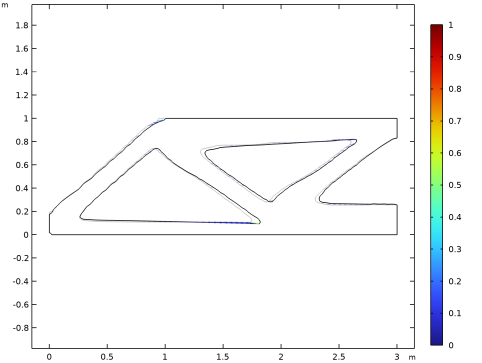
In the Settings window for 2D Plot Group, type Shape Optimization (alternative plot) in the Label text field.
|
|
3
|
|
4
|
|
1
|
|
2
|
|
3
|
|
4
|
|
5
|
|
6
|
|
1
|
|
2
|
|
3
|
|
4
|
|
1
|
|
2
|
|
3
|
|
4
|
|
5
|
|
6
|
|
7
|
|
1
|
|
2
|
|
3
|
|
4
|
|
5
|
|
6
|
|
7
|
|
8
|
|
9
|
|
1
|
|
2
|
In the Settings window for 2D Plot Group, type Shaped Optimized Stress (solid2) in the Label text field.
|


