You are viewing the documentation for an older COMSOL version. The latest version is available here.
PDF

Eigenvalue Analysis of a Crankshaft
Introduction
This application describes a modal analysis of a crankshaft. The pistons’ reciprocating movement is transferred to the crankshaft through connecting rods by means of crankshaft throws. The forces, torques, and bending moments, which are highly variable both in time and space, subject the crankshaft to very high and complex loading. The crankshaft design must therefore incorporate careful and precise calculations of the vibrational characteristics.
Model Definition
Geometry
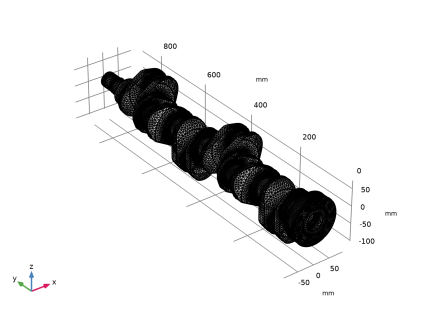
The geometry comes from a NASTRAN mesh, which you import into the COMSOL Desktop.
Figure 1: The NASTRAN mesh.
Material Properties and Boundary Conditions
The crankshaft geometry is in millimeters.The crankshaft is made of structural steel. The boundary conditions are as follows:
Results
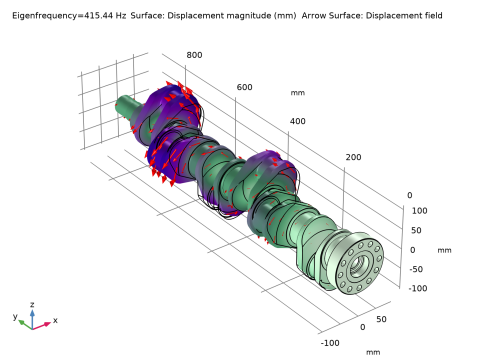
The analysis provides the lowest six eigenfrequencies. The first eigenmode is shown in Figure 2. It has an eigenfrequency of approximately 467.1 Hz, and the mode shape shows a mixture of axial and torsional motion, with the axial one dominating. Note that the eigenmode solution is scaled, so that the maximum value shown in the plot does not reflect the actual magnitude of any corresponding vibration. The type of scaling used can be changed under the setting for the eigenvalue solver.
Figure 2: The first axial mode in the crankshaft.
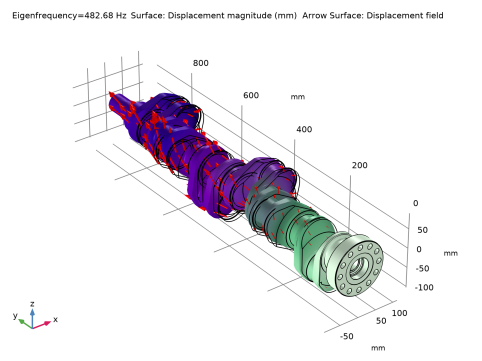
The second distinctly shaped eigenmode has an eigenfrequency at 512.8 Hz. It is also a superposition of torsional and axial motion. But in contrast to the first one, in this case the torsion dominates Figure 3.
Figure 3: The torsional mode of the crankshaft throws.
The other higher modes show a similar behavior. Such mode shapes are caused by the nature of the constraints due to the main bearings, which allow certain axial sliding and torsion but prevent any significant bending of the shaft. Furthermore, the torsion implies either extension or contraction in the axial direction, so that the modes appear as superposition of both axial and torsional motion.
Application Library path: COMSOL_Multiphysics/Structural_Mechanics/crankshaft
Modeling Instructions
From the File menu, choose New.
New
In the New window, click  Model Wizard.
Model Wizard
1
In the Model Wizard window, click  3D.
2
In the Select Physics tree, select Structural Mechanics>Solid Mechanics (solid).
3
Click Add.
4
Click  Study.
5
In the Select Study tree, select General Studies>Eigenfrequency.
6
Geometry 1
Import a NASTRAN mesh file under the mesh node which provides the mesh as well as domains, boundaries, and so on of the model. Before importing the file, select mm as the length unit to get the correct size for the geometry.
1
In the Model Builder window, under Component 1 (comp1) click Geometry 1.
2
In the Settings window for Geometry, locate the Units section.
3
From the Length unit list, choose mm.
Mesh 1
Import 1
1
In the Mesh toolbar, click  Import.
2
In the Settings window for Import, locate the Import section.
3
From the Source list, choose NASTRAN file.
4
From the Data to import list, choose Only mesh.
5
Click  Browse.
6
7
Click  Import.
8
Click the  Zoom Extents button in the Graphics toolbar.
Materials
Now, define the material properties using structural steel from the built-in materials.
Add Material
1
In the Home toolbar, click  Add Material to open the Add Material window.
2
Go to the Add Material window.
3
In the tree, select Built-in>Structural steel.
4
Click Add to Component in the window toolbar.
5
In the Home toolbar, click  Add Material to close the Add Material window.
Solid Mechanics (solid)
1
In the Model Builder window, under Component 1 (comp1) click Solid Mechanics (solid).
2
In the Settings window for Solid Mechanics, click to expand the Discretization section.
Change the element order to 1 so as to conform to the NASTRAN mesh.
3
From the Displacement field list, choose Linear.
Add a cylindrical coordinate system to be used when prescribing the constraints.
Definitions
Cylindrical System 2 (sys2)
1
In the Definitions toolbar, click  Coordinate Systems and choose Cylindrical System.
2
In the Settings window for Cylindrical System, locate the Settings section.
3
Find the Longitudinal axis subsection. In the table, enter the following settings:
Solid Mechanics (solid)
Prescribed Displacement 1
1
In the Physics toolbar, click  Boundaries and choose Prescribed Displacement.
2
3
In the Settings window for Prescribed Displacement, locate the Coordinate System Selection section.
4
From the Coordinate system list, choose Cylindrical System 2 (sys2).
5
Locate the Prescribed Displacement section. Select the Prescribed in r direction check box.
These settings constrain the normal direction movements of the main bearing surfaces.
Fixed Constraint 1
1
In the Physics toolbar, click  Boundaries and choose Fixed Constraint.
2
Study 1
In the Home toolbar, click  Compute.
Results
Mode Shape (solid)
The default plot shows the displacement magnitude and the deformed shape for the first mode in the crankshaft. Add the displacement arrow plot for better visualization of the mode type.
Arrow Surface 1
1
Right-click Mode Shape (solid) and choose Arrow Surface.
2
In the Settings window for Arrow Surface, locate the Coloring and Style section.
3
Select the Scale factor check box. In the associated text field, type 7e4.
4
In the Mode Shape (solid) toolbar, click  Plot.
5
Click the  Go to Default View button in the Graphics toolbar.
The resulting plot should be similar to that shown in Figure 2. The mode presents a mixture of axial and torsional motion, but the axial one is dominating.
To get a plot showing the second eigenmode, follow these steps:
Mode Shape (solid)
1
In the Model Builder window, click Mode Shape (solid).
2
In the Settings window for 3D Plot Group, locate the Data section.
3
From the Eigenfrequency (Hz) list, choose 482.68.
4
In the Mode Shape (solid) toolbar, click  Plot.
The resulting plot should look similar to that shown in Figure 3. It shows that the second mode is also a superposition of torsional and axial motion. In this case, the torsion dominates.