|
|
|
 from the surface in a well pumped vacuum system with dimension
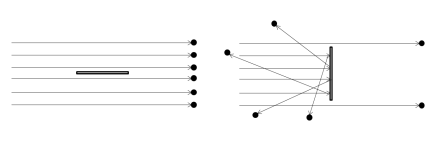
  . The molecules have a range of velocities in this flow, but their direction of travel (indicated by the arrows in the figure) is uniform. If the surface’s normal is perpendicular to the direction of travel of the molecules, none of the molecules collide with the top surface, so the pressure and molecular flux on the surface are zero. However, the number density of the gas molecules in the vicinity of the surface is nonzero. Next, rotate the surface such that its normal is parallel to the direction of travel and both the pressure and flux on the surface become finite. The number density also increases.

 is the mean velocity of the molecules. Again it is clear that the equation cannot apply generally from considering Figure 1. The derivation of Equation 1 and Equation 2 is discussed in more detail in the Molecular Flow Module User’s Guide.
 , by a modified form of the ideal gas equation:
|
1
|
|
2
|
|
3
|
Click Add.
|
|
4
|
Click
 Study. Study. |
|
5
|
|
6
|
Click
 Done. Done. |
|
1
|
|
2
|
|
1
|
|
2
|
|
3
|
|
4
|
|
5
|
|
1
|
|
2
|
|
3
|
|
1
|
|
2
|
|
3
|
|
1
|
|
2
|
|
3
|
|
4
|
|
5
|
|
6
|
|
7
|
|
1
|
|
2
|
Select the object r1 only.
|
|
3
|
|
4
|
|
5
|
Select the object r2 only.
|
|
6
|
|
1
|
|
2
|
|
3
|
|
4
|
Click
 Browse. Browse. |
|
5
|
Browse to the model’s Application Libraries folder and double-click the file RadiationAnalogyG.txt.
|
|
6
|
Click
 Import. Import. |
|
7
|
|
1
|
|
2
|
|
3
|
|
4
|
Click
 Browse. Browse. |
|
5
|
Browse to the model’s Application Libraries folder and double-click the file RadiationAnalogyP.txt.
|
|
6
|
Click
 Import. Import. |
|
7
|
|
1
|
|
2
|
|
3
|
|
4
|
Click
 Browse. Browse. |
|
5
|
Browse to the model’s Application Libraries folder and double-click the file RadiationAnalogyN.txt.
|
|
6
|
Click
 Import. Import. |
|
7
|
|
1
|
|
2
|
|
3
|
|
4
|
|
1
|
|
2
|
|
3
|
|
1
|
|
1
|
|
3
|
|
4
|
|
1
|
|
2
|
|
3
|
|
4
|
|
1
|
|
2
|
|
3
|
|
1
|
|
2
|
|
1
|
|
2
|
|
3
|
Click
 Add. Add. |
|
5
|
|
1
|
|
3
|
|
4
|
|
1
|
|
2
|
|
3
|
|
4
|
|
5
|
|
1
|
|
2
|
|
3
|
|
4
|
|
1
|
|
2
|
|
4
|
|
1
|
|
2
|
|
3
|
|
1
|
|
2
|
|
1
|
|
2
|
|
1
|
|
2
|
|
3
|
|
1
|
|
2
|
|
1
|
|
2
|
|
1
|
|
2
|
|
3
|