|
|
|

|
•
|
mphopen to load the model .mph file.
|
|
•
|
mphglobal to evaluate global quantities in the model.
|
|
•
|
mphplot to display plots.
|
|
1
|
Start COMSOL with MATLAB.
|
|
•
|
Enter each command, starting at step 2 below, at the MATLAB command line.
|
|
•
|
Paste the full model script, included in the section Model M-File, into a text editor, then save the file with a “.m” extension, and finally run this file in MATLAB.
|
|
6
|
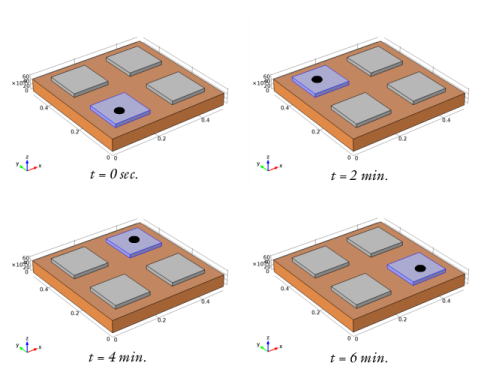
The next command defines the variable k as the modulus of the division of the iteration number by 8. Use this variable in step 8 below to define which domain becomes active in the current iteration.
|
|
8
|
The heat transfer physics interface should be active only on the copper plate, domain 1, and the currently active steel plate, domain k. Set the top plate selection feature node 'sel1':
|
|
12
|
|
13
|
|
16
|
Use the function mphglobal to extract the value of the simulation stop time of the current iteration. Use this to update the solver start time for the next iteration:
|
|
1
|
|
2
|
|
3
|
Click Add.
|
|
4
|
Click
 Study. Study. |
|
5
|
|
6
|
Click
 Done. Done. |
|
1
|
|
2
|
|
1
|
|
2
|
|
3
|
|
4
|
|
5
|
|
1
|
|
2
|
|
3
|
|
4
|
|
5
|
|
6
|
|
7
|
|
8
|
|
1
|
|
2
|
Select the object blk2 only.
|
|
3
|
|
4
|
|
5
|
|
6
|
|
7
|
|
1
|
|
2
|
|
1
|
|
2
|
|
1
|
|
2
|
|
3
|
|
4
|
|
5
|
Click OK.
|
|
1
|
|
2
|
|
3
|
|
4
|
|
5
|
Click OK.
|
|
1
|
|
2
|
|
3
|
|
4
|
|
5
|
|
6
|
|
7
|
|
8
|
|
9
|
|
10
|
|
1
|
|
2
|
|
3
|
|
4
|
|
5
|
|
6
|
Click OK.
|
|
1
|
|
2
|
|
3
|
In the tree, select Built-in>Copper.
|
|
4
|
|
5
|
Click
 Done. Done. |
|
1
|
|
2
|
|
3
|
|
1
|
|
2
|
|
3
|
|
4
|
|
1
|
|
2
|
|
3
|
|
4
|
|
5
|
|
1
|
|
2
|
|
3
|
|
1
|
In the Model Builder window, under Component 1 (comp1) right-click Materials and choose Blank Material.
|
|
2
|
|
3
|
|
4
|
|
5
|
|
1
|
|
2
|
|
3
|
|
1
|
|
3
|
|
4
|
|
1
|
|
3
|
|
4
|
|
1
|
|
2
|
|
3
|
|
4
|
|
1
|
|
2
|
|
3
|
|
1
|
|
2
|
Browse to a directory which path is set in MATLAB and enter domain_activation_llmatlab in the File name text field.
|
|
3
|
Click Save.
|