|
|
|

 , while the parameter
  is seen as infinite life and it should not be taken into account in damage calculations.

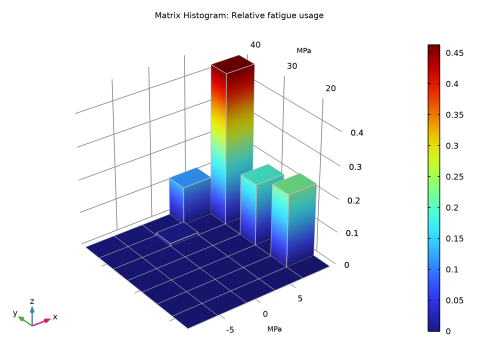
 . The COMSOL result is fus= 0.182. The small discrepancy between the results is attributed to the evaluation of the S-N curve.
 = 42.9 MPa and
  = 4.0 MPa. Since bin stresses are lower than true stresses in that cycle, they predict less damage and thus give a nonconservative contribution to the fatigue usage factor.
 |
1
|
|
2
|
|
3
|
Click Add.
|
|
4
|
Click
 Study. Study. |
|
5
|
|
6
|
Click
 Done. Done. |
|
1
|
|
2
|
|
3
|
|
1
|
|
2
|
|
3
|
|
4
|
|
1
|
|
2
|
|
3
|
|
4
|
|
5
|
|
1
|
|
2
|
|
3
|
|
4
|
|
5
|
|
1
|
|
1
|
|
2
|
|
1
|
|
2
|
|
3
|
|
4
|
|
1
|
|
1
|
|
3
|
|
4
|
|
5
|
|
1
|
|
2
|
|
1
|
In the Model Builder window, under Component 1 (comp1) right-click Materials and choose Blank Material.
|
|
2
|
|
1
|
|
2
|
|
3
|
|
4
|
Click
 Add. Add. |
|
6
|
|
1
|
|
2
|
|
3
|
|
1
|
|
2
|
|
3
|
|
4
|
|
5
|
|
1
|
|
2
|
|
3
|
|
4
|
|
5
|
|
6
|
|
1
|
|
2
|
In the Settings window for Surface, click Replace Expression in the upper-right corner of the Expression section. From the menu, choose Component 1 (comp1)>Solid Mechanics>Stress (Gauss points)>Second Piola-Kirchhoff stress, Gauss point evaluation (material and geometry frames) - N/m²>solid.SGpYY - Second Piola-Kirchhoff stress, Gauss point evaluation, YY-component.
|
|
3
|
|
4
|
|
1
|
|
2
|
|
1
|
|
3
|
In the Settings window for Point Graph, click Replace Expression in the upper-right corner of the y-Axis Data section. From the menu, choose Component 1 (comp1)>Solid Mechanics>Stress (Gauss points)>Second Piola-Kirchhoff stress, Gauss point evaluation (material and geometry frames) - N/m²>solid.SGpYY - Second Piola-Kirchhoff stress, Gauss point evaluation, YY-component.
|
|
4
|
|
5
|
|
1
|
|
2
|
|
3
|
|
4
|
|
1
|
|
2
|
|
3
|
|
4
|
Find the Physics interfaces in study subsection. In the table, clear the Solve check box for Study 1.
|
|
5
|
|
6
|
|
1
|
|
3
|
|
4
|
|
5
|
Locate the Cycle Counting Parameters section. Find the Discretization subsection. In the Nm text field, type 5.
|
|
6
|
|
7
|
|
8
|
|
9
|
|
1
|
|
2
|
|
3
|
Find the Physics interfaces in study subsection. In the table, clear the Solve check box for Solid Mechanics (solid).
|
|
4
|
Find the Studies subsection. In the Select Study tree, select Preset Studies for Selected Physics Interfaces>Fatigue.
|
|
5
|
|
6
|
|
1
|
|
2
|
Find the Values of variables not solved for subsection. From the Settings list, choose User controlled.
|
|
3
|
|
4
|
|
5
|
|
1
|
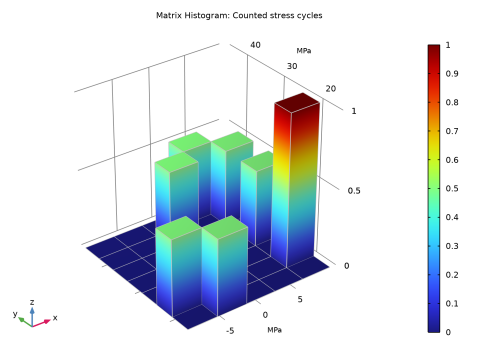
In the Model Builder window, expand the Stress Cycle Distribution (ftg) node, then click Matrix Histogram 1.
|
|
2
|
|
3
|
|
4
|
|
5
|
|
1
|
In the Model Builder window, expand the Fatigue Usage Distribution (ftg) node, then click Matrix Histogram 1.
|
|
2
|
|
3
|
|
4
|
|
5
|
 =
=  =
=