PDF

Bracket — Frequency-Response Analysis
Introduction
A frequency response analysis solves for the linear steady-state response of a structure when subjected to harmonic loads. The problem is solved in the frequency domain and you can set a range of frequencies at which to compute the structural response.
In this example you learn how to perform a frequency response analysis of a structure under harmonic loads, but also how to perform a frequency response analysis of a prestressed structure.
It is recommended that you review the Introduction to the Structural Mechanics Module, which includes background information and discusses the bracket_basic.mph model relevant to this example.
Model Definition
This model is an extension of the model example described in the section “The Fundamentals: A Static Linear Analysis” in the Introduction to the Structural Mechanics Module.
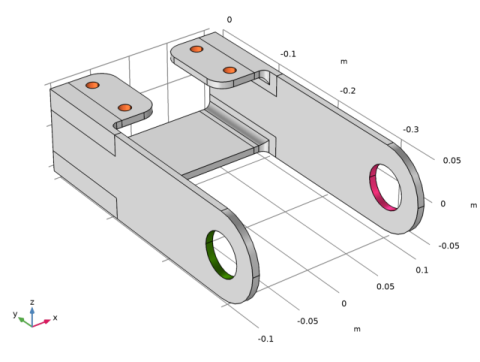
The geometry is shown in Figure 1.
Figure 1: Bracket geometry
You study two load cases. In the first case, a harmonic load in the X-direction, with a an amplitude of 10 kPa, is applied to the boundaries of the bracket holes. The second load case consists of a combination of a static preload and the same harmonic perturbation.
An eigenfrequency analysis of this structure is performed in the tutorial Bracket — Eigenfrequency Analysis. It shows that the first resonance frequency is about 114 Hz. For the prestressed case, the eigenfrequency solution shows that the first resonance frequency is about 107 Hz when the arm is under a compressive load, and about 128 Hz when the arm is under a tensile load. In order to capture the resonance peaks properly, you can refine the frequency stepping around these values.
Results and Discussion
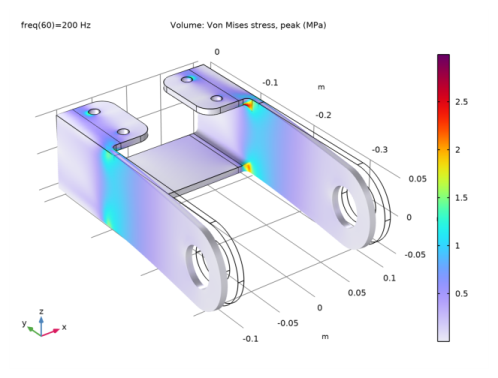
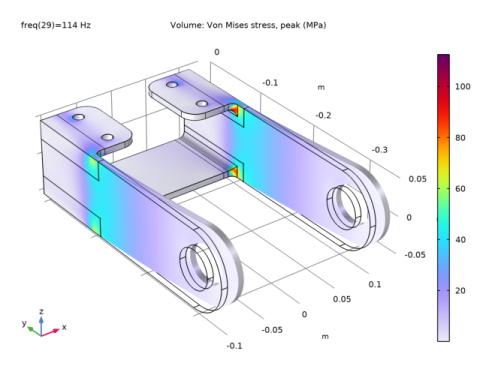
The default plot in a frequency-domain analysis shows the variable <phys>.mises_peak. This is a special variable that, in each point, contains the maximum von Mises stress over the whole cycle. The standard von Mises stress variable, <phys>.mises, contains the stress at the current phase angle. This may be far from the peak stress, if there are significant phase shifts. In Figure 2, the stress at the last computed frequency, 200 Hz is shown. More interesting is to look at the results at 114 Hz at which the first natural frequency is located. This is shown in Figure 3. Here, the peak value is 110 MPa, to be compared with 3 MPa in the previous case.
Figure 2: von Mises stress at 200 Hz.
Figure 3: von Mises stress at 114 Hz.
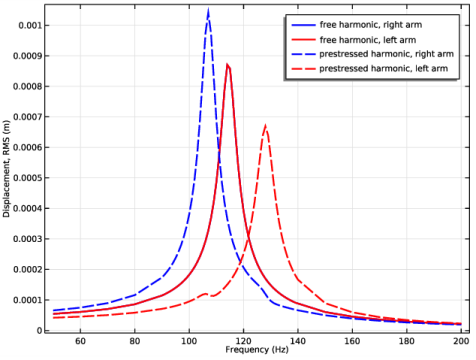
Figure 4 shows the root mean square of the displacement at the tip of the arms of the bracket for both the pure harmonic load case and the combined harmonic and static load cases.
Figure 4: Root mean square of the displacement at the tip of the left (red) and right (blue) arms for both pure harmonic loaded case (solid) and a combined static and harmonic loaded case (dashed).
The curves show resonance peaks around 114  Hz for the unloaded structure in both bracket arms and a frequency shift for the loaded structure. These results are in agreement with the values predicted by solving with the eigenfrequency solver. The curves for the left and right arms coincide as long as there is no prestress.
You can also verify that the deformation remains small even around the resonance frequency. Thus, the linearity assumption within the frequency-domain studies is fulfilled.
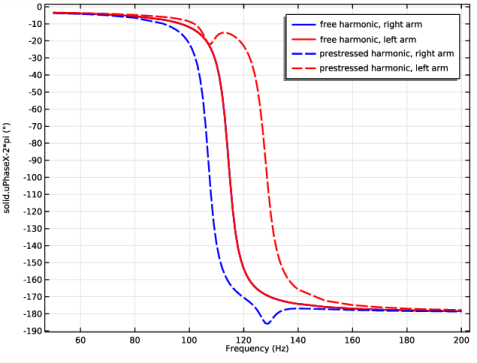
Figure 5 shows the phase of the x-displacement at the tips of both arms.
Figure 5: Phase of x-displacement at the tip of the bracket right arm.
Note the smooth transition where the displacement is in phase with the load at lower frequencies and in counterphase for higher frequencies. This is an effect of the damping using a 5% loss factor. The prestressed load case solution shows interesting properties where the phase flips at different frequencies in each arm. This can be interpreted so that the two arms move synchronously for low an d high frequencies, but against each other for intermediate frequencies.
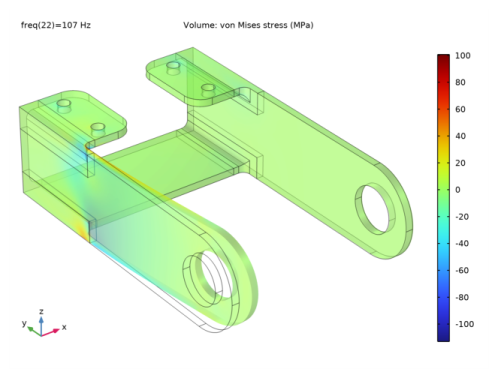
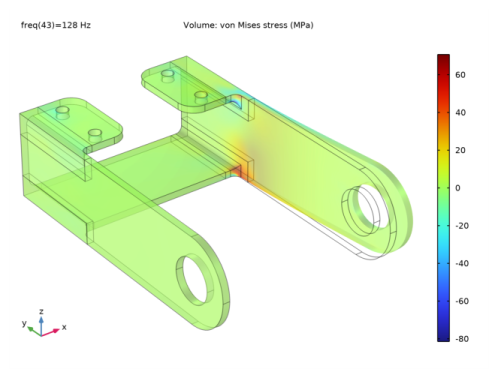
In Figure 6 and Figure 7, the perturbation of the von Mises stress is shown at 107 Hz and 128 Hz. This result is the linearized deviation from the constant stress caused by the static preload, and thus the values are both positive and negative. Each arm dominates the response close to its own eigenfrequency.
Figure 6: Perturbation in von Mises stress at first eigenfrequency, 108 Hz.
Figure 7: Perturbation in von Mises stress at first eigenfrequency, 108 Hz.
Notes About the COMSOL Implementation
For a structural mechanics physics interface in COMSOL Multiphysics, there are four predefined study types available for frequency-response analysis: Frequency Domain; Frequency-Domain Modal; Frequency Domain Prestressed; and Frequency Domain Prestressed, Modal.
The modal analysis uses the modal solver to compute the frequency response. This analysis type speeds up the computation significantly when compared to the regular frequency-domain analysis if the number of frequencies is large. In this example, the modal solver is used in the first study, and the direct solver in the second study. This is purely for comparison. If the modal solver had been selected also for the second study, it wold run more than 10 times faster.
Use the prestressed frequency-response analysis when a structure is subjected to both static and harmonic loads, and the stiffness induced by the static load case can affect the structural response to the harmonic load.
Application Library path: Structural_Mechanics_Module/Tutorials/bracket_frequency
Modeling Instructions
Application Libraries
1
From the File menu, choose Application Libraries.
2
In the Application Libraries window, select Structural Mechanics Module>Tutorials>bracket_basic in the tree.
3
Solid Mechanics (solid)
Linear Elastic Material 1
In the Model Builder window, expand the Component 1 (comp1)>Solid Mechanics (solid) node, then click Linear Elastic Material 1.
Damping 1
1
In the Physics toolbar, click  Attributes and choose Damping.
In the frequency domain you can use loss factor damping, viscous damping, or Rayleigh damping. For this example, use loss factor damping.
2
In the Settings window for Damping, locate the Damping Settings section.
3
From the Damping type list, choose Isotropic loss factor.
Materials
Structural steel (mat1)
1
In the Model Builder window, expand the Component 1 (comp1)>Materials node, then click Structural steel (mat1).
2
In the Settings window for Material, locate the Material Contents section.
3
You can now apply an external harmonic load to the bracket arms.
Solid Mechanics (solid)
Boundary Load, Harmonic
1
In the Physics toolbar, click  Boundaries and choose Boundary Load.
2
In the Settings window for Boundary Load, type Boundary Load, Harmonic in the Label text field.
3
4
Locate the Force section. Specify the FA vector as
To define a harmonic load in the frequency domain modal analysis, you need to mark the load as being a harmonic perturbation.
5
Right-click Boundary Load, Harmonic and choose Harmonic Perturbation.
Add Study
1
In the Home toolbar, click  Add Study to open the Add Study window.
2
Go to the Add Study window.
3
Find the Studies subsection. In the Select Study tree, select Preset Studies for Selected Physics Interfaces>Frequency Domain, Modal.
4
Click Add Study in the window toolbar.
5
In the Home toolbar, click  Add Study to close the Add Study window.
Study 1
Step 1: Eigenfrequency
1
In the Settings window for Eigenfrequency, locate the Study Settings section.
2
Select the Desired number of eigenfrequencies check box.
3
Step 2: Frequency Domain, Modal
The frequency range will be 50 Hz–190 Hz with a refined frequency sweep step between 100 Hz and 130 Hz.
1
In the Model Builder window, click Step 2: Frequency Domain, Modal.
2
In the Settings window for Frequency Domain, Modal, locate the Study Settings section.
3
In the Frequencies text field, type 50 70 90 range(100,1,130) 150 170 190.
4
In the Home toolbar, click  Compute.
Results
Stress (solid)
1
Click the  Zoom Extents button in the Graphics toolbar.
The default plot group shows the stress distribution on a deformed geometry for the final frequency. You can change the frequency for the plot evaluation in the Parameter value list in the settings for the plot group.
Plot the root mean square of the displacement at the tip of the left arm of the bracket.
Displacement, RMS
1
In the Home toolbar, click  Add Plot Group and choose 1D Plot Group.
2
In the Settings window for 1D Plot Group, type Displacement, RMS in the Label text field.
3
Locate the Plot Settings section. Select the x-axis label check box.
4
Point Graph 1
1
Right-click Displacement, RMS and choose Point Graph.
2
3
In the Settings window for Point Graph, locate the y-Axis Data section.
4
In the Expression text field, type solid.disp_rms.
5
Click to expand the Coloring and Style section. From the Color list, choose Blue.
6
Find the Line markers subsection. From the Marker list, choose Point.
7
From the Positioning list, choose In data points.
8
Click to expand the Legends section. Select the Show legends check box.
9
From the Legends list, choose Manual.
10
Displacement, RMS
1
In the Model Builder window, click Displacement, RMS.
2
In the Settings window for 1D Plot Group, click to expand the Title section.
3
From the Title type list, choose None.
Point Graph 2
1
Right-click Displacement, RMS and choose Point Graph.
2
3
In the Settings window for Point Graph, locate the y-Axis Data section.
4
In the Expression text field, type solid.disp_rms.
5
Locate the Coloring and Style section. From the Color list, choose Red.
6
Find the Line markers subsection. From the Marker list, choose Square.
7
From the Positioning list, choose In data points.
8
Locate the Legends section. Select the Show legends check box.
9
From the Legends list, choose Manual.
10
11
In the Displacement, RMS toolbar, click  Plot.
Now plot the phase shift with respect to the applied load at a specified point location.
Cut Point 3D 1
1
In the Results toolbar, click  Cut Point 3D.
2
In the Settings window for Cut Point 3D, locate the Point Data section.
3
In the X text field, type 0.
4
In the Y text field, type -50e-3.
5
In the Z text field, type -50e-3.
6
From the Snapping list, choose Snap to closest boundary.
Displacement phase, X component
1
In the Results toolbar, click  1D Plot Group.
2
In the Settings window for 1D Plot Group, type Displacement phase, X component in the Label text field.
3
Locate the Title section. From the Title type list, choose None.
4
Locate the Plot Settings section. Select the x-axis label check box.
5
Point Graph 1
1
Right-click Displacement phase, X component and choose Point Graph.
2
In the Settings window for Point Graph, locate the Data section.
3
From the Dataset list, choose Cut Point 3D 1.
4
Click Replace Expression in the upper-right corner of the y-Axis Data section. From the menu, choose Component 1 (comp1)>Solid Mechanics>Displacement>Displacement phase (material and geometry frames) - rad>solid.uPhaseX - Displacement phase, X component.
5
Locate the y-Axis Data section. From the Unit list, choose °.
6
Locate the Legends section. Select the Show legends check box.
7
From the Legends list, choose Manual.
8
9
In the Displacement phase, X component toolbar, click  Plot.
In the solution dataset node, you can change the phase used to display the solution.
You will now consider a static load applied to the bracket and perform a prestressed frequency domain analysis.
Add Study
1
In the Home toolbar, click  Add Study to open the Add Study window.
2
Go to the Add Study window.
3
Find the Studies subsection. In the Select Study tree, select Preset Studies for Selected Physics Interfaces>Frequency Domain, Prestressed.
4
Click Add Study in the window toolbar.
5
In the Home toolbar, click  Add Study to close the Add Study window.
Global Definitions
Parameters 1
1
In the Model Builder window, under Global Definitions click Parameters 1.
2
In the Settings window for Parameters, locate the Parameters section.
3
Definitions
Analytic 1 (an1)
1
In the Home toolbar, click  Functions and choose Local>Analytic.
2
In the Settings window for Analytic, type load in the Function name text field.
3
Locate the Definition section. In the Expression text field, type F*cos(atan2(py,abs(px))).
4
In the Arguments text field, type F, py, px.
5
Locate the Units section. In the table, enter the following settings:
6
In the Function text field, type Pa.
Solid Mechanics (solid)
Boundary Load, Prestress
1
In the Physics toolbar, click  Boundaries and choose Boundary Load.
Apply a boundary load to the bracket holes.
2
In the Settings window for Boundary Load, type Boundary Load, Prestress in the Label text field.
3
Locate the Boundary Selection section. From the Selection list, choose Pin Holes.
4
Locate the Coordinate System Selection section. From the Coordinate system list, choose Boundary System 1 (sys1).
5
Locate the Force section. Specify the FA vector as
The default boundary system is in the deformed configuration. This would make the load behave as a follower load when used in a geometrically nonlinear context. Change to a fixed coordinate system.
Definitions
Boundary System 1 (sys1)
1
In the Model Builder window, under Component 1 (comp1)>Definitions click Boundary System 1 (sys1).
2
In the Settings window for Boundary System, locate the Settings section.
3
From the Frame list, choose Reference configuration.
Study 2
Step 2: Frequency Domain Perturbation
1
In the Model Builder window, under Study 2 click Step 2: Frequency Domain Perturbation.
2
In the Settings window for Frequency Domain Perturbation, locate the Study Settings section.
3
In the Frequencies text field, type 50 70 90 range(100,2,140) 150 170 190.
4
In the Home toolbar, click  Compute.
Results
1
Click the  Zoom Extents button in the Graphics toolbar.
You have previously created a point graph plot for the unloaded case. Add a new point graph plot to the same figure but use the dataset of the second load case.
Point Graph 1, Point Graph 2
1
In the Model Builder window, under Results>Displacement, RMS, Ctrl-click to select Point Graph 1 and Point Graph 2.
2
Point Graph 3
1
In the Settings window for Point Graph, locate the Data section.
2
From the Dataset list, choose Study 2/Solution 3 (sol3).
3
Locate the Coloring and Style section. Find the Line style subsection. From the Line list, choose Dashed.
4
Find the Line markers subsection. From the Marker list, choose Triangle.
5
Locate the Legends section. In the table, enter the following settings:
Point Graph 4
1
In the Model Builder window, click Point Graph 4.
2
In the Settings window for Point Graph, locate the Data section.
3
From the Dataset list, choose Study 2/Solution 3 (sol3).
4
Locate the Coloring and Style section. Find the Line style subsection. From the Line list, choose Dashed.
5
Find the Line markers subsection. From the Marker list, choose Circle.
6
Locate the Legends section. In the table, enter the following settings:
7
In the Displacement, RMS toolbar, click  Plot.
Cut Point 3D 2
1
In the Model Builder window, under Results>Datasets right-click Cut Point 3D 1 and choose Duplicate.
2
In the Settings window for Cut Point 3D, locate the Data section.
3
From the Dataset list, choose Study 2/Solution 3 (sol3).
Point Graph 2
1
In the Model Builder window, under Results>Displacement phase, X component right-click Point Graph 1 and choose Duplicate.
2
In the Settings window for Point Graph, locate the Data section.
3
From the Dataset list, choose Cut Point 3D 2.
4
In the Displacement phase, X component toolbar, click  Plot.
5
Locate the Legends section. In the table, enter the following settings:
6
In the Displacement phase, X component toolbar, click  Plot.
Stress (solid), prestressed
1
In the Model Builder window, under Results click Stress (solid) 1.
2
In the Settings window for 3D Plot Group, type Stress (solid), prestressed in the Label text field.