You are viewing the documentation for an older COMSOL version. The latest version is available here.
PDF

Detecting the Orientation of a Metallic Cylinder Embedded in a Dielectric Shell
Introduction
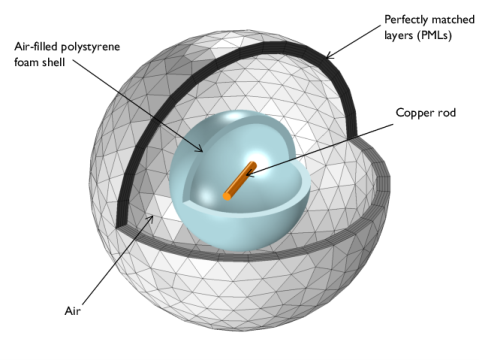
A metallic cylindrical rod is hidden inside a spherical dielectric shell and its orientation is unknown. By studying the polarization-dependent scattered field of a cylindrical object and performing a parametric sweep as a function of polarization angle, the rod is detected for the polarization angle where the scattered field is highest. The model uses a linearly polarized plane wave for the background field and computes the far-field radiation patterns.
Figure 1: A copper rod inside a spherical polystyrene foam shell. Some parts are removed for visualization purposes.
Model Definition
A cylindrical copper rod is enclosed in a 2 cm thick polystyrene foam (εr = 1.03) dielectric shell that is filled with air. The copper rod lies in the xy-plane, but its orientation is unknown. The dielectric shell is surrounded by air and the entire model domain is enclosed by perfectly matched layers.
The model is solved using the scattered field formulation, while the built-in linearly polarized plane wave is used for background field. The wave vector of the background field is pointing toward the -z direction after it is transformed from the +x-directional initial wave by a 90 degree pitch angle. The polarization is determined by the parameterized value of the yaw angle that varies from 0 to 175 degrees.
The copper rod is modeled using the Impedance boundary condition and its inner volume is removed from the model domain. This is done because the skin depth is much smaller than the size of the rod. The rod's scattered field is computed on the boundaries configured by the Far-Field Domain node and its Far-Field Calculation subfeature by performing a near-field to far-field transformation.
A perfectly matched layer (PML) domain is outside of the surrounding air domain and acts as an absorber of the scattered field. The PML is placed at a half-wavelength away from the dielectric shell.
Results and Discussion
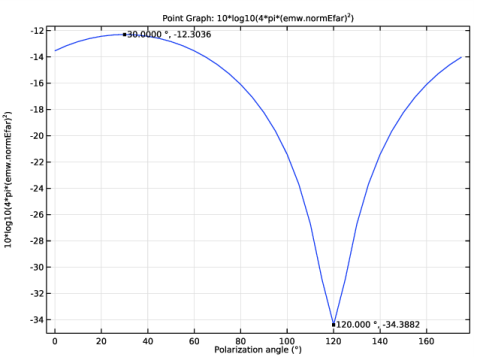
Figure 2 shows the radar cross section (RCS) of the example in dB scale. The maximum occurs when the yaw angle for the polarization is 30 degrees, while the minimum value occurs at 120 degrees. The maximum scattering is known to take a place when the polarization is parallel to the cylinder. This means the cylinder is oriented at 30 degrees, with respect to the x-axis.
Figure 2: The maximum radar cross section (RCS) is observed at 30 degrees. With respect to the orientation of the cylinder, when the polarization angle of the background field is rotated 45 degrees, the RCS is 3dB lower than the maximum.
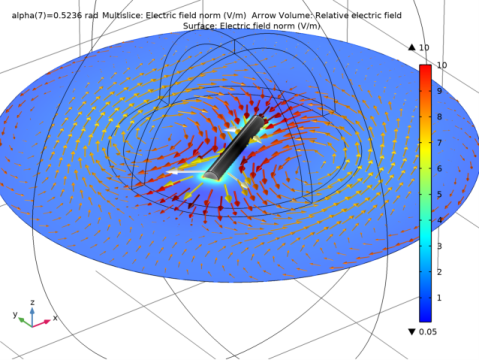
Figure 3 shows the electric field norm in the xy-plane at the maximum scattering angle. The electric field resembles that of a dipole antenna. The background field induces the oscillating current along the rod which then radiates as a dipole.
Figure 3: The electric field norm in the xy-plane at the maximum scattering angle
Application Library path: RF_Module/Scattering_and_RCS/cylinder_orientation
Modeling Instructions
From the File menu, choose New.
New
In the New window, click  Model Wizard.
Model Wizard
1
In the Model Wizard window, click  3D.
2
In the Select Physics tree, select Radio Frequency>Electromagnetic Waves, Frequency Domain (emw).
3
Click Add.
4
Click  Study.
5
In the Select Study tree, select General Studies>Frequency Domain.
6
Global Definitions
Parameters 1
1
In the Model Builder window, under Global Definitions click Parameters 1.
2
In the Settings window for Parameters, locate the Parameters section.
3
Geometry 1
Sphere 1 (sph1)
1
In the Geometry toolbar, click  Sphere.
2
In the Settings window for Sphere, locate the Size section.
3
In the Radius text field, type 0.34.
4
Click to expand the Layers section. In the table, enter the following settings:
5
Click  Build Selected.
6
Click the  Wireframe Rendering button in the Graphics toolbar.
Sphere 2 (sph2)
1
In the Geometry toolbar, click  Sphere.
2
In the Settings window for Sphere, locate the Size section.
3
In the Radius text field, type 0.16.
4
Locate the Layers section. In the table, enter the following settings:
Cylinder 1 (cyl1)
1
In the Geometry toolbar, click  Cylinder.
2
In the Settings window for Cylinder, locate the Size and Shape section.
3
In the Radius text field, type 0.01.
4
In the Height text field, type 0.15.
5
Locate the Position section. In the x text field, type -0.075.
6
Locate the Axis section. From the Axis type list, choose x-axis.
Rotate 1 (rot1)
1
In the Geometry toolbar, click  Transforms and choose Rotate.
2
3
In the Settings window for Rotate, locate the Rotation section.
4
In the Angle text field, type 30.
5
Click  Build All Objects.
6
Click the  Zoom In button in the Graphics toolbar.
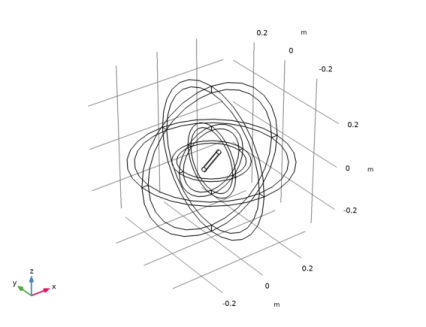
The finished geometry should look like this.
Definitions
Perfectly Matched Layer 1 (pml1)
1
In the Definitions toolbar, click  Perfectly Matched Layer.
2
3
In the Settings window for Perfectly Matched Layer, locate the Geometry section.
4
From the Type list, choose Spherical.
Electromagnetic Waves, Frequency Domain (emw)
1
In the Model Builder window, under Component 1 (comp1) click Electromagnetic Waves, Frequency Domain (emw).
2
In the Settings window for Electromagnetic Waves, Frequency Domain, locate the Domain Selection section.
3
Click  Clear Selection.
4
Click  Paste Selection.
5
In the Paste Selection dialog box, type 1-10, 12-19 in the Selection text field.
6
7
In the Settings window for Electromagnetic Waves, Frequency Domain, locate the Formulation section.
8
From the list, choose Scattered field.
9
From the Background wave type list, choose Linearly polarized plane wave.
10
In the Pitch angle text field, type 90[deg].
11
In the Yaw angle text field, type alpha.
Far-Field Domain 1
In the Physics toolbar, click  Domains and choose Far-Field Domain.
Impedance Boundary Condition 1
1
In the Physics toolbar, click  Boundaries and choose Impedance Boundary Condition.
2
In the Settings window for Impedance Boundary Condition, locate the Boundary Selection section.
3
Click  Paste Selection.
4
In the Paste Selection dialog box, type 25-29, 62 in the Selection text field.
5
Materials
Material 1 (mat1)
1
In the Model Builder window, under Component 1 (comp1) right-click Materials and choose Blank Material.
2
In the Settings window for Material, locate the Material Contents section.
3
Material 2 (mat2)
1
Right-click Materials and choose Blank Material.
2
In the Settings window for Material, locate the Geometric Entity Selection section.
3
Click  Paste Selection.
4
In the Paste Selection dialog box, type 6-9, 14-15, 17-18 in the Selection text field.
5
6
In the Settings window for Material, locate the Material Contents section.
7
Add Material
1
In the Home toolbar, click  Add Material to open the Add Material window.
2
Go to the Add Material window.
3
In the tree, select Built-in>Copper.
4
Right-click and choose Add to Component 1 (comp1).
5
In the Home toolbar, click  Add Material to close the Add Material window.
Materials
Copper (mat3)
1
In the Settings window for Material, locate the Geometric Entity Selection section.
2
From the Geometric entity level list, choose Boundary.
3
Click  Paste Selection.
4
In the Paste Selection dialog box, type 25-29, 62 in the Selection text field.
These are same boundaries where you assigned Impedance Boundary Condition.
5
Definitions
Hide for Physics 1
1
In the Model Builder window, right-click View 1 and choose Hide for Physics.
2
In the Settings window for Hide for Physics, locate the Geometric Entity Selection section.
3
From the Geometric entity level list, choose Boundary.
4
Click  Paste Selection.
5
In the Paste Selection dialog box, type 6, 10, 18, 22, 31, 34, 36, 38, 41, 43 in the Selection text field.
6
Mesh 1
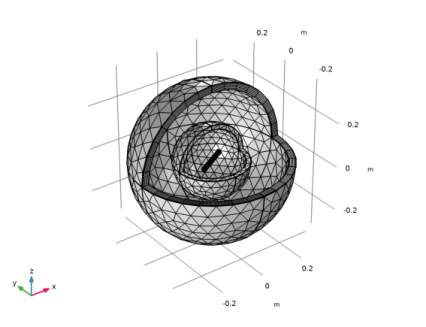
In the Model Builder window, under Component 1 (comp1) right-click Mesh 1 and choose Build All.
Study 1
Parametric Sweep
1
In the Study toolbar, click  Parametric Sweep.
2
In the Settings window for Parametric Sweep, locate the Study Settings section.
3
4
Step 1: Frequency Domain
In the Study toolbar, click  Compute.
Results
1D Plot Group 4
In the Home toolbar, click  Add Plot Group and choose 1D Plot Group.
Point Graph 1
1
Right-click 1D Plot Group 4 and choose Point Graph.
2
3
In the Settings window for Point Graph, locate the y-Axis Data section.
4
In the Expression text field, type 10*log10(4*pi*(emw.normEfar)^2).
5
Locate the x-Axis Data section. From the Parameter list, choose Expression.
6
In the Expression text field, type alpha.
7
From the Unit list, choose °.
8
In the 1D Plot Group 4 toolbar, click  Plot.
Graph Marker 1
1
Right-click Point Graph 1 and choose Graph Marker.
2
In the Settings window for Graph Marker, locate the Text Format section.
3
Select the Show x value check box.
4
Select the Include unit check box.
5
Click to expand the Coloring and Style section. From the Anchor point list, choose Middle left.
This reproduces Figure 2.
Study 1/Solution 1 (sol1)
In the Model Builder window, expand the Results>Datasets node, then click Study 1/Solution 1 (sol1).
Selection
1
In the Results toolbar, click  Attributes and choose Selection.
2
In the Settings window for Selection, locate the Geometric Entity Selection section.
3
From the Geometric entity level list, choose Domain.
4
Click  Paste Selection.
5
In the Paste Selection dialog box, type 5-11, 14-15, 17-18 in the Selection text field.
6
Electric Field (emw)
1
In the Model Builder window, under Results click Electric Field (emw).
2
In the Settings window for 3D Plot Group, locate the Data section.
3
From the Parameter value (alpha (rad)) list, choose 0.5236.
Multislice
1
In the Model Builder window, expand the Electric Field (emw) node, then click Multislice.
2
In the Settings window for Multislice, locate the Multiplane Data section.
3
Find the X-planes subsection. In the Planes text field, type 0.
4
Find the Y-planes subsection. In the Planes text field, type 0.
Arrow Volume 1
1
In the Model Builder window, right-click Electric Field (emw) and choose Arrow Volume.
2
In the Settings window for Arrow Volume, click Replace Expression in the upper-right corner of the Expression section. From the menu, choose Component 1 (comp1)>Electromagnetic Waves, Frequency Domain>Electric>emw.relEx,...,emw.relEz - Relative electric field.
3
Locate the Arrow Positioning section. Find the X grid points subsection. In the Points text field, type 31.
4
Find the Y grid points subsection. In the Points text field, type 31.
5
Find the Z grid points subsection. In the Points text field, type 1.
6
Locate the Coloring and Style section. From the Arrow length list, choose Logarithmic.
Color Expression 1
1
Right-click Arrow Volume 1 and choose Color Expression.
2
In the Settings window for Color Expression, locate the Expression section.
3
In the Expression text field, type 20*log10(emw.normE).
4
Locate the Coloring and Style section. From the Color table list, choose Thermal.
5
Clear the Color legend check box.
Surface 1
1
In the Model Builder window, right-click Electric Field (emw) and choose Surface.
2
In the Settings window for Surface, locate the Coloring and Style section.
3
Clear the Color legend check box.
4
From the Color table list, choose GrayScale.
Selection 1
1
Right-click Surface 1 and choose Selection.
2
3
In the Electric Field (emw) toolbar, click  Plot.
4
Click the  Zoom In button in the Graphics toolbar.
Compare the reproduced plot with Figure 3.
3D Far Field (emw)
1
In the Model Builder window, under Results click 3D Far Field (emw).
2
In the Settings window for 3D Plot Group, locate the Data section.
3
From the Parameter value (alpha (rad)) list, choose 0.5236.
Radiation Pattern 1
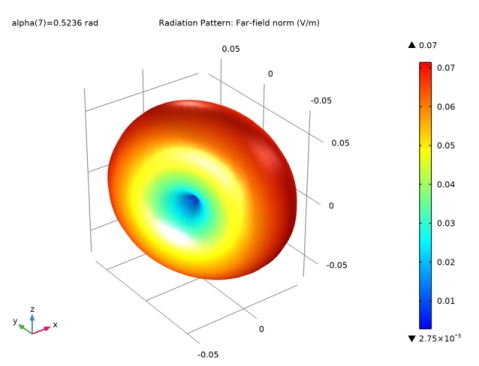
3D Far-field radiation plot looks like that of a dipole antenna.